Introduction
PHP-FPM (FastCGI Process Manager) is a modern and efficient PHP handler widely recommended for servers running cPanel/WHM. Compared to the legacy PHP-CGI, PHP-FPM offers better performance, improved memory usage, and enhanced security, making it ideal for high-traffic and resource-intensive websites.
Prerequisites
- Root access to WHM
- cPanel/WHM version 68 or later
- PHP installed via EasyApache 4
- A recent server backup (recommended)
- Basic knowledge of WHM and Apache configuration
Implementation
Step 1: Log in to WHM
Access WHM using your root credentials
https://your-server-ip:2087
Step 2: Ensure PHP-FPM Is Installed
- Navigate to Home → Software → EasyApache 4
- Click Customize
- Under PHP Extensions, ensure PHP-FPM is enabled
- Click Review and Provision if changes are required
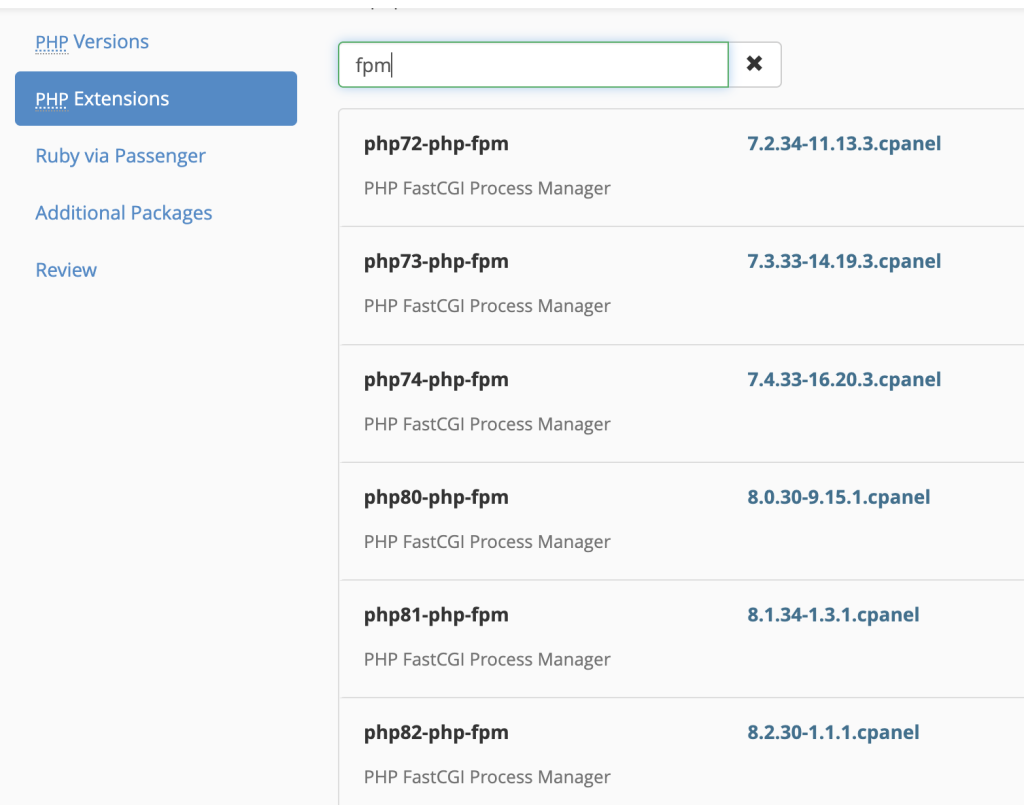
Step 3: Enable PHP-FPM Globally
- Go to Home → Software → MultiPHP Manager
- Click the Manage PHP-FPM tab
- Enable PHP-FPM for:
All Domains (Recommended)
or
Select individual domains as needed - Click Apply
Step 4: Disable PHP-CGI (Optional but Recommended)
PHP-CGI is automatically replaced when PHP-FPM is enabled, but to ensure optimal performance:
- Navigate to Home → Software → EasyApache 4
- Under Apache Modules, ensure mod_cgid is not required
- PHP handlers will now run via PHP-FPM (FastCGI)
Step 5: Restart Services
Restart Apache and PHP-FPM to apply changes:
$ systemctl restart httpd
$ systemctl restart ea-php*-php-fpm
Conclusion
Switching from PHP-CGI to PHP-FPM in WHM is a simple yet powerful optimization that significantly improves server performance, stability, and scalability. With PHP-FPM enabled, the server can efficiently handle higher traffic loads while maintaining better resource control.
If we manage multiple websites or run high-traffic applications, PHP-FPM is strongly recommended as the default PHP handler.