Introduction
mod_evasive is an Apache security module used in cPanel servers to protect websites from HTTP DoS, DDoS, and brute-force attacks.
If mod_evasive is not tuned properly, it may block legitimate user traffic.
This guide explains how to tune mod_evasive on a cPanel server to balance security and usability.By default, mod_evasive logs are stored in:
/var/log/apache2/mod_evasive/
Prerequisites
Before proceeding, ensure you have:
- Root or sudo access
- SSH access to the server or Terminal access via WHM
- Apache installed and running
- mod_evasive already installed and enabled
Step 1:
Log in via SSH:
| $ ssh root@your-server-ip |
Or access Terminal directly from WHM.
Step 2:
Open the mod_evasive Configuration File
Edit the configuration file using your preferred editor.
Using vim
| $ vim /etc/apache2/conf.d/300-mod_evasive.conf |
Using nano
| nano /etc/apache2/conf.d/300-mod_evasive.conf |
Step 3:
Tune mod_evasive Settings (DDoS Related)
Adjust the following commonly used directives based on traffic:
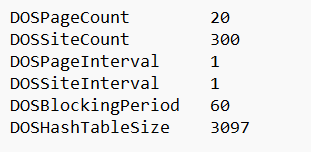
Explanation:
DOSPageCount – Requests allowed for the same page
|DOSSiteCount – Total requests allowed to the site
DOSBlockingPeriod – Time (in seconds) an IP remains blocked
Increase values if legitimate users are being blocked.
Step 4:
Apply the changes by restarting Apache.
| $ /scripts/restartsrv_httpd |
Monitor mod_evasive activity:
| $ tail -f /var/log/apache2/mod_evasive/* |
Conclusion
Properly tuning mod_evasive on a cPanel server helps mitigate DDoS attacks while allowing genuine traffic to pass through.
Always monitor logs after changes to ensure legitimate users are not impacted.