Introduction
Managing FTP accounts is a fundamental task for hosting administrators and website owners who need to provide secure file access without sharing the main cPanel credentials. Whether you’re managing multiple websites, working with developers, or granting access to clients, creating dedicated FTP accounts ensures better security, accountability, and access control.
This guide explains how to create, manage, modify, and secure FTP accounts using cPanel and WHM. It also covers best practices, common troubleshooting steps, and security recommendations for production hosting environments.
What is an FTP Account?
An FTP (File Transfer Protocol) account is a user account that allows authenticated access to upload, download, edit, and manage files on a web hosting server.
Unlike the primary cPanel account, FTP accounts can be limited to specific directories, making them ideal for:
- Web developers
- Designers
- Content managers
- Backup applications
- Deployment tools
- External collaborators
Each FTP account has:
- Username
- Password
- Home directory
- Storage permissions
- Access restrictions
Benefits of Separate FTP Accounts
Creating dedicated FTP users provides several operational advantages:
Improved Security
Instead of sharing the cPanel password, each user receives an individual login.
Limited Directory Access
Users can be restricted to only the folders they need.
Example:
/public_html/client1
Instead of:
/home/username
Easy User Management
You can:
- Create
- Rename
- Change passwords
- Suspend
- Delete
without affecting the hosting account.
Prerequisites
Before creating FTP accounts, ensure:
- cPanel account is active
- FTP service (Pure-FTPd or ProFTPD) is running
- Correct disk quota is available
- Required directory already exists
- Firewall allows FTP connections
Creating an FTP Account in cPanel
Step 1: Login to cPanel
Open your hosting control panel.
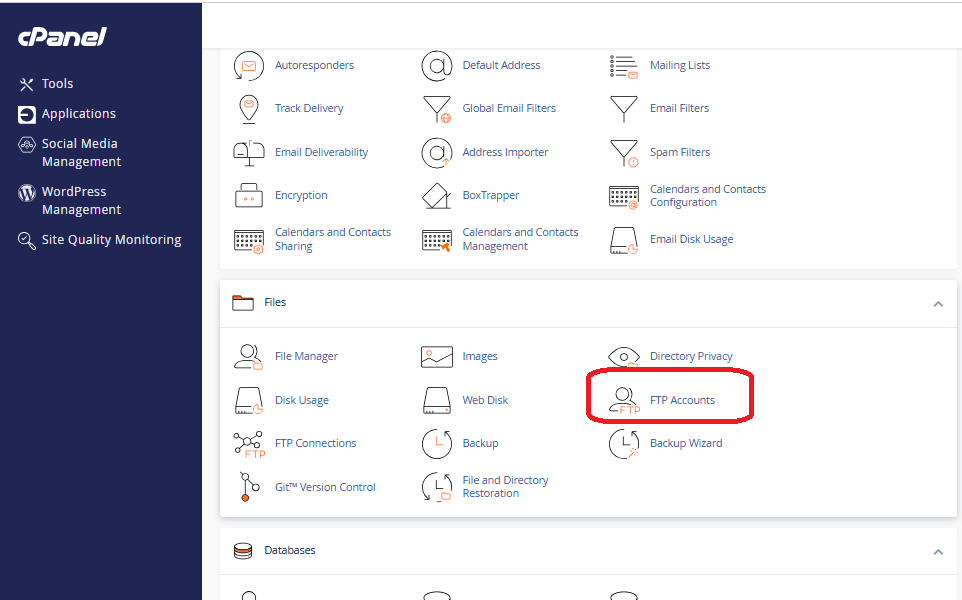
Navigate to:
Files
→ FTP Accounts
Step 2: Create New FTP Account
Complete the following fields.
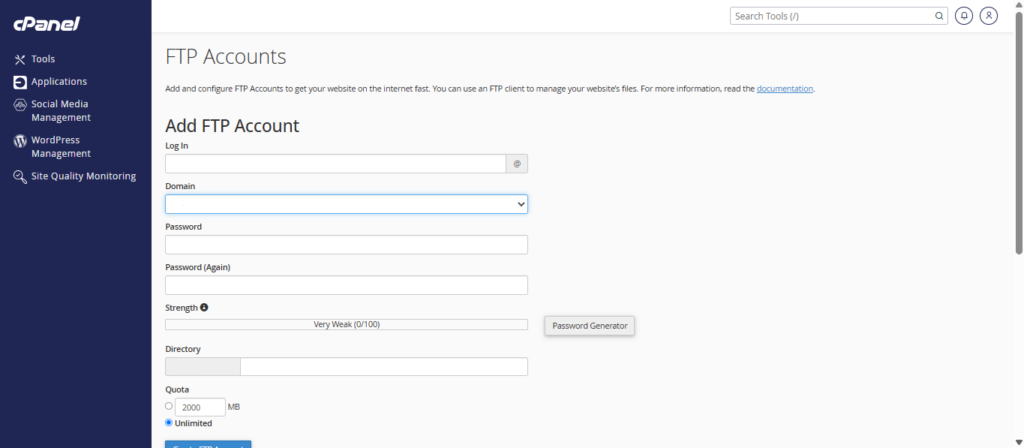
Login
Example
developer
The full username becomes
developer@example.com
Domain
Choose the hosting domain if multiple domains exist.
Password
Create a strong password.
Recommended:
- 16+ characters
- Uppercase
- Lowercase
- Numbers
- Symbols
Avoid:
- Website name
- Company name
- Common passwords
Directory
Specify the folder this user should access.
Examples

public_html
or
public_html/client-site
or
public_html/uploads
The FTP user will not be able to browse outside this directory.
Quota
Choose one:
Unlimited
or
500 MB
5 GB
10 GB

depending on your hosting policy.
Click Create FTP Account
The account is immediately available.
FTP Username Format
Depending on your hosting configuration, usernames may appear as:
developer@example.com
or
developer@domain.com
or
username_developer
Always use the exact username shown in cPanel.
Viewing Existing FTP Accounts
The FTP Accounts page lists:
- Username
- Home Directory
- Disk Usage
- Quota
- Password Management
- Configuration Files
From here administrators can manage every FTP user.
Configuring FTP Client Access
Users typically connect using an FTP client.
Required information:
Host
ftp.example.com
or
server hostname
Username
developer@example.com
Password
********
Port
21
Protocol
FTP
or preferably
FTPS
Downloading FTP Configuration Files
cPanel can generate configuration files for popular FTP clients.
Supported applications include:
- FileZilla
- Cyberduck
- Core FTP
These files automatically configure:
- Host
- Port
- Username
- Encryption
This reduces manual configuration errors..
Conclusion
FTP accounts in cPanel provide a secure and flexible way to manage file access for websites and hosting environments. By assigning dedicated accounts, restricting directory permissions, enforcing strong passwords, and using encrypted FTP connections, administrators can improve both security and operational efficiency.
WHM further extends these capabilities by allowing server-wide FTP service management, configuration, and monitoring. Combined with regular account reviews and security best practices, FTP management becomes a reliable part of maintaining a professional hosting environment.