Introduction
Resetting the MySQL root password in WHM (WebHost Manager) is a common administrative task performed when the current password is lost, compromised, or needs to be updated for security reasons. The MySQL root user has full control over all databases on the server, so maintaining its security is critical. WHM provides built-in tools that make the reset process simple, secure, and reliable without requiring manual database reconfiguration in most cases.
Prerequisites
Before resetting the MySQL root password in WHM, ensure the following:
- You must have root access to WHM/server
- WHM/cPanel service should be properly installed and running
- You should know the current server SSH access (recommended)
- Ensure no critical database operations are running
- Take a full backup of databases (recommended for safety)
IMPLEMENTATION
Step 1: Login to WHM.
Step 2: Search mysql root on the search bar.
Step 3: Select MySQL Root Password under the SQL Services.
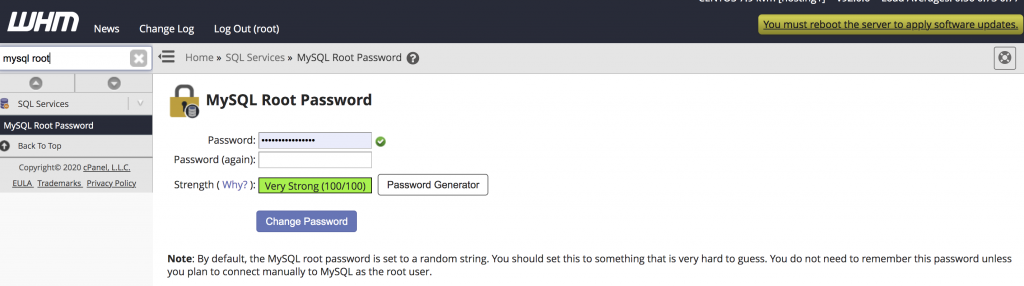
Step 4: Enter the new password or generate new password by click on the Password Generator and it shows the new password. You can use this password and Re enter the same password to confirm.
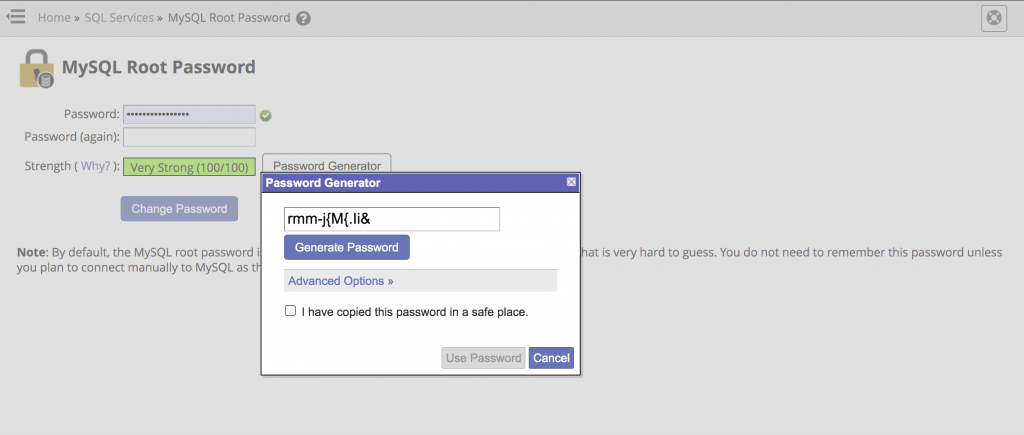
Step 5: Click on Change Password. Now your root MySQL password is updated and ready to use.
Conclusion
Resetting the MySQL root password in WHM is simple when you have root access, especially through the WHM “MySQL Root Password” interface or the /scripts/mysqlpasswd command. However, in locked-out scenarios, manual recovery via safe mode is required. Always ensure proper backups and strong password practices to maintain database security.