Introduction:
Managing the mail queue in WHM (Web Host Manager) is essential for monitoring email delivery, troubleshooting delays, and identifying potential spam or configuration issues. The Mail Queue Manager in WHM provides a user-friendly interface to view and filter queued emails, while command-line tools offer quick insights into queue statistics.
Prerequisites
Before accessing the mail queue in WHM, ensure the following:
- You have root or administrative access to WHM
- WHM is properly installed and accessible via browser
- The mail service (Exim) is running on the server
- Basic understanding of email flow and server management (recommended)
Implementation:
- Log in to WHM.
- In search bar type ” mail queue”, you will get mail queue manager
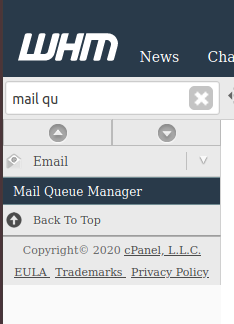
3. Click on ” Mail Queue Manager”, you can see the below details.
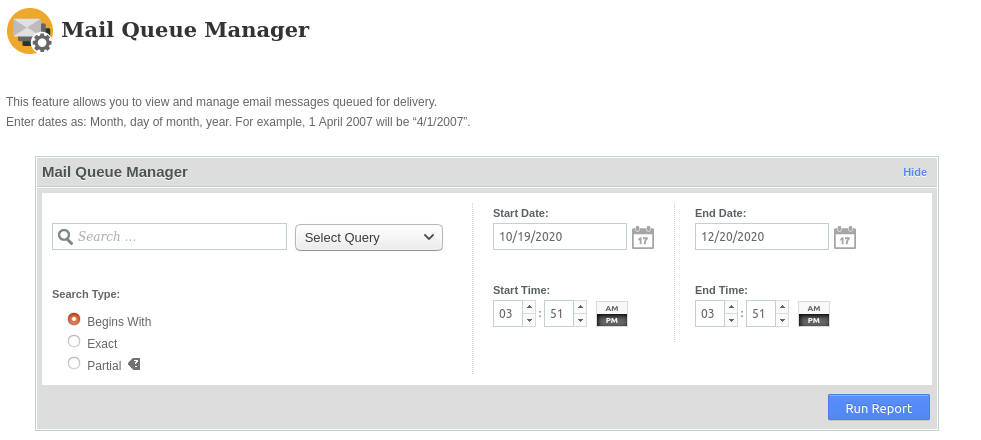
4. Based on you requirement, you can choose the query. Click on select query and a drop down box will appear. You can choose by search sender, search recipients, Search message ID. You can also choose start date, end date. After choosing the option according to your requirement, click on “Run Report”. You will get the report of “mail queue”. Please find the below sample report.
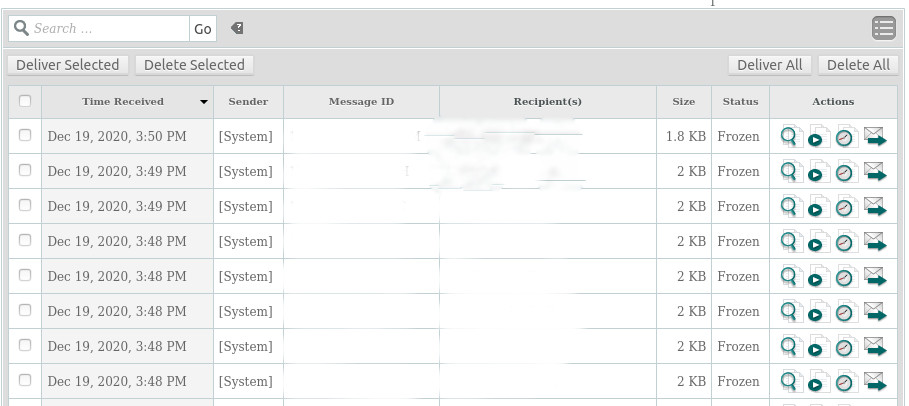
5. If you want to know the count of the queued mail then please use the below commands.
exim -bpc
exim -bp | exiqsumm

Conclusion
The Mail Queue Manager in WHM provides a simple and effective way to monitor and manage queued emails. For quick checks and automation, Exim command-line tools are highly efficient. Regular monitoring of the mail queue helps ensure smooth email delivery and prevents issues like spam buildup or server overload.