Introduction
Changing the PHP version for your main domain and subdomains in cPanel is important for compatibility, performance, and security. cPanel provides an easy way to manage PHP versions using the MultiPHP Manager.
Prerequisites
Before proceeding, ensure the following:
- You have access to your cPanel account
- The MultiPHP Manager feature is enabled on your hosting server
- You know which PHP version is required for your application (e.g., WordPress, Laravel, etc.)
Implementation:
Step 1: Log in to cPanel and click on the MultiPHP Manager under the Software sections on the cPanel home page.
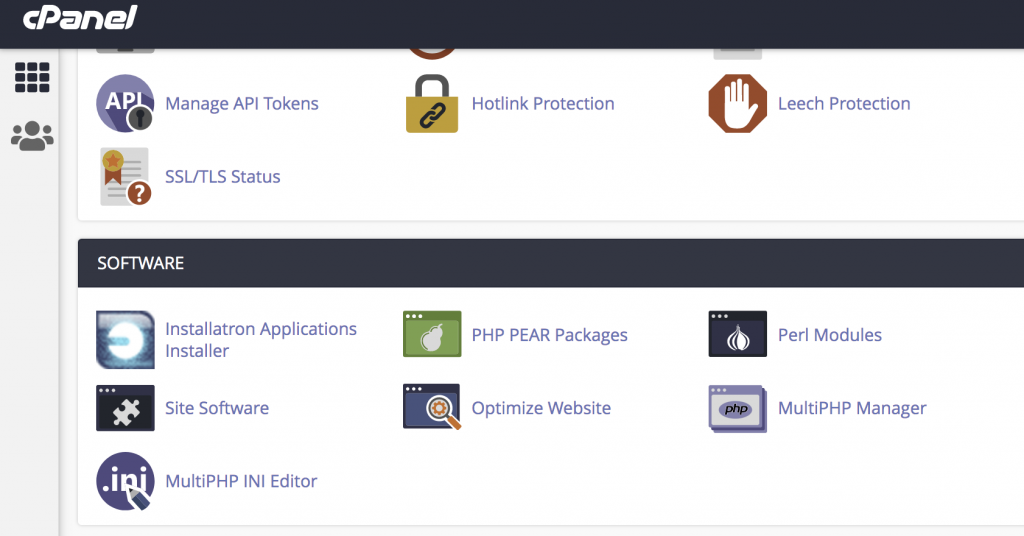
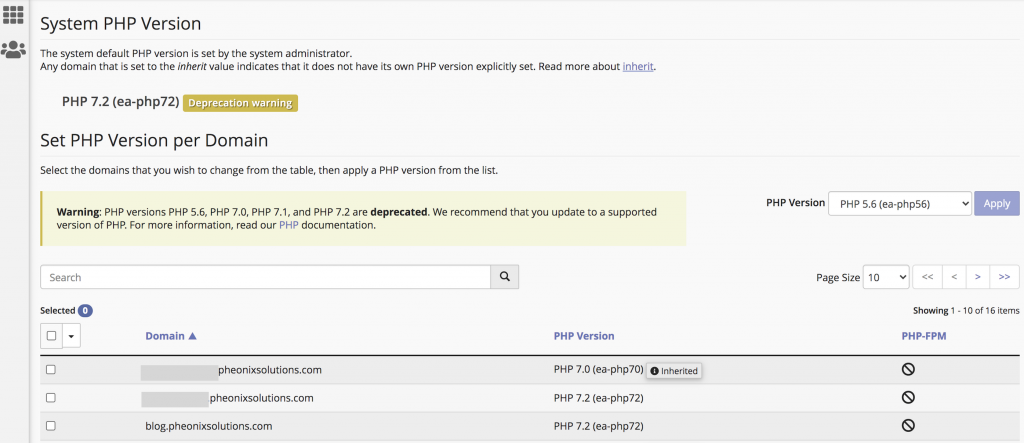
Step 2: You can select the domain name or subdomain name under the Domain section and scroll down and select the version on the right side PHP Version box and click Apply.
Conclusion:
Using MultiPHP Manager in cPanel makes it simple to switch PHP versions for both main domains and subdomains. This helps ensure your applications run smoothly and remain secure. Always verify compatibility before changing the PHP version to avoid breaking your website.