
Introduction
Running workloads on Kubernetes in production introduces a different set of risks than running them in development or staging. Missing resource limits, misconfigured probes, weak RBAC policies, and absent backup strategies can all lead to outages, security incidents, or unpredictable scaling behavior once real traffic hits the cluster.
A structured readiness review helps confirm that a cluster and its workloads meet baseline requirements for reliability, security, and observability before they carry production traffic.
This checklist covers practical areas that can be reviewed to bring a Kubernetes cluster and its workloads to production readiness.
Architecture Overview
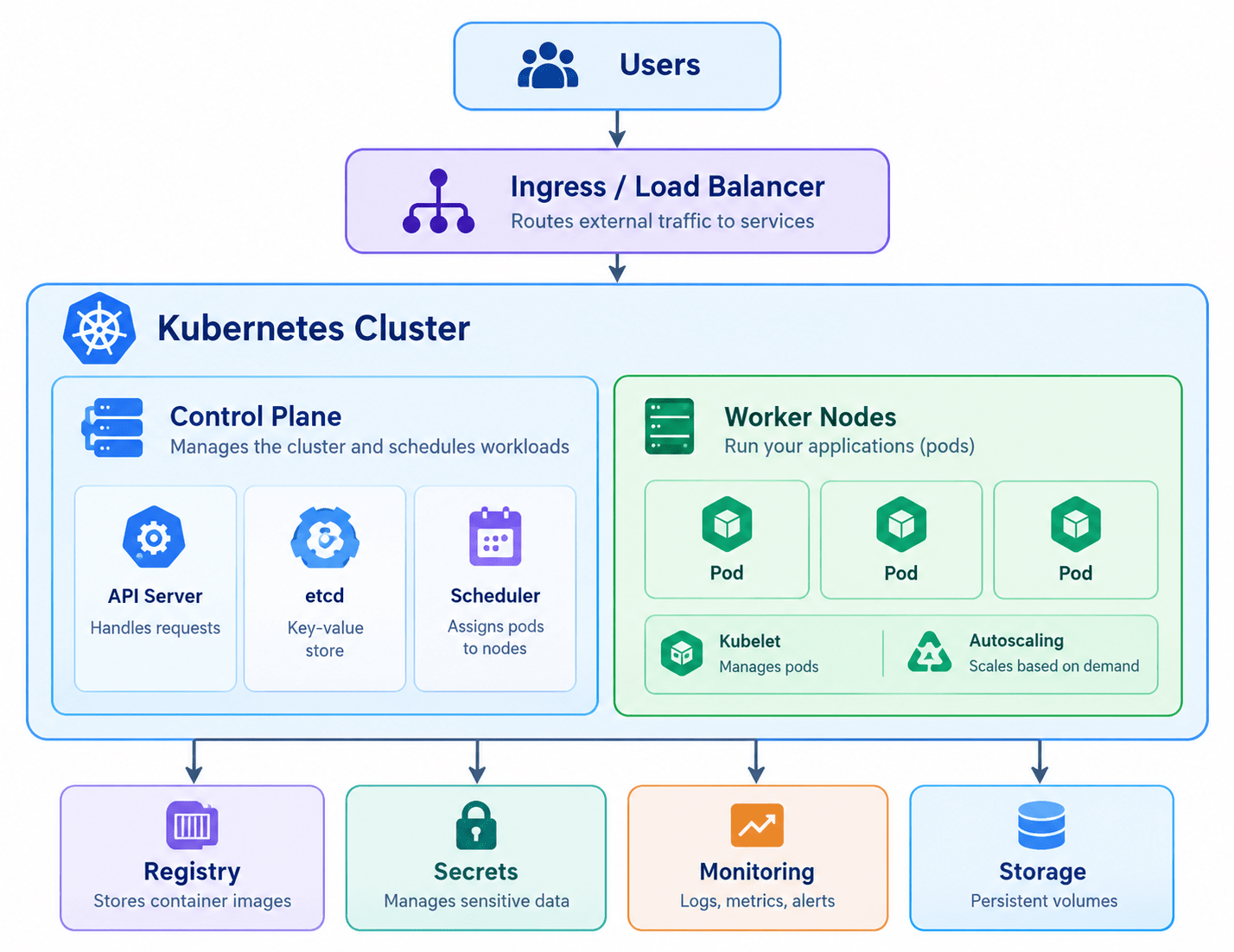
The diagram below shows how the areas in this checklist map onto a typical production Kubernetes setup: traffic enters through an ingress/load balancer, the cluster splits into a control plane and worker nodes, and the nodes depend on supporting services for images, secrets, observability, and storage.
Prerequisites
Before starting a Kubernetes production readiness review, ensure that you have:
- Access to the Kubernetes cluster with sufficient permissions (kubectl, cloud console, or cluster dashboard)
- Access to cluster monitoring and logging tools
- Knowledge of the workloads currently deployed
- Information about expected traffic patterns and SLAs
- Understanding of namespace boundaries between environments (staging and production)
Implementation
1. Review Cluster Architecture and Version
Start by reviewing the overall cluster setup and confirming it is on a supported, patched version.
Check:
- Kubernetes version and support status
- Control plane availability (single vs. multi-master)
- Node pool distribution across zones
- Managed vs. self-hosted control plane
- Cluster upgrade and patching process
Use kubectl version and your provider’s console to confirm version support windows before going further.
2. Set Resource Requests and Limits
Every container should declare CPU and memory requests and limits appropriate to its actual usage.
Review:
- Pods running without requests/limits
- Requests set too low, causing throttling or OOM kills
- Limits set too high, wasting node capacity
- QoS class assigned to critical workloads (Guaranteed, Burstable, BestEffort)
Workloads without requests and limits can starve other pods on the same node or get evicted unpredictably under pressure.
3. Configure Liveness, Readiness, and Startup Probes
Check whether each deployment has the correct probes configured for its behavior.
Review:
- Liveness probes for detecting hung processes
- Readiness probes for gating traffic until the pod is ready
- Startup probes for slow-starting applications
- Probe timeout, period, and failure thresholds
- Probes pointing at the correct port and path
Missing or misconfigured probes are one of the most common causes of failed rollouts and traffic sent to unready pods.
4. Implement Horizontal and Cluster Autoscaling
For workloads with variable traffic, confirm autoscaling is configured at both the pod and node level.
For example:
Low Traffic
    |
    v
3 Pods / 2 Nodes
    |
Traffic Increases
    |
    v
8 Pods / 4 Nodes
    |
Traffic Decreases
    |
    v
3 Pods / 2 Nodes
Review:
- Horizontal Pod Autoscaler (HPA) targets and thresholds
- Cluster Autoscaler node group limits
- Vertical Pod Autoscaler where applicable
- Scaling behavior during traffic spikes
- Minimum replica counts for high availability
5. Configure Pod Disruption Budgets
Review whether critical workloads are protected during voluntary disruptions such as node drains or upgrades.
Review:
- PodDisruptionBudget (PDB) coverage for critical services
- minAvailable / maxUnavailable settings
- Impact of node upgrades on availability
- Multi-replica deployments without a PDB
Workloads without a PDB can lose all replicas simultaneously during a routine node drain.
6. Review RBAC and Access Controls
Access to the cluster and its resources should follow least-privilege principles.
Review:
- ClusterRoles and Roles in use
- Overly broad permissions (e.g., cluster-admin bindings)
- Service account permissions per namespace
- Human user access via SSO or IAM integration
- Default service account token auto-mounting
7. Secure Secrets Management
Check how sensitive configuration such as credentials and API keys is stored and accessed.
Review:
- Secrets stored as plain Kubernetes Secrets vs. an external secrets manager
- Encryption at rest for etcd
- Secret rotation process
- Secrets mounted only where required
- Secrets committed to source control (should be none)
8. Apply Network Policies
By default, most CNI plugins allow all pod-to-pod traffic. Review whether this matches your security requirements.
Review:
- NetworkPolicy resources restricting pod-to-pod traffic
- Namespace isolation between environments
- Ingress and egress rules for sensitive workloads
- Default-deny policies where appropriate
9. Review Namespace and Resource Quotas
Review how workloads are separated and whether quotas prevent one team or app from exhausting cluster resources.
Review:
- Namespace-per-environment or per-team structure
- ResourceQuota objects per namespace
- LimitRange defaults for pods without explicit limits
- Shared vs. dedicated node pools for critical workloads
10. Harden Container Images
Review the images running in the cluster for security and size.
Review:
- Base image source and trust
- Vulnerability scanning in the CI/CD pipeline
- Image tags (avoid
:latestin production) - Image pull policies
- Minimal/distroless images where possible
- Running containers as non-root
11. Configure Logging and Monitoring
Confirm that logs and metrics are collected centrally and retained appropriately.
Review:
- Centralized logging (e.g., stdout/stderr shipped to a log aggregator)
- Metrics collection (e.g., Prometheus, cloud-native monitoring)
- Log retention periods
- Cluster-level and application-level dashboards
- Node and pod resource metrics visibility
12. Set Up Alerting
Configure alerts so issues are identified before they affect users.
For example:
Error Rate / Latency
     |
     +-- Warning threshold  → Notify on-call channel
     |
     +-- Critical threshold → Page on-call engineer
     |
     +-- Sustained breach   → Trigger incident process
Review:
- Alerts for pod crash loops and restarts
- Alerts for node resource pressure
- Alerts for failed deployments/rollouts
- Alert routing and on-call ownership
- Alert fatigue from noisy or low-value alerts
13. Plan Rolling Updates and Deployment Strategy
Review how new versions of an application are deployed to avoid downtime.
Review:
- RollingUpdate strategy settings (maxSurge, maxUnavailable)
- Blue/green or canary deployment needs for critical services
- Rollback process for failed deployments
- Readiness gates tied to deployment health
14. Review Ingress and TLS Configuration
Check how external traffic reaches the cluster and whether it is properly secured.
Review:
- Ingress controller configuration and version
- TLS certificate issuance and renewal (e.g., cert-manager)
- Domain and routing rules
- Rate limiting and WAF requirements
- Internal vs. external-facing services
15. Backup and Disaster Recovery
Confirm that both cluster state and application data can be recovered after a failure.
Review:
- etcd backup schedule and restore testing
- Persistent Volume backup strategy
- Multi-region or multi-zone failover plan
- Documented recovery time objective (RTO) and recovery point objective (RPO)
- Last tested recovery date
Backups that have never been restored in a test should not be assumed to work.
16. Review Node Affinity, Taints, and Tolerations
Review whether workloads are scheduled appropriately across the node pool.
Review:
- Node affinity/anti-affinity rules for critical workloads
- Taints and tolerations for dedicated node pools
- Pod topology spread constraints across zones
- Workloads unintentionally co-located on the same node
17. Regularly Review Production Readiness
Production readiness should not be treated as a one-time gate before launch.
A regular review should cover:
- New workloads before they reach production
- Cluster and dependency upgrades
- Resource utilization trends
- Security posture and RBAC drift
- Backup and recovery testing
- Incident retrospectives and follow-ups
Kubernetes Production Readiness Checklist
| Area | Check |
|---|---|
| Cluster | Confirm supported version and architecture |
| Resources | Set requests and limits on all containers |
| Probes | Configure liveness, readiness, startup probes |
| Autoscaling | Configure HPA and Cluster Autoscaler |
| Availability | Set PodDisruptionBudgets for critical services |
| RBAC | Apply least-privilege access controls |
| Secrets | Use secure secrets management and rotation |
| Network | Apply NetworkPolicies between workloads |
| Namespaces | Set quotas and limit ranges |
| Images | Scan and harden container images |
| Logging | Centralize logs with retention policy |
| Monitoring | Collect metrics and dashboards |
| Alerting | Configure actionable, routed alerts |
| Deployments | Define rolling update and rollback strategy |
| Ingress/TLS | Secure external traffic with valid certificates |
| Backup/DR | Test etcd and PV backup/restore process |
| Scheduling | Use affinity, taints, and topology spread |
Conclusion
Kubernetes production readiness is an ongoing process that requires regular attention to resource configuration, availability, security, observability, and disaster recovery.
By configuring proper resource limits, health probes, autoscaling, access controls, secrets management, and backup strategies, teams can run workloads reliably while reducing the risk of outages and security incidents.
The objective of a production readiness review should not simply be to pass a checklist. It should be to ensure the cluster and its workloads can reliably meet the performance, availability, and security requirements of the business.
Frequently Asked Questions
1. What is the first step in Kubernetes production readiness? The first step is reviewing the cluster’s version, architecture, and support status, followed by confirming that all workloads have resource requests and limits configured before addressing autoscaling, security, and observability.
2. What causes most Kubernetes production incidents? Common causes include missing or misconfigured health probes, absent resource limits leading to noisy-neighbor issues, insufficient RBAC controls, and untested backup and recovery procedures.
3. How often should production readiness be reviewed? Production readiness should be reviewed before any new workload goes live, after major cluster or dependency upgrades, and on a regular cadence such as quarterly, alongside backup and recovery testing.
Related Articles
How to Renew Kubernetes Certificates Using kubeadm (Step-by-Step Guide with Zero Planned Downtime)
How to Configure cert-manager ClusterIssuer with Cloudflare API Token on Kubernetes
Talk to Our Technology Experts
Planning a Kubernetes production rollout or looking to harden an existing cluster? Our team can help with cluster architecture, security, observability, deployment strategy, and ongoing operations.