Introduction
File and directory permissions control who can read, write, and execute files within a hosting account. Proper permissions are essential for maintaining website security while ensuring that applications, scripts, and users can access the resources they require.
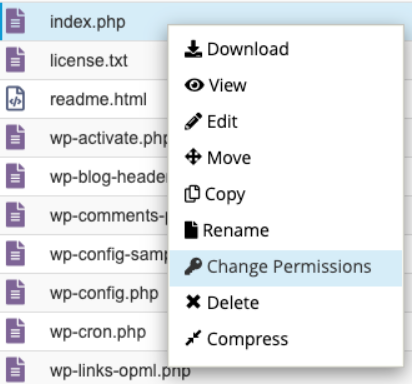
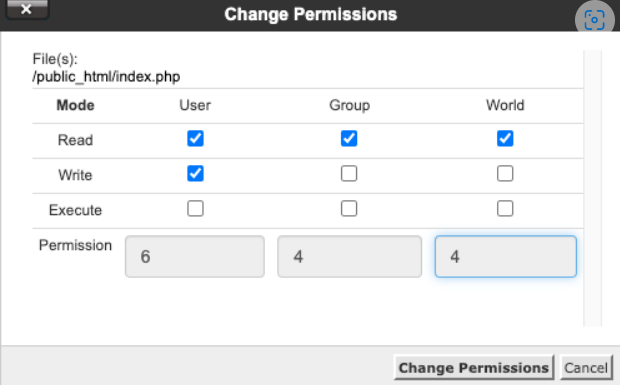
The cPanel File Manager provides a simple graphical interface that allows users to modify file and folder permissions without requiring SSH or command-line access. This article explains how to change permissions for files and directories directly through the cPanel File Manager.
Prerequisites
Before proceeding, ensure the following requirements are met:
Access Requirements
- Valid cPanel user credentials.
- Access to the hosting account where the file or folder is located.
Knowledge Requirements
- Basic understanding of Linux file permissions.
- Knowledge of the file or directory that requires permission changes.
Recommended Permission Values
Some commonly used permission settings include:
| Permission | Usage |
|---|---|
| 644 | Standard permission for most website files |
| 755 | Standard permission for most directories |
| 600 | Sensitive files containing credentials or configuration data |
| 700 | Private directories accessible only by the account owner |
Security Considerations
- Avoid setting permissions to
777unless specifically required and fully understood. - Incorrect permissions may expose sensitive data or cause website functionality issues.
- Always verify permission changes after updating them.
Conclusion
Changing file and folder permissions through the cPanel File Manager provides a convenient and user-friendly method for managing access controls within a hosting account. By applying the appropriate permissions, users can improve website security, prevent unauthorized access, and ensure that applications function correctly.
After making permission changes, it is recommended to test the affected website or application to confirm proper functionality. Regular reviews of file permissions can help maintain a secure and stable hosting environment.