Introduction
SSL certificate expiry notifications in cPanel alert users when a certificate is nearing expiration. While this is helpful for production environments, it may not be necessary when SSL certificates are auto-renewed or managed externally. Disabling these notifications can help reduce unnecessary email alerts.
Prerequisites
- Access to your cPanel account
- Valid login credentials
- Appropriate permissions to modify contact preferences
Implementation
Step 1: Log in to cPanel
- Access your hosting cPanel account using your credentials
Step 2: Navigate to Contact Information
- Go to “Contact Information” under the “Preferences” section.
Step 3: Update Contact Preferences
- Scroll down to Contact Preferences
- Locate the option: “SSL certificate expiry”
- Uncheck this option
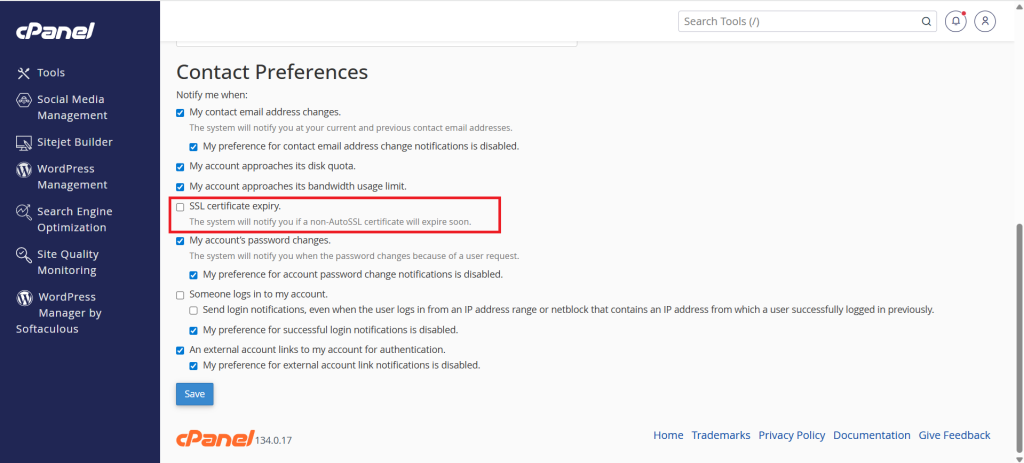
Step 4: Save Changes
Click on the Save button to apply the changes
Conclusion
Disabling SSL certificate expiry notifications in cPanel helps reduce unnecessary alerts, especially in environments where SSL certificates are automatically managed. However, ensure you have an alternative monitoring or renewal mechanism in place to avoid unexpected certificate expirations.