Introduction
Shell Fork Bomb Protection is a security feature in WHM that helps protect the server from fork bombs.
A fork bomb creates a large number of processes continuously, which can consume the server’s available resources. This feature helps prevent users with SSH or Telnet access from exhausting server resources.
Prerequisites
Before enabling Shell Fork Bomb Protection:
- Root access to WHM is required.
- The server should provide terminal access such as SSH or Telnet.
- Ensure that applications running on the server can work with the configured resource limits.
Implementation
Step 1: Access Shell Fork Bomb Protection
- Log in to WHM as the root user.
- Navigate to Security Center → Shell Fork Bomb Protection.
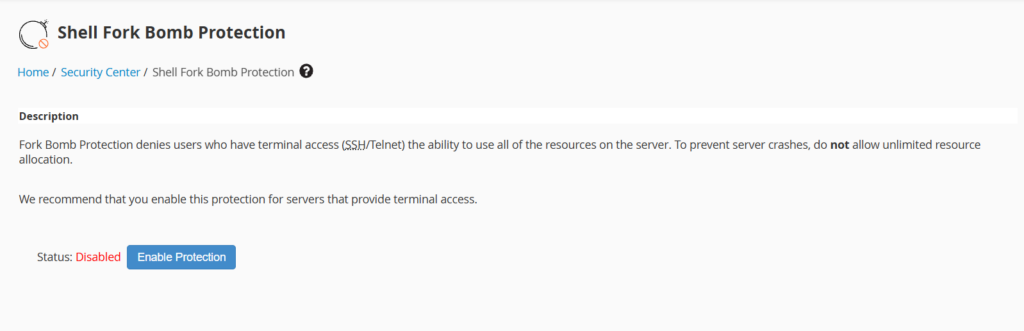
Step 2: Enable Protection
- Check the current protection status.
- Click Enable Protection.

3. WHM applies the required ulimit resource restrictions.
The default resource limits include:
| Option | Limit | Description |
|---|---|---|
-c | 200000 | Core file size |
-d | 200000 | Process data segment |
-m | 200000 | Resident set size |
-n | 100 | Open-file descriptors |
-s | 8192 | Stack size |
-u | 35 | Maximum processes per user |
-v | Unlimited | Virtual memory |
Note: The
-ulimit restricts cPanel users with Bash shell access to 35 processes per user.
Step 3: Verify the Protection
After enabling the feature, verify that the status is displayed as Enabled in the Shell Fork Bomb Protection interface.
To disable the protection, return to the same interface and click Disable Protection.
Conclusion
Shell Fork Bomb Protection helps improve server security and stability by limiting the resources that users can consume through excessive process creation. It is recommended for servers that provide terminal access to users.
FAQs
1. What is a fork bomb?
A fork bomb is a process that continuously creates new processes until the server’s available resources are exhausted.
2. Where can I find Shell Fork bomb protection?
You can find it under WHM → Security Center → Shell Fork Bomb Protection.
3. What happens when protection is enabled?
WHM applies ulimit restrictions to control the resources available to users.
4. How many processes can a cPanel user create?
By default, cPanel users with Bash shell access are limited to 35 processes per user.
5. Can I disable shell fork bomb protection?
Yes. You can disable it from the same Shell Fork Bomb Protection interface in WHM.
Related Articles
- How to enable shell access (SSH) for cPanel account in WHM
- How to create DB, user and password and give privileges in cPanel using UAPI in terminal