Introduction
WHM provides Tweak Settings to configure various server-wide settings in cPanel. Under the PHP section, administrators can configure PHP-related limits used by cPanel services.
In this article, we will explain how to check and modify the PHP memory limit using WHM Tweak Settings.
Prerequisites
Before proceeding, make sure you have:
- WHM root access
- A cPanel/WHM server
- Administrator privileges
Implementation
Step 1: Log in to WHM
Log in to your WHM interface using your administrator credentials.
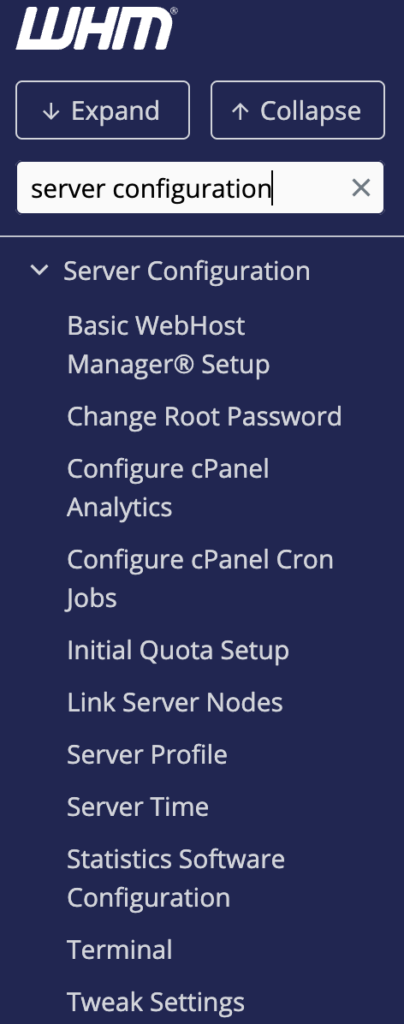
Navigate to:
WHM → Server Configuration → Tweak Settings
Step 2: Open the PHP Settings
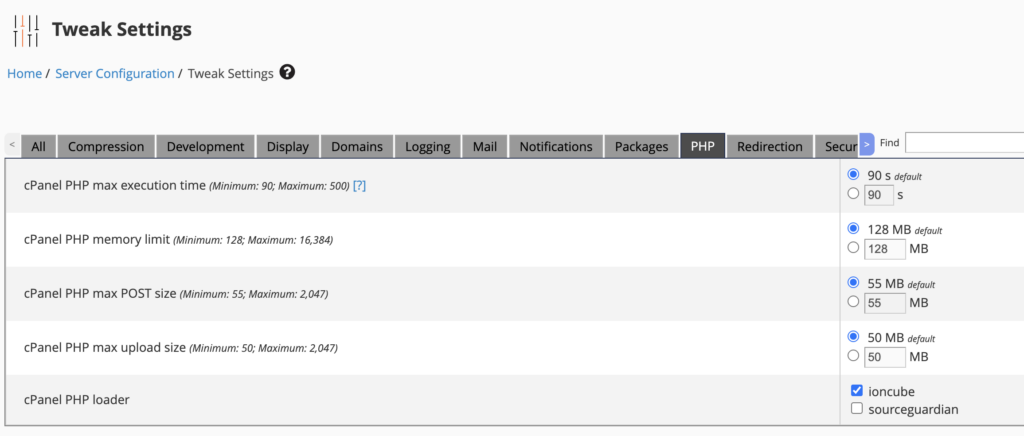
In the Tweak Settings page, select the PHP section.
You can find PHP-related configuration options available for the server.
Step 3: Configure PHP Memory Limit
Locate the following setting:
cPanel PHP memory limit
Set the required memory value according to your server requirements.
For example:
512M
The value should be selected based on the available server resources and the requirements of your cPanel services.
Step 4: Save the Configuration
After changing the value, scroll to the bottom of the page and click:
Save
WHM will apply the updated configuration.
Verification
After saving the configuration, return to:
WHM → Server Configuration → Tweak Settings → PHP
Verify that the cPanel PHP memory limit displays the newly configured value.
Note
The cPanel PHP memory limit in Tweak Settings applies to cPanel’s internal PHP processes/services. It should not be confused with the PHP limits configured for individual websites.
For website-specific PHP settings, use the appropriate PHP configuration for the domain, such as MultiPHP INI Editor.
Conclusion
WHM’s Tweak Settings provides an easy way for server administrators to configure the PHP memory limit used by cPanel services. Before increasing the value, ensure that the server has sufficient available memory to handle the additional resource requirements.
FAQ
1. Where can I configure the cPanel PHP memory limit?
Go to:
WHM → Server Configuration → Tweak Settings → PHP
2. Does this change the PHP limit for my website?
No. The cPanel PHP memory limit is intended for cPanel services. Website PHP settings should be configured separately.
3. Do I need root access to change this setting?
Yes. WHM Tweak Settings requires WHM administrator/root-level access.
4. What value should I use for the PHP memory limit?
The value depends on the server’s available resources and the requirements of the cPanel services. Avoid setting unnecessarily high values.