
Introduction
cPanel with Apache 2.4 lets you add custom virtual host configuration without editing Apache’s main config directly — changes go into per-domain “userdata” files that cPanel automatically includes and preserves across rebuilds. This guide explains how to add a custom virtual host configuration on cPanel with Apache 2.4.
Implementation
I. Prerequisites
- A cPanel server running Apache 2.4
- Root/server access
- The domain and cPanel username you’re configuring (this guide uses
domain.tldandcusernameas examples)
II. How cPanel’s userdata System Works
cPanel doesn’t want you editing its main Apache config directly, since it regenerates that file automatically. Instead, it reads any .conf files placed in specific per-domain “userdata” directories and automatically includes them — separately for HTTP and HTTPS.
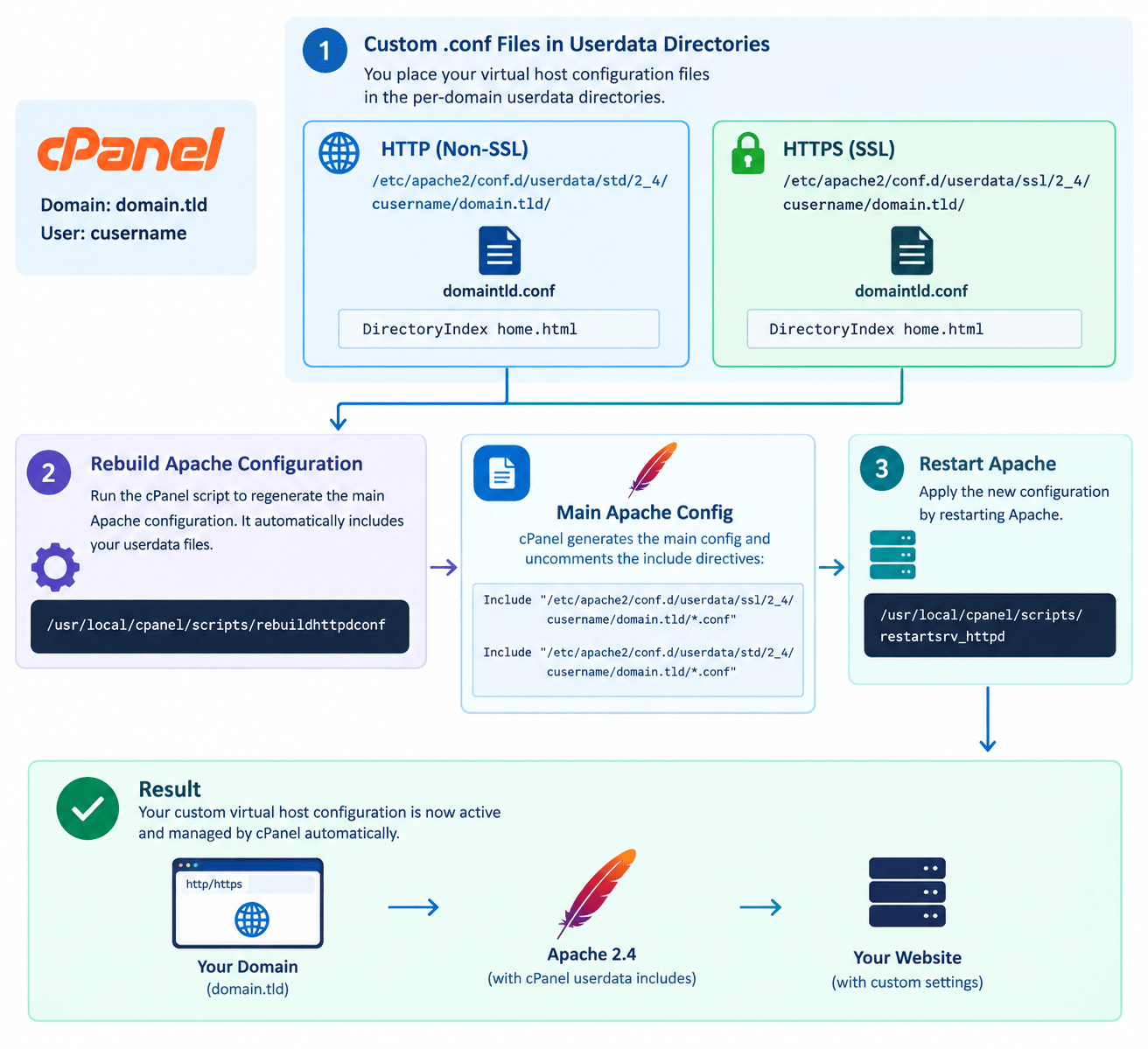
III. Create the Configuration Directories
For the HTTPS (SSL) virtual host:
mkdir -p /etc/apache2/conf.d/userdata/ssl/2_4/cusername/domain.tld/
For the HTTP (non-SSL) virtual host:
mkdir -p /etc/apache2/conf.d/userdata/std/2_4/cusername/domain.tld/
IV. Add the SSL Configuration
vi /etc/apache2/conf.d/userdata/ssl/2_4/cusername/domain.tld/domaintld.conf
DirectoryIndex home.html
You can add any other Apache directives you need in this file, not just DirectoryIndex.
V. Add the HTTP Configuration
vi /etc/apache2/conf.d/userdata/std/2_4/cusername/domain.tld/domaintld.conf
DirectoryIndex home.html
VI. Rebuild the Apache Configuration
/usr/local/cpanel/scripts/rebuildhttpdconf
This regenerates cPanel’s main Apache config and automatically uncomments the include directives pointing at your userdata files, correctly separated by SSL and non-SSL:
Include "/etc/apache2/conf.d/userdata/ssl/2_4/cusername/domain.tld/*.conf"
Include "/etc/apache2/conf.d/userdata/std/2_4/cusername/domain.tld/*.conf"
Note: The
stdinclude path is easy to get wrong if typed from memory — both the SSL and non-SSL include paths must match the directory structure from Step III exactly, including thestdsegment for the non-SSL path. A missing or mismatched path segment here means cPanel silently won’t pick up your HTTP-side configuration.
VII. Restart Apache
/usr/local/cpanel/scripts/restartsrv_httpd
Your custom configuration is now active.
VIII. Conclusion
Custom virtual host configuration on cPanel comes down to placing .conf files in the correct per-domain userdata directories — separately for SSL and non-SSL — then running rebuildhttpdconf and restarting Apache. This keeps your customizations safe from being overwritten whenever cPanel regenerates its main Apache configuration.
Frequently Asked Questions
Will my changes survive a cPanel update? Yes — userdata files are cPanel’s officially supported way to persist custom Apache configuration, specifically so it isn’t lost when cPanel regenerates the main config.
What if I only need HTTP or only HTTPS, not both? Just create the one directory and config file you need — you don’t have to configure both if your site only requires one.
Can I include more than DirectoryIndex in these files? Yes — any valid Apache directive can go in these .conf files, not just DirectoryIndex.
Related Articles
How to Deploy WordPress Behind a Reverse Proxy on cPanel/Apache
Installing ModSecurity with OWASP CRS on Apache (Ubuntu)
Talk to our experts.
Looking for the right technology solution for your business? Our team of experts can help you with development, cloud, DevOps, design, and a wide range of other technology needs. Get in touch with our team here.