
Introduction:
In Ubuntu 24.04, administrators can temporarily disable or re-enable user access using command-line tools. Locking a user prevents password-based logins without deleting the account or its files.
Prerequisites
Before proceeding, ensure the following requirements are met:
- A server or system running Ubuntu 24.04
- Root or sudo privileges
- Access to the terminal or SSH
- Basic knowledge of Linux command-line operations
Implementation
- Lock a User Account
Use the following command to lock a user account:
Command:
| $ sudo passwd -l username |
Example:
| $ sudo passwd -l testuser |
Output:
passwd: password expiry information changed

This locks the user’s password and prevents login using password authentication.
2. Unlock a User Account
| $sudo passwd -u username |
Example:
| $ sudo passwd -u testuser |
Output:
passwd: password expiry information changed.

The user can log in again using their existing password.
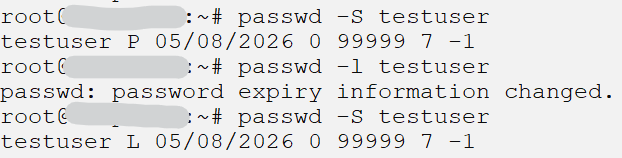
Verify User Lock Status.
Check Password Status
| $ sudo passwd -S username |
Example:
| $ sudo passwd -S testuser |
Sample Output:
testuser L 05/08/2026 0 99999 7 -1
L = Locked P = Active password
Conclusion
Ubuntu 24.04 provides simple commands to securely lock and unlock user accounts. Using passwd or usermod, administrators can quickly control account access while preserving user data and system integrity.