
Post Date: February 5, 2018
Last Updated: September 20, 2026
Introduction
This guide originally explained how to install the mcrypt PHP extension on macOS for a development server. Before following it, there’s something important to know: mcrypt was removed from PHP core in PHP 7.2, and the underlying libmcrypt library itself has been unmaintained since 2007 and is considered insecure by modern standards.
Prerequisites
- macOS with Homebrew installed
- PHP installed
Important: Don’t Use mcrypt for New Code
If you’re writing new code, use PHP’s built-in OpenSSL functions instead — openssl_encrypt() and openssl_decrypt() are included with PHP by default, actively maintained, and don’t require installing anything extra. This avoids both problems with the original guide below: mcrypt being deprecated/insecure, and the homebrew/php tap it depended on no longer existing (Homebrew removed that tap years ago, so brew install homebrew/php/php71-mcrypt will fail on any current system).
Only continue with the steps below if you’re maintaining genuinely legacy code that hasn’t been migrated off mcrypt yet.
Architecture
- PHP’s encryption calls are handled by whichever extension is loaded — either the built-in OpenSSL extension, or the legacy mcrypt extension if explicitly installed and enabled
php.inidetermines which extensions PHP loads at startup
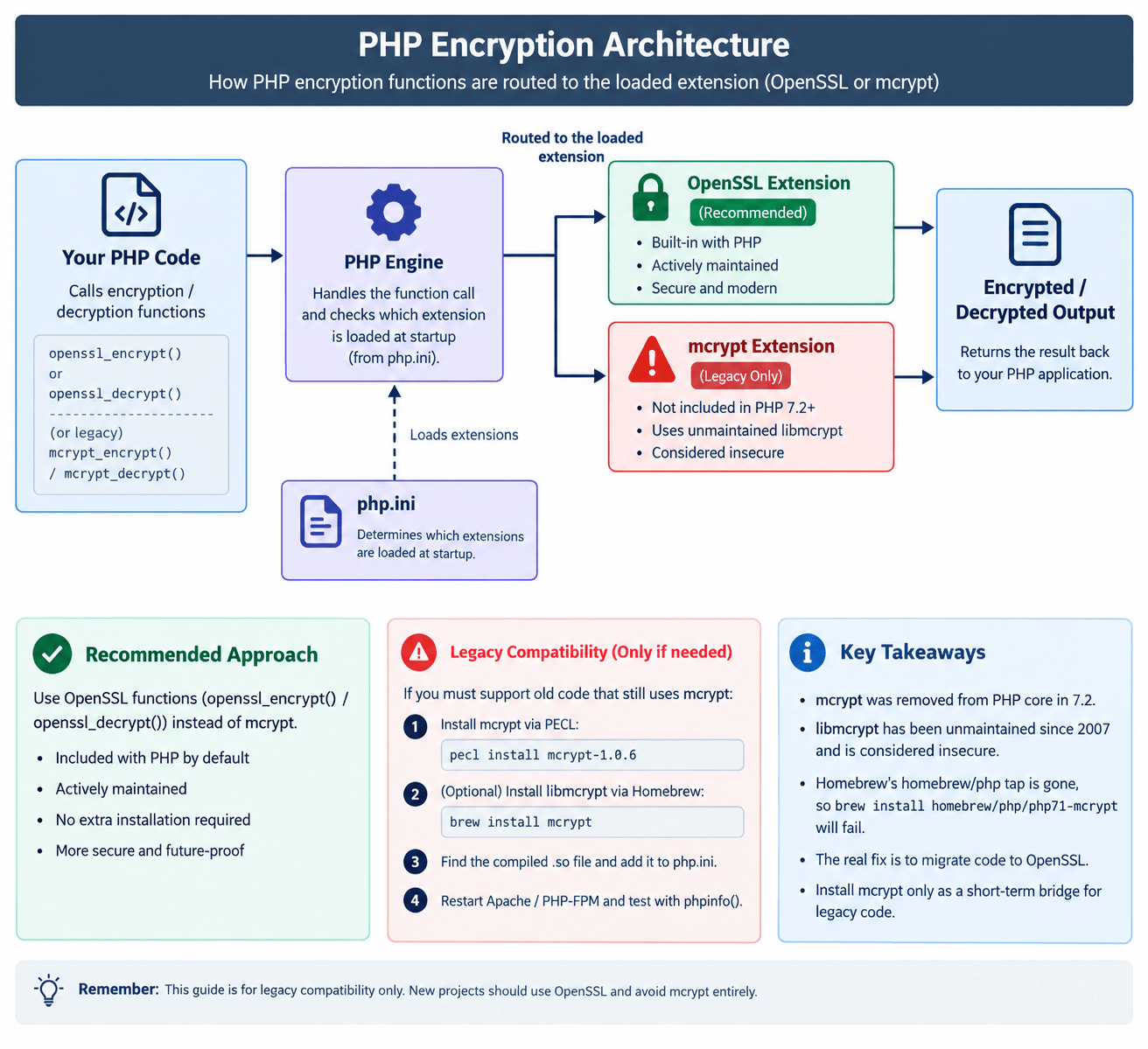
Steps (Legacy Compatibility Only)
1. Check your PHP version:
php --version
2. Install mcrypt via PECL (the current path, since the old Homebrew tap is gone):
pecl install mcrypt-1.0.6
This compiles against the deprecated
libmcryptlibrary, which you may also need to install separately via Homebrew (brew install mcrypt, if still available on your macOS version).
3. Find the compiled extension file:
find /usr -type f -name "mcrypt.so"
4. Find your php.ini:
php -i | grep 'Configuration File'
5. Add the extension to php.ini:
extension=/path/to/mcrypt.so
6. Restart Apache (or PHP-FPM, depending on your setup), then confirm with a phpinfo() test page.
Conclusion
The real fix here usually isn’t installing mcrypt — it’s migrating the code that still calls mcrypt_encrypt()/mcrypt_decrypt() over to PHP’s built-in openssl_encrypt()/openssl_decrypt() functions. Only install mcrypt itself if you’re temporarily supporting legacy code you haven’t migrated yet, and treat it as a short-term bridge rather than a long-term setup.
Frequently Asked Questions
Why was mcrypt removed from PHP? The underlying libmcrypt library stopped being maintained in 2007, and PHP’s project decided to remove the extension from core starting in PHP 7.2 rather than keep shipping an unmaintained, insecure component.
Is OpenSSL a drop-in replacement for mcrypt? Not exactly a drop-in — the function signatures differ, so migrating requires updating your encryption/decryption code, not just swapping the extension. But it’s the standard, supported path forward.
Why did brew install homebrew/php/php71-mcrypt fail for me? Homebrew removed the entire homebrew/php tap years ago. That specific formula path no longer exists on any current Homebrew installation.
Related Articles
How to Install and Manage Multiple PHP Versions on Ubuntu
How to Automate Kannel Monitoring with PHP and Scheduled Cron Jobs
Talk to our experts.
Looking for the right technology solution for your business? Our team of experts can help you with development, cloud, DevOps, design, and a wide range of other technology needs. Get in touch with our team here.
Appreciate!!!
Thats a really nice post, but step 3 dows not work. Homebrew ginds norhing..
Same as Jonas. brew says:
Error: No available formula with the name “homebrew/php/php71-mcrypt”