
JQUERY | empty() and remove()
Date: 10/02/2020
Introduction:
Empty:
Jquery empty() and remove() methods are the jquery inbuilt methods, which are used to remove the HTML element and contents.
empty() – empty() method is used to remove all the child nodes from the content from the selected content.
<!DOCTYPE html>
<html>
<head>
	<title></title>
	https://ajax.googleapis.com/ajax/libs/jquery/3.3.1/jquery.min.js
        <script>
            $(document).ready(function() {
                $("button").click(function() {
                    $("body").empty();
                });
            });
        </script>
</head>
<body style="background-color: yellow;">
	<div>
		<center>
			<h3>Hello</h3>
			<h3>Jquery empty method</h3>
		    <button>click</button>
		</center>

	</div>

</body>
</html>
Before clicking the button

After clicking the button:

Remove:
remove() used to remove the selected element from the document. It removes selected elements and also everything inside it.
syntax: $(selector).remove()
A selector is an optional parameter, it used to specify one or more elements.
<!DOCTYPE html>
<html>
<head>
	<title></title>
	https://ajax.googleapis.com/ajax/libs/jquery/3.3.1/jquery.min.js
        <script>
            $(document).ready(function() {
                $("button").click(function() {
                    $("p.test").remove();
                });
            });
        </script>
</head>
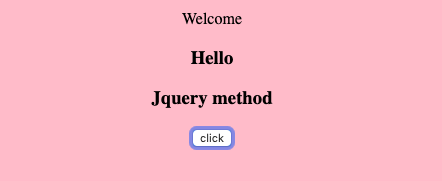
<body style="background-color: pink;">
	<center>
	<div class="mycon">

			<p>Welcome</p>
			<p class="test">Remove this line</p>
			<h3>Hello</h3>
			<h3>Jquery empty method</h3>
		    <button>click</button>


	</div>

</center>

</body>
</html>
Before clicking the button:

After clicking the button:
Conclusion
Thanks for using pheonixsolutions.
If you like it, please share it with your friends. Comments are most welcome.
Great content! Super high-quality! Keep it up! 🙂