Introduction
File permissions control who can read, write, and execute files on your server. In web hosting environments like cPanel, setting the correct permissions is important for both security and proper functioning of your website. This guide will help you easily modify file or folder permissions using cPanel’s File Manager.
Prerequisites
Before you begin, make sure you have:
- Access to your cPanel account
- Valid login credentials (username and password)
- Basic understanding of file and folder structure
- Required permission to modify files in your hosting account
Steps to Change File Permissions
Step 1:
Go to File Manager from cPanel Home.
Step 2:
Navigate to the file or folder you wish to modify and select it with a single click.
Step 3:
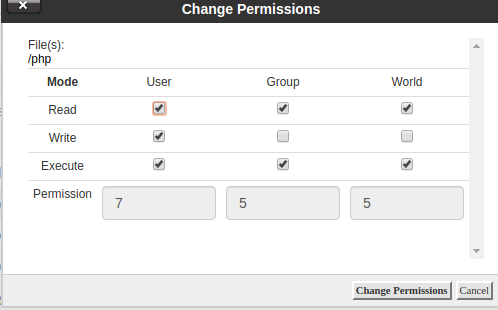
Click on the Permissions option from the top menu in File Manager. A prompt window will appear.
Step 4:
Choose the desired permissions (Read, Write, Execute) according to your requirement and click on Change Permissions to save the changes.
Conclusion
Changing file permissions in cPanel is a simple yet crucial task for maintaining your website’s security and functionality. Always assign permissions carefully—incorrect settings can either expose your files to unauthorized access or cause your website to malfunction. By following the above steps, you can safely manage your file permissions with ease.