Introduction
In a shared hosting environment, addon domains are often used to host multiple websites under a single cPanel account. However, for better security, resource isolation, and management, it is recommended to convert addon domains into separate accounts.
WHM provides a built-in feature called “Convert Addon Domain to Account”, which allows administrators to seamlessly migrate an addon domain into its own independent cPanel account without manual data transfer.
Prerequisites
Before starting the conversion process, ensure the following:
- Root or reseller access to WHM
- The addon domain is active and properly configured
- Backup of the existing cPanel account (recommended to avoid data loss)
- Ensure no critical operations (like migrations or updates) are running
- Verify sufficient disk space and resources for the new account
- DNS and email considerations are reviewed in advance
Implementation:
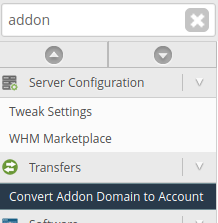
- In WHM search bar type “addon” , you will see “convert addon domain to account”. Click on it.
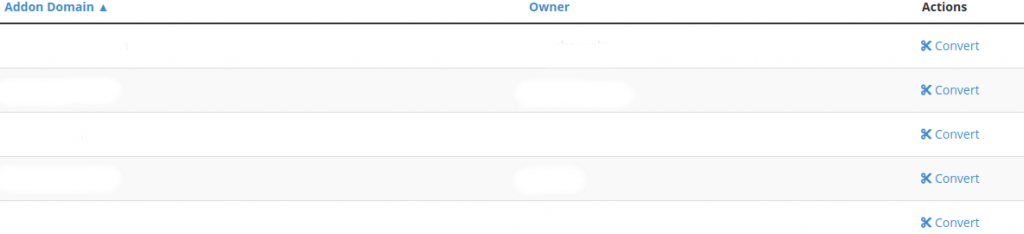
2. You will see the list of addon domain and aslo you will see the option “convert” beside these domains. Select the addon domain and click on “convert”.
3. It willl ask for username, contact email, package, etc.. Fill and proceed.
4. Website configuration- Configure and continue.

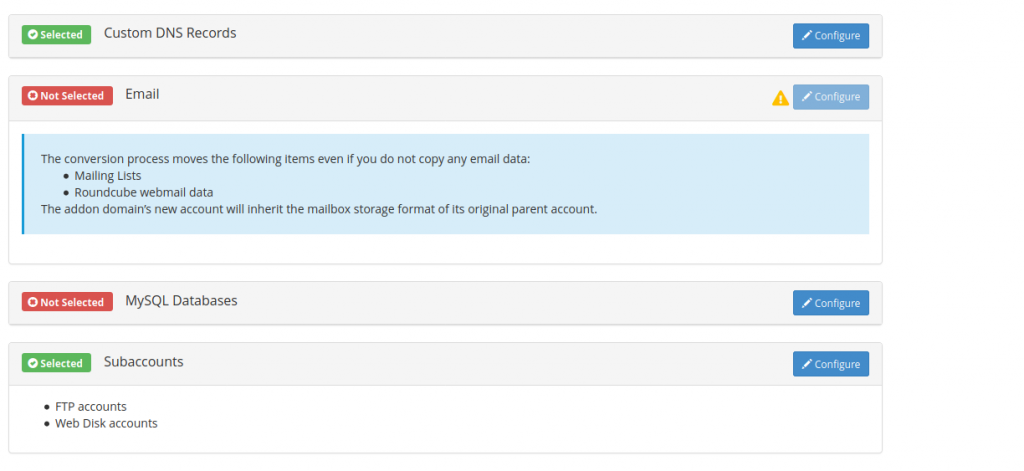
4) Configure the custom DNS records, Email, Mysql, Subaccounts and click on start conversion.
5) Conversion will start and it will be successfully converted to account.
Conclusion
Converting an addon domain into a standalone account in WHM enhances server organization, improves security isolation, and allows better resource management per website. This is especially useful for hosting providers managing multiple clients or projects.