Introduction
There are some instances where cPanel users wish to create a password-less SSH key. By default, this is not allowed in the cPanel SSH Access interface unless the administrator configures their password strength requirements for SSH. From our documentation, passwords are optional if the administrator sets the SSH Keys setting to 0 in WHM’s Password Strength Configuration interface.
Prerequisites
Before proceeding, ensure the following requirements are met:
- Root access to the server via SSH.
- WHM/cPanel installed and functioning properly.
- SSH access enabled for the cPanel account.
IMPLEMENTATION
Procedure
To adjust your Password Strength Requirements:
2. Navigate to “Security Center” >> “Password Strength Configuration”


3. Set the SSH setting to 0
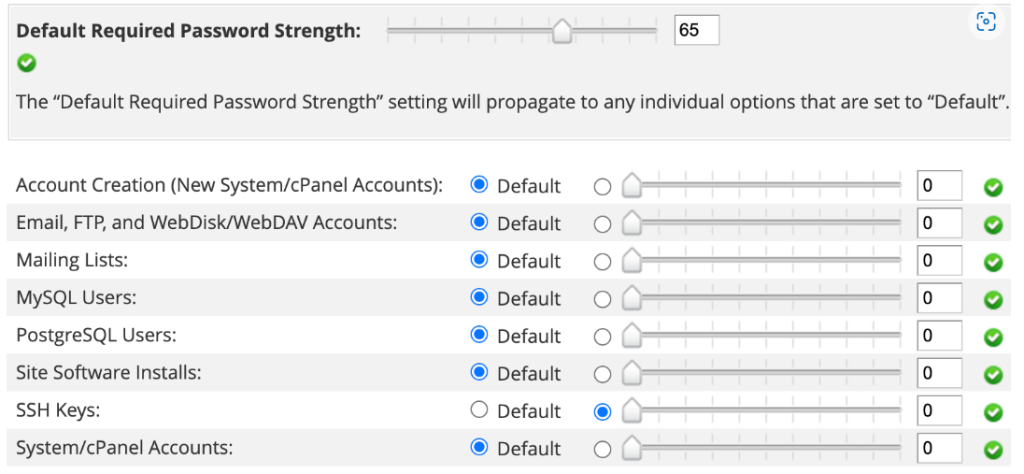
4. Click “Save”
From here, you can now access cPanel >> SSH Access once more and create a password-less key.
Conclusion
Allowing SSH key creation without passwords in cPanel can simplify automated tasks and server management workflows. While this approach eliminates the need to enter a passphrase during authentication, administrators should carefully evaluate the associated security risks and implement appropriate safeguards to protect private keys and server access.