Introduction:
Two-factor authentication (2FA) is a security feature that adds an extra layer of protection to your server by requiring users to provide a second form of authentication, typically a temporary code, in addition to their regular credentials. Enabling 2FA for WHM enhances the overall security of your server administration interface.
Prerequisites
Before enabling Two-Factor Authentication (2FA) in WHM, ensure the following requirements are met:
- WHM Root or Reseller Access
You must have valid WHM login access with the required privileges to manage Two-Factor Authentication settings. - 2FA Feature Enabled in WHM
The Two-Factor Authentication feature should be enabled on the server from WHM settings. - Authenticator Application
Install an authenticator app on your mobile device, such as Google Authenticator, Microsoft Authenticator, Authy, or any other TOTP-supported application. - Mobile Device Availability
Keep your mobile device ready to scan the QR code or manually enter the setup key. - Correct Server Time
Ensure the server time and mobile device time are properly synchronized, as 2FA codes are time-based. - Stable Internet Connection
A stable internet connection is required to access WHM and complete the 2FA setup process.
Implementation
Step 1:
Log in to WHM.
Step 2:
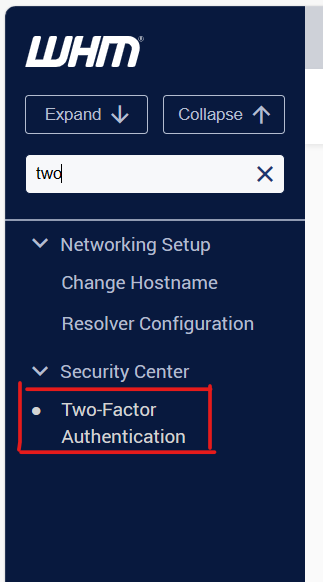
From the side, menu scroll down to Security Centre (alternatively enter “two-factor” into the search bar).
Step 3:
Click “Two-Factor Authentication”.
Step 4:
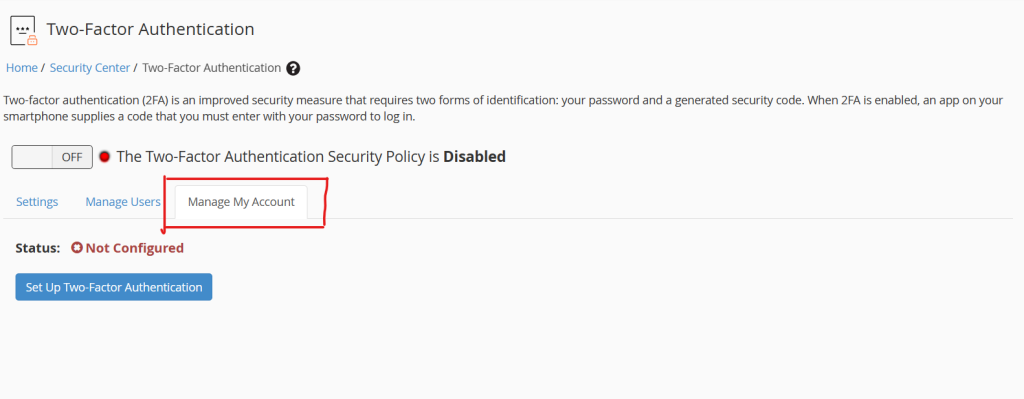
Click “Manage My Account”.
Step 5:
Open your authentication app and scan the onscreen QR code or enter the key code into your app.
Step 6:
Enter the 6-digit security code generated by your app into the box titled Security Code.
Step 7:
Click “Configure Two-Factor Authentication”.
Conclusion:
Enabling Two-Factor Authentication for WHM is a crucial step in enhancing the security of your server management interface. It adds an extra layer of protection, making it more challenging for unauthorized users to gain access to sensitive server configurations.