Introduction
WHM (Web Host Manager) allows server administrators and resellers to manage multiple cPanel accounts from a single interface. One of the important account management features in WHM is the ability to suspend or unsuspend cPanel accounts.
Suspending an account temporarily disables website access, email services, and FTP access for a specific user without deleting their data. This is useful in situations such as unpaid invoices, policy violations, security concerns, or maintenance activities. Unsuspending an account restores all services and allows the user to access their hosting account again.
This guide explains the step-by-step process to suspend and unsuspend cPanel accounts in WHM.
Prerequisites
Before proceeding, ensure that the following requirements are met:
- Access to the WHM panel with root or reseller privileges
- A valid WHM username and password
- The cPanel account already created on the server
- Stable internet connectivity
- Proper authorization to manage hosting accounts
cPanel Account Suspension
Step 1: Log in to WHM
Open your browser and log in to your WHM panel using your administrator or reseller credentials.
Step 2: Open Manage Account Suspension
In the WHM search bar, type Manage Account Suspension.
Under the Account Functions section, click on Manage Account Suspension.
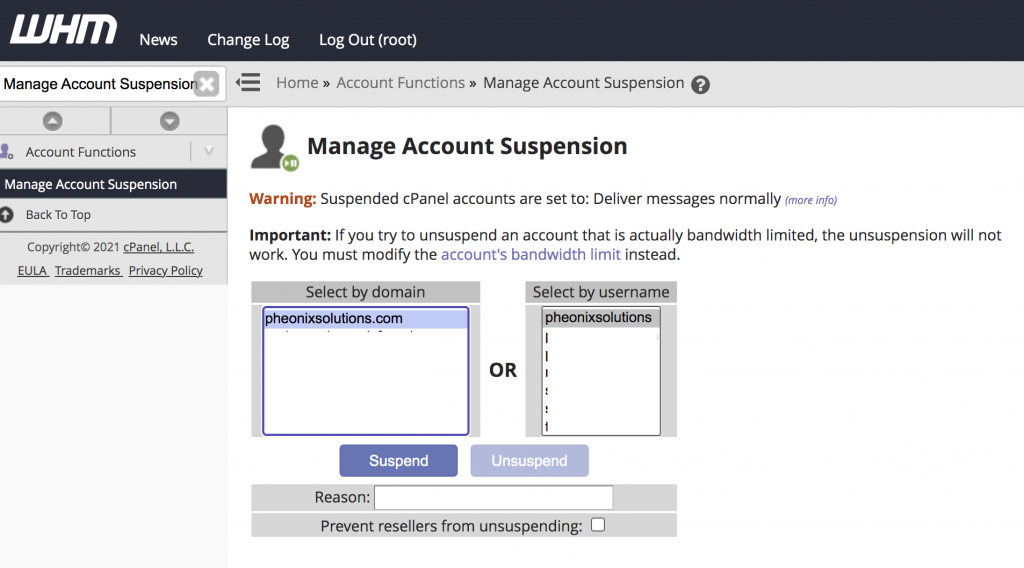
Step 3: Suspend the cPanel Account
- Select the cPanel account that you want to suspend.
- Enter the reason for suspension in the provided field.
- Click the Suspend button.
Once suspended, the account will be highlighted in red colour, indicating that the account is currently inactive.
cPanel Account Unsuspension
Step 4: Unsuspend the cPanel Account
- Follow Step 1 and Step 2 to open the Manage Account Suspension page.
- Select the suspended account marked in red colour.
- Click the Unsuspend button.
The account will be restored immediately, and all hosting services associated with the account will become active again.
Conclusion
WHM provides a simple and effective way to suspend or unsuspend cPanel accounts whenever required. Suspending accounts helps administrators manage hosting environments securely and efficiently without deleting user data. By following the above steps, administrators can quickly control account access and restore services whenever needed.