Introduction
Plesk provides a centralized interface for managing websites, domains, subdomains, and hosting services. Website administrators can remove domains or subdomains that are no longer required through the Plesk Control Panel.
Removing a domain from Plesk deletes its hosting configuration and may also remove associated website data, depending on the domain configuration.
This document explains how to remove an existing domain or subdomain from the Plesk Control Panel.
Purpose
The purpose of this document is to provide a step-by-step procedure for removing an existing domain or subdomain from Plesk.
Prerequisites
Before removing a domain or subdomain, ensure that the following requirements are met:
- Access to the Plesk Control Panel.
- Administrative permissions to manage domains and websites.
- The domain or subdomain identified for removal.
- Confirmation that the selected domain or subdomain is no longer required.
- A backup of website files, databases, and other required data, if applicable.
Procedure
Follow the steps below to remove a domain or subdomain through the Plesk Control Panel.
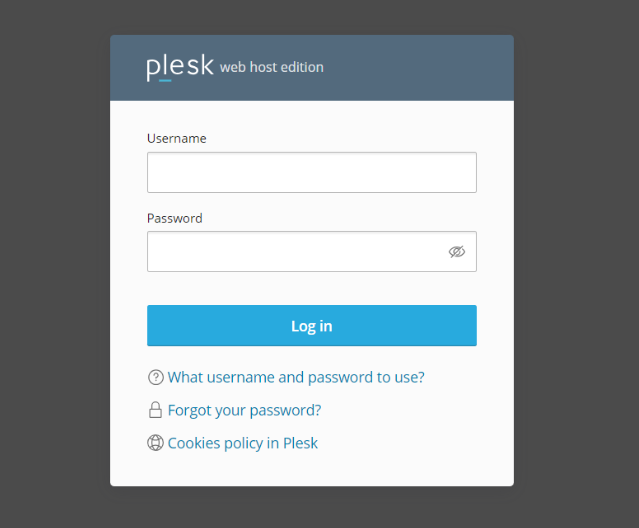
Step 1: Log in to the Plesk Control Panel
- Open the Plesk Control Panel URL in a web browser.
- Enter your Administrator username and password.
- Click Log In to access the Plesk dashboard.
Step 2: Navigate to Websites & Domains
- From the Plesk dashboard, navigate to Websites & Domains.
- Review the list of websites, domains, and subdomains configured in Plesk.
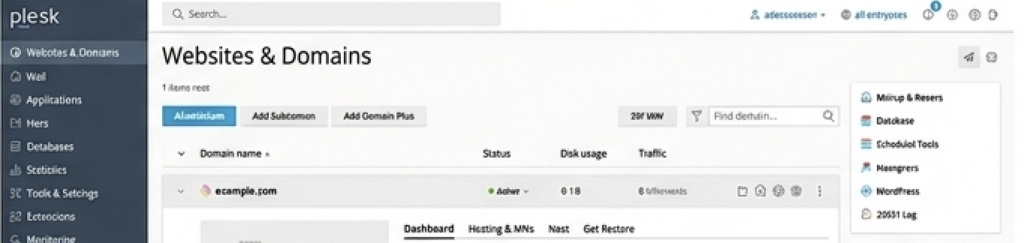
Step 3: Locate the Domain or Subdomain
- Identify the domain or subdomain that you want to remove.
- Verify the domain name carefully.
- Locate the corresponding removal option for the selected domain or subdomain.
Ensure that the correct domain or subdomain is selected before proceeding.
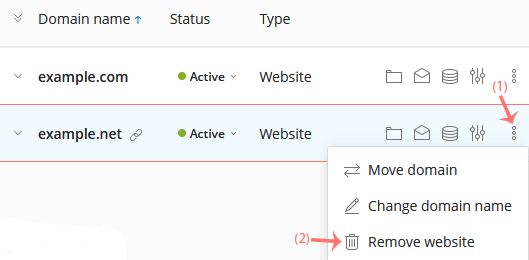
Step 4: Select Remove Website or Remove Subdomain
- Locate the required domain or subdomain in the Websites & Domains section.
- Click the corresponding Remove Website or Remove Subdomain option.
- Review the removal prompt displayed by Plesk.
Step 5: Confirm the Removal
- Review the confirmation message displayed by Plesk.
- Verify the domain or subdomain name once again.
- Confirm that the selected website or subdomain is the one intended for removal.
- Click OK to proceed with the removal.
Step 6: Verify the Removal
After completing the removal process:
- Return to the Websites & Domains section.
- Verify that the removed domain or subdomain is no longer listed.
- Confirm that the removal process has completed successfully.
- If applicable, verify that other websites and domains within the subscription remain unaffected.
Result
The selected domain or subdomain is successfully removed from the Plesk Control Panel.
The domain or subdomain is no longer available under the configured hosting management interface, and its associated hosting configuration is removed.
Important Notes and Best Practices
- Verify the domain name: Carefully check the domain or subdomain before confirming removal to avoid deleting the wrong website.
- Take a backup: Ensure that required website files, databases, email data, and configurations are backed up before removal.
- Understand data deletion: Removing a domain from Plesk may delete its associated website data from the server.
- Check associated services: Review any associated databases, mail services, scheduled tasks, SSL certificates, and application configurations before removing the domain.
- Main domain restrictions: The main domain of a subscription may not be removable independently through the Plesk interface.
- Check dependent websites: Ensure that removing the selected domain or subdomain does not affect other websites that share directories, databases, or configurations.
- Domain registration remains active: Removing a domain from Plesk does not cancel its registration with the domain registrar.
- Confirm before proceeding: Perform the removal only after obtaining the required approval, especially for production websites.
Conclusion
Plesk provides a convenient way to remove domains and subdomains through the Websites & Domains section.
By following this procedure, administrators can identify the required domain or subdomain, confirm the removal, and verify that it has been removed successfully from Plesk.
Verifying the domain name, maintaining backups, and reviewing associated services before removal helps prevent accidental data loss and unwanted service disruption.
Frequently Asked Questions (FAQs)
1. How do I remove a domain from Plesk?
Log in to Plesk, navigate to Websites & Domains, locate the required domain, click Remove Website, and confirm the removal.
2. How do I remove a subdomain from Plesk?
Navigate to Websites & Domains, locate the required subdomain, select Remove Subdomain, and confirm the removal.
3. Will removing a domain from Plesk delete website files?
Removing a domain may delete the associated website data from the server. Before proceeding, ensure that all required website files, databases, and other data are backed up.
4. Will removing a domain from Plesk cancel its registration?
No. Removing a domain from Plesk does not cancel the domain registration. The domain remains registered with the domain registrar until its registration expires or is cancelled separately.
Related Articles
How to Monitor Website Performance and Resource Usage in Plesk
Talk to Our Technology Experts
Need assistance with domain removal, Plesk configuration, or website hosting management? Our team can assist with domain management, hosting configuration, troubleshooting, data backups, and ongoing server administration through our Software Maintenance and Support services.