
Post Date: June 07, 2019
Last Updated: October 25, 2026
Introduction
Backup and Restore cPanel Account operations are essential for protecting website files, databases, email accounts, and hosting configurations. Regular backups help prevent data loss and make it easier to recover a website after accidental deletion, server failure, or migration.
cPanel provides command-line scripts to simplify these operations. The pkgacct script creates a cPanel account backup, while restorepkg restores an account from a compatible backup archive. In this guide, we will explain how to backup and restore a cPanel account using SSH commands on a WHM server.
Prerequisites
Before starting the cPanel backup and restore process, ensure that you have the following:
- Root access or the necessary administrative privileges on the cPanel/WHM server.
- The cPanel account username that needs to be backed up or restored.
- Sufficient disk space for creating and storing the backup archive.
- An existing compatible backup archive if you are restoring an account.
- SSH access to the server and basic knowledge of Linux commands.
Implementation: How to Backup and Restore cPanel Account
STEPS
1) Log-in to the server using SSH as Root user.
2) To Backup a cpanel account enter the following command on the command line, Instead of username enter your username init.
/scripts/pkgacct username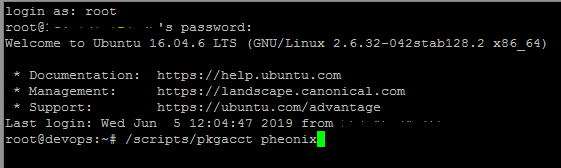
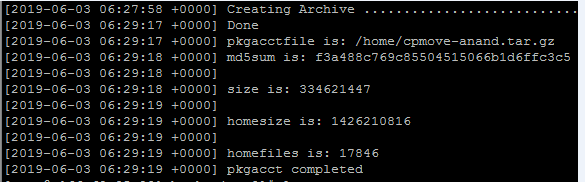
After completing backup it display location, size of file and status of backup.
3) To Restore a cpanel account enter the following command on the command line, Instead of username enter your username init.
/scripts/restorepkg usernameNote – To restore the file, 1st goto the directory, that to be stored
Conclusion
Backing up and restoring a cPanel account through SSH is a useful skill for hosting administrators. The pkgacct command creates account backup archives, while restorepkg restores accounts from compatible backups. Following the steps in this guide helps you protect important hosting data, verify backup integrity, and prepare for recovery when needed.
Always maintain separate backup copies and verify the restoration process before considering a recovery complete. For more cPanel, WHM, and web hosting tutorials, visit pheonixsolutions.com
FAQs
1. Which command is used to back up a cPanel account?
Use the following command to create a backup of a cPanel account:
/scripts/pkgacct username
Replace username with the actual cPanel account username.
2. Where is the cPanel account backup file stored?
By default, the backup file is generally created in the /home directory in the format cpmove-username.tar.gz. The command output displays the backup location.
3. Which command is used to restore a cPanel account?
Use the following command to restore a cPanel account from an available backup:
/scripts/restorepkg username
Replace username with the actual cPanel account username.
Related Articles
How to Install WHM cPanel on Ubuntu 20.04
How to use the automount feature with cPanel backups
Need Help with cPanel Backup and Restore?
Need help with cPanel account backups, account restoration, or WHM server administration? Our experts can assist with cPanel account management, backup and recovery, website migration, server troubleshooting, and other hosting requirements. Get in touch with our team here.