
Post Date: November 26, 2026
Introduction
Modern software development requires teams to deliver application updates quickly while maintaining quality, security, and reliability. Manual build, testing, and deployment processes can slow down releases and introduce configuration errors. This is where Continuous Integration and Continuous Delivery or Deployment (CI/CD) become important.
A CI/CD pipeline automates the process of integrating code changes, building applications, running tests, and deploying releases to the required environments. A well-designed CI/CD pipeline architecture helps development and operations teams streamline software delivery, identify issues earlier, and maintain consistent deployment practices.
In this article, we explore the main components of CI/CD pipeline architecture, how the workflow operates, and the best practices for implementing an effective pipeline.
What Is CI/CD Pipeline Architecture?
CI/CD pipeline architecture is the structured design of tools, processes, environments, and automation workflows used to build, test, deliver, and deploy software applications.
It connects development activities with deployment operations through a sequence of automated stages.
CI/CD consists of two closely related practices:
- Continuous Integration (CI): Developers regularly merge code changes into a shared repository. Automated builds and tests help identify integration issues early.
- Continuous Delivery (CD): Successfully tested application changes are prepared for release and can be deployed to production through an approval or release process.
- Continuous Deployment: Every change that passes the required automated checks is automatically deployed to production without a separate manual release approval.
Together, these practices establish a repeatable software delivery workflow.
Key Components of CI/CD Pipeline Architecture
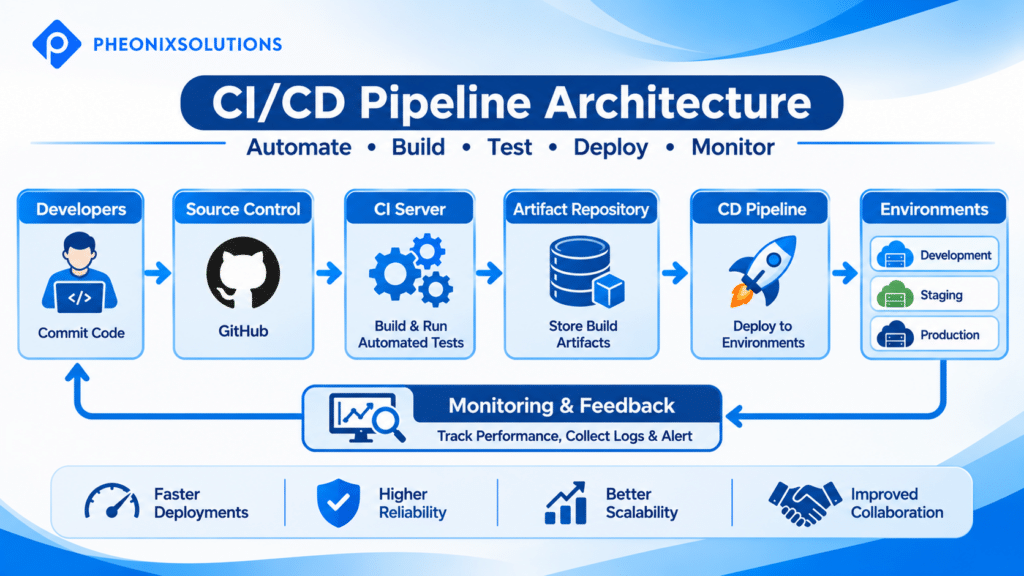
A typical CI/CD architecture includes the following components:
1. Source Code Management
Source code management systems provide a central location for developers to store, track, and collaborate on application code.
Common platforms include GitHub, GitLab, and Bitbucket.
Developers create branches, commit changes, and submit pull requests. When a configured event occurs, such as a push or pull request, it triggers the CI/CD workflow.
2. CI Server and Build Automation
The CI server receives repository events and executes the configured pipeline.
It performs tasks such as:
- Checking out the latest source code.
- Installing project dependencies.
- Compiling or building the application.
- Running automated tests.
- Reporting build and test results.
Popular CI/CD platforms include Jenkins, GitHub Actions, GitLab CI/CD, and CircleCI.
3. Automated Testing
Automated testing verifies that code changes meet the required quality standards before deployment.
Common testing stages include:
- Unit testing to validate individual functions and components.
- Integration testing to check interactions between application modules.
- Functional testing to verify application behaviour.
- Security testing to identify vulnerabilities.
- End-to-end testing to validate complete user workflows.
Failed tests should stop the pipeline from progressing to subsequent stages.
4. Artifact Repository
After a successful build, the pipeline generates deployable artifacts such as application packages, container images, or compiled files.
An artifact repository stores these outputs so they can be versioned, retrieved, and deployed consistently.
Examples include Docker Hub, Amazon Elastic Container Registry (ECR), and JFrog Artifactory.
5. Deployment Automation
The deployment stage transfers the validated application artifact to the required environment.
A typical workflow includes:
- Deploying to a development or testing environment.
- Promoting the release to staging.
- Performing deployment validation.
- Releasing the application to production after the required checks or approvals.
Deployment automation reduces manual intervention and helps maintain consistency between environments.
6. Monitoring and Feedback
Monitoring provides visibility into application performance and deployment health after release.
Teams can monitor:
- Application availability and response times.
- CPU, memory, and disk utilization.
- Application and infrastructure logs.
- Error rates and failed requests.
- Deployment status and service health.
Monitoring tools provide feedback that helps teams identify problems and improve future releases.
How Does a CI/CD Pipeline Work?
A typical CI/CD pipeline follows a sequence of automated stages.
Step 1: Developers Commit Code to a Repository
Developers make application changes and push their commits to a shared Git repository.
For example, a developer pushes changes to a GitHub repository. A configured event triggers the CI/CD workflow.
Step 2: Trigger the CI Pipeline
The CI platform detects the repository event and starts the configured workflow.
The pipeline checks out the latest source code and prepares the build environment.
Step 3: Build the Application
The build stage installs dependencies, compiles the source code where necessary, and generates the application package.
If the build fails, the pipeline reports the error and stops further execution.
Step 4: Execute Automated Tests
The pipeline runs configured unit, integration, functional, and security tests.
Only changes that pass the required checks should proceed to the next stage.
Step 5: Store the Build Artifacts
The successfully generated application package or container image is stored in an artifact repository.
Versioning artifacts helps teams identify and deploy the correct application release.
Step 6: Deploy to Staging and Production
The deployment pipeline retrieves the validated artifact and deploys it to the staging environment.
After successful validation and any required approval, the release is promoted to production.
Depending on the deployment strategy, teams can use rolling, blue-green, or canary deployments to reduce release risks.
Step 7: Get Expert Support for CI/CD Implementation
Designing a reliable CI/CD pipeline requires the right combination of source control, build automation, testing, infrastructure, deployment, and monitoring.
Pheonix Solutions can help organizations establish and improve their software delivery workflows through:
- CI/CD implementation: Design automated build, test, and deployment workflows using suitable tools and platforms.
- DevOps and cloud infrastructure: DevOps and cloud services for cloud infrastructure configuration, deployment automation, and environment management.
- Application development: Web development services to support application development and integration requirements.
- Ongoing maintenance: Software maintenance and support to maintain deployment reliability and address application and infrastructure issues.
Discuss your CI/CD requirements with our team to identify an appropriate implementation approach.
Step 8: Monitor the Application and Collect Feedback
After deployment, monitoring tools track application health, infrastructure utilization, and errors.
If an issue occurs, the team investigates the problem, applies the necessary correction, and commits the updated code. This starts another pipeline execution and continues the delivery cycle.
CI/CD Pipeline Architecture: Best Practices
Consider the following practices when designing and maintaining a CI/CD pipeline.
Automate Repetitive Tasks
Automate builds, testing, deployment, and validation wherever practical. This reduces manual work and makes releases more consistent.
Maintain Separate Environments
Use separate development, staging, and production environments to validate application changes before releasing them to users.
Keep environment configurations consistent while managing environment-specific settings securely.
Secure Pipeline Credentials
Store API keys, deployment credentials, and other sensitive values in an approved secrets management system or the CI/CD platform’s secure secrets store.
Avoid hardcoding credentials in source code, configuration files, or pipeline logs.
Implement Automated Quality Checks
Include code quality analysis, dependency scanning, automated tests, and security checks in the pipeline.
Configure appropriate quality gates to prevent unsuccessful builds from reaching production.
Use Versioned Build Artifacts
Build the application once and promote the same validated artifact across environments whenever possible.
This reduces inconsistencies caused by rebuilding the application separately for staging and production.
Implement Rollback Procedures
Maintain a reliable rollback strategy so teams can restore a previous stable release when a deployment causes unexpected issues.
Test recovery procedures rather than relying on assumptions.
Monitor Pipeline and Application Health
Track pipeline execution times, build failures, deployment status, application errors, and infrastructure metrics.
Use alerts to notify the responsible teams when critical thresholds or failures occur.
Benefits of CI/CD Pipeline Architecture
A properly implemented CI/CD pipeline provides several advantages:
- Faster software releases: Automated workflows reduce the time required to build, test, and deploy applications.
- Improved software quality: Automated testing helps identify defects earlier in the development lifecycle.
- Reduced deployment errors: Repeatable deployment processes minimize manual configuration mistakes.
- Better team collaboration: Developers and operations teams work through a shared delivery workflow.
- Consistent releases: Versioned artifacts and standardized environments improve deployment consistency.
- Improved visibility: Pipeline logs, test reports, and monitoring provide insight into software delivery activities.
Conclusion
CI/CD pipeline architecture is an important part of modern software development and DevOps practices. By connecting source code management, automated builds, testing, artifact storage, deployment, and monitoring, organizations can establish a reliable and repeatable software delivery process.
The right architecture depends on application requirements, infrastructure, team workflows, security needs, and deployment frequency. Selecting suitable tools and implementing appropriate automation, quality checks, and monitoring practices can help organizations improve release efficiency while maintaining application stability.
Frequently Asked Questions
1. What are the main components of CI/CD pipeline architecture?
The main components include source code management, CI server, build automation, automated testing, artifact repository, deployment automation, and monitoring.
2. What is the difference between Continuous Delivery and Continuous Deployment?
Continuous Delivery prepares tested application changes for release, generally with a manual approval before production deployment. Continuous Deployment automatically releases every change that passes the configured pipeline checks.
3. Which tools are commonly used to build CI/CD pipelines?
Common tools include Jenkins, GitHub Actions, GitLab CI/CD, CircleCI, Docker, Kubernetes, and artifact repositories such as JFrog Artifactory.
4. Why is automated testing important in a CI/CD pipeline?
Automated testing helps identify defects, integration problems, and security issues before deployment. It also reduces the need for repetitive manual testing.
5. How can CI/CD pipeline failures be handled?
Teams can configure pipeline notifications, inspect build and test logs, identify the failing stage, correct the underlying issue, and rerun the workflow. Rollback procedures can help restore a stable release if a production deployment fails.
Related Articles
Automating Application Deployment with Webhooks
Implementing GitOps with Argo CD: Installation and Initial Deployment
Talk to DevOps Experts
Building a dependable CI/CD pipeline involves more than selecting an automation tool. It requires a well-planned architecture that connects application development, infrastructure, security, deployment, and monitoring.
Pheonix Solutions provides DevOps and cloud services to help organizations automate software delivery, manage cloud infrastructure, and improve deployment workflows.
Whether you are implementing CI/CD for a new application or optimizing an existing pipeline, our team can help you evaluate your requirements and plan an appropriate solution.
Need Assistance?
Need help designing a CI/CD pipeline, automating application deployments, or configuring your DevOps infrastructure?
The technical team at Pheonix Solutions can assist with CI/CD implementation, cloud infrastructure management, deployment automation, and ongoing software support.
For assistance, contact us.