
Introduction
Before you upgrade ArgoCD, plan the change carefully to avoid disruptions to your GitOps workflows. Back up your ArgoCD configuration and Kubernetes resources, review the release notes for breaking changes, and document any custom changes you made to the installation manifests.
This guide shows how to upgrade ArgoCD (officially written Argo CD) from version 3.1.8 to 3.5.8 using Kubernetes server-side apply. It covers the backup, the updated installation manifest and the checks that confirm every component is running afterward.
Warning: Always take a backup before you upgrade ArgoCD. The
--force-conflictsflag lets the new manifest take ownership of conflicting fields, so custom changes to fields the manifests manage, such as affinity, environment variables and probes, may be overwritten. Record any customizations you need before you start.
This procedure applies to manifest-based installations. If you installed ArgoCD with Helm, use helm upgrade instead. You may also need to log in again after the ArgoCD server restarts.
Prerequisites
Before you upgrade ArgoCD, confirm the following:
- Access:
kubectlworks against the cluster, with permission to change theargocdnamespace and its CRDs - Kubernetes version: ArgoCD 3.5 is tested on Kubernetes v1.33 to v1.36. If your cluster is older, upgrade Kubernetes first
- Install method: this guide covers the standard
install.yaml(non-HA) install. For an HA install, usemanifests/ha/install.yaml, and for a Helm install, usehelm upgrade - Upgrade notes: read the notes for every minor version between yours and the target, for example 3.1 to 3.2, 3.2 to 3.3, 3.3 to 3.4 and 3.4 to 3.5
- Customizations: list any edits you made to the ArgoCD Deployments, StatefulSet, Services or ConfigMaps
- Network and firewall: the nodes can pull images from
quay.io,ghcr.ioandpublic.ecr.aws, and your workstation can reachraw.githubusercontent.com - Service check: all ArgoCD pods are
Runningand all applications areSyncedbefore you begin
ArgoCD Architecture Before You Upgrade
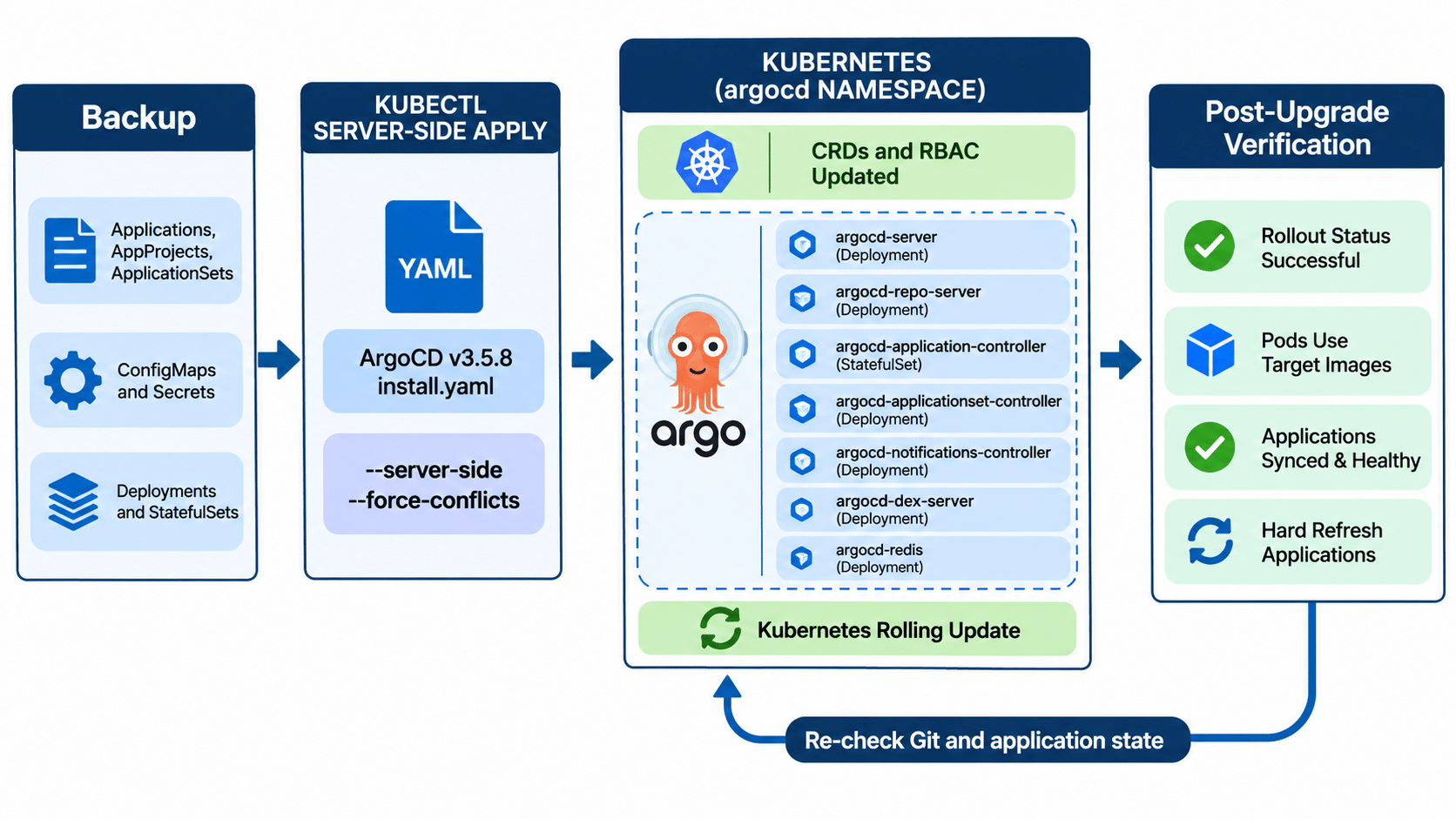
All components live in the argocd namespace, and one manifest updates them all when you upgrade ArgoCD:
argocd-server: the API server and web UIargocd-repo-server: clones Git repositories and renders manifests (plain YAML, Helm, Kustomize)argocd-application-controller: a StatefulSet that compares live cluster state with Git and runs syncsargocd-applicationset-controller: generates Applications from ApplicationSet templatesargocd-notifications-controller: sends alerts about application eventsargocd-dex-server: handles single sign-onargocd-redis: caches state for the other components
The upgrade workflow:
- You export applications, projects and configuration as a backup
kubectl apply --server-sideupdates the CRDs, RBAC and workloads from one manifest- Kubernetes rolls each Deployment and the StatefulSet to the new image
- ArgoCD re-reads Git and re-checks every application, and your Application resources are not deleted
The image below shows the workflow. For release-specific changes, see the official ArgoCD upgrade overview and the 3.4 to 3.5 upgrade notes.
How to Upgrade ArgoCD Step by Step
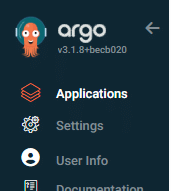
Step 1: Check the Current Version and Cluster Health
Before you upgrade ArgoCD, record what you run today, and confirm the cluster is healthy.
kubectl -n argocd get deploy argocd-server -o jsonpath='{.spec.template.spec.containers[0].image}'; echo
kubectl get nodes
kubectl -n argocd get pods
kubectl get applications.argoproj.io -A
All nodes should be Ready, all pods Running, and the applications Synced.
Step 2: Back Up ArgoCD
Export the ArgoCD resources and configuration. The configuration backup contains secrets, so store it encrypted and never commit it to Git.
kubectl get applications.argoproj.io,appprojects.argoproj.io,applicationsets.argoproj.io -n argocd -o yaml > argocd-apps-backup.yaml
kubectl get cm,secret -n argocd -o yaml > argocd-config-backup.yaml
kubectl get deploy,statefulset -n argocd -o yaml > argocd-workloads-backup.yaml
If your cluster runs on virtual machines, also take a VM or etcd snapshot. That snapshot is your real rollback.
Step 3: Choose the Target Version
Pick the release you want to upgrade ArgoCD to from the ArgoCD releases page on GitHub, and set it as a variable. We used v3.5.8, the latest 3.5 patch on the day we tested.
export TARGET=v3.5.8
echo $TARGET
Step 4: Apply the New Manifest with Server-Side Apply
Run the command below to upgrade ArgoCD in place. For an HA install, use manifests/ha/install.yaml instead of manifests/install.yaml.
kubectl apply -n argocd --server-side --force-conflicts -f https://raw.githubusercontent.com/argoproj/argo-cd/$TARGET/manifests/install.yaml
--server-sideis required because the ApplicationSet CRD is too large for client-side apply--force-conflictslets the server take ownership of fields thatkubectlmanaged before. It also overwrites manual edits to those fields, so reapply your recorded customizations afterwards
Step 5: Wait for the Rollout
kubectl rollout status deploy/argocd-server -n argocd
kubectl rollout status deploy/argocd-repo-server -n argocd
kubectl rollout status deploy/argocd-applicationset-controller -n argocd
kubectl rollout status deploy/argocd-notifications-controller -n argocd
kubectl rollout status deploy/argocd-dex-server -n argocd
kubectl rollout status deploy/argocd-redis -n argocd
kubectl rollout status statefulset/argocd-application-controller -n argocd
Each command ends with a message saying the rollout completed successfully.
Step 6: Verify the Upgrade
After you upgrade ArgoCD, check that every component runs the new image.
kubectl -n argocd get pods -o custom-columns=NAME:.metadata.name,IMAGE:.spec.containers[*].image
kubectl get applications.argoproj.io -A
kubectl -n argocd logs deploy/argocd-repo-server --tail=20
What you should see:
- The server, repo server, application controller, ApplicationSet controller and notifications controller all use
quay.io/argoproj/argocd:v3.5.8 - Dex and Redis keep their own image tags (in our test, Dex v2.45.1 and Redis 8.2.3-alpine)
- Every application is still
SyncedandHealthy - The logs show normal activity with no repeating errors
Step 7: Refresh Your Applications
Force a hard refresh so every application is compared again with the new version. Replace guestbook with your own application names.
kubectl annotate application guestbook -n argocd argocd.argoproj.io/refresh=hard --overwrite
kubectl get applications.argoproj.io -A
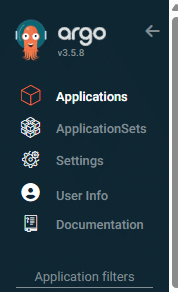
Then sign in to the web UI again and confirm the new version in the sidebar. Optionally, update the argocd CLI to the same version, using the method you used to install it.
Troubleshooting
If something fails while you upgrade ArgoCD, match the message below.
The ApplicationSet CRD Is Invalid: Too Long
The CustomResourceDefinition "applicationsets.argoproj.io" is invalid: metadata.annotations: Too long: may not be more than 262144 bytes
A plain kubectl apply stores the whole object in an annotation, and the ApplicationSet CRD exceeds that limit. The apply does not stop at the first error, so in our test most other resources were already updated before it failed. Rerun the full Step 4 command with --server-side --force-conflicts, then repeat Step 6.
Session Token Expired
rpc error: code = Unauthenticated desc = invalid session: token has invalid claims: token is expired
Your argocd CLI session has expired, which also happens after the server restarts. Log in again with argocd login and your server address.
Warning About gRPC Web
Failed to invoke grpc call. Use flag --grpc-web in grpc calls. To avoid this warning message, use flag --grpc-web.
This appears when the server is reached through a proxy or port-forward that does not pass native gRPC. Add --grpc-web to your argocd commands.
Application Health Looks Blank After the Restart
Right after the rollout, the per-resource Health column was briefly empty in our test, while the overall application status was Healthy. A hard refresh (Step 7) filled it in. Wait a minute and refresh before you assume something is wrong.
Pods Stuck in ImagePullBackOff
The node cannot pull the image. Run the command below and check the Events section for errors. Also, verify that the nodes can reach quay.io, ghcr.io, and public.ecr.aws. Once connectivity is confirmed and the issue is resolved, rerun the Step 5 commands.
kubectl -n argocd describe pod <pod-name>
Rolling Back
We did not test an in-place rollback, and applying an older manifest over upgraded CRDs is not a verified path. Restore your VM, etcd or cluster snapshot, or restore the Step 2 backups into a fresh namespace. Decide on your rollback plan before you start.
Conclusion
You can upgrade ArgoCD with a handful of kubectl commands: back up, apply the target manifest with --server-side --force-conflicts, wait for the rollouts, and verify the images and application health. The step that most often catches people is the ApplicationSet CRD error, and the fix is the server-side flag. For production, take a snapshot, check your Kubernetes version against the release’s tested range, and read the notes for each minor version you skip.
Frequently Asked Questions
Can I upgrade ArgoCD from 3.1 straight to 3.5?
We did it in one step on a lab cluster with a single Git-backed application, and it worked. The official notes still ask you to read the changes for every minor version in between. For production, take a snapshot first, or move one minor version at a time and verify after each hop.
Why do I need –server-side and –force-conflicts?
Since ArgoCD 3.3 the ApplicationSet CRD is too large for client-side apply, which stores the whole object in an annotation. Server-side apply avoids that limit, and --force-conflicts lets it take ownership of fields that kubectl managed earlier.
Will I lose my applications when I upgrade ArgoCD?
No. Application and AppProject resources stay in the cluster. In our test the guestbook application remained Synced and Healthy, and a manual sync reported its resources as unchanged.
What if I installed ArgoCD with Helm?
Use helm upgrade with the chart version that ships the target ArgoCD release, and review your values first. Do not apply the raw manifest over a Helm release.
Do I need to update the argocd CLI?
It is not required, but keeping the CLI on the same version as the server avoids confusing mismatches. Install it the same way you installed it originally.
Related Articles
Implementing GitOps with Argo CD: Installation and Initial Deployment
Kubernetes Cost Optimization: Best Practices and Implementation Checklist
Talk to Our Technology Experts
Upgrading GitOps tooling without breaking live deployments takes careful planning, backups, and version checks. At Pheonix Solutions, our team helps businesses manage Kubernetes clusters, automate CI/CD pipelines, plan safe upgrades, and maintain reliable GitOps environments.
We can help you with:
- DevOps and cloud services for Kubernetes management, ArgoCD installation and upgrades, GitOps workflows, and cloud automation.
- Software maintenance and support to plan backups, monitor application health, and troubleshoot issues after upgrades.
- Security services to secure cluster access, manage secrets safely, and review RBAC and authentication settings.
Need help planning an ArgoCD upgrade, managing Kubernetes clusters, or building GitOps pipelines for production? Talk to our DevOps and Cloud experts to discuss your requirements.