
Introduction
Mobile app development is now one of the best investments a business can make. People spend most of their phone time inside apps, not mobile browsers, so a well-built app keeps your brand one tap away from your customers.
In this mobile app development guide for businesses, the team at Pheonix Solutions walks you through the full process, step by step, from the first idea to launch day and beyond.
Key points you’ll learn:
- The 8-step mobile app development process used by professional teams.
- How to choose between native, Flutter, React Native and PWA development.
- Realistic costs and timelines for business apps in 2026.
- The security, launch and growth practices that keep an app successful.
On This Page
Why Mobile App Development Matters for Businesses
A good app does more than sit on a home screen. With the right mobile app development strategy, a business can:
- Improve customer loyalty with push notifications, rewards and personalized offers.
- Increase sales through faster, one-tap checkouts.
- Automate operations such as bookings, field-staff tracking and inventory.
- Collect useful data about how customers use its products and services.
Mobile app development is the process of creating software that runs on smartphones and tablets, mainly on Android and iOS. It covers strategy, UI/UX design, coding, backend and API work, testing, publishing to the app stores and ongoing maintenance. There are three main types of apps:
- Native apps: built separately for each platform (Kotlin for Android, Swift for iOS).
- Cross-platform apps: one codebase for both platforms, using frameworks like Flutter or React Native.
- Progressive Web Apps (PWAs): websites that behave like apps and can be installed from the browser.
Prerequisites
Before you start mobile app development, have these ready:
- A clear business goal: the problem the app solves and how you’ll measure success (downloads, sales, bookings or time saved).
- A budget range and a target launch date, even if they’re rough.
- Target platforms: Android, iOS or both.
- Brand assets: logo, colors, fonts and any existing website content.
- Developer accounts: a Google Play Console account (one-time registration fee) and an Apple Developer Program membership (yearly fee) to publish the app.
- A product owner on your side who can review designs and builds every week.
- A list of integrations the app needs, such as your CRM, ERP, payment provider, booking system or existing website.
- Content and data: product lists, prices, help text, legal pages and a privacy policy, so the team isn’t waiting on them later.
You don’t need everything perfect on day one. A short discovery workshop with your development partner can fill the gaps and turn rough ideas into a clear plan.
The Mobile App Development Process: 8 Proven Steps
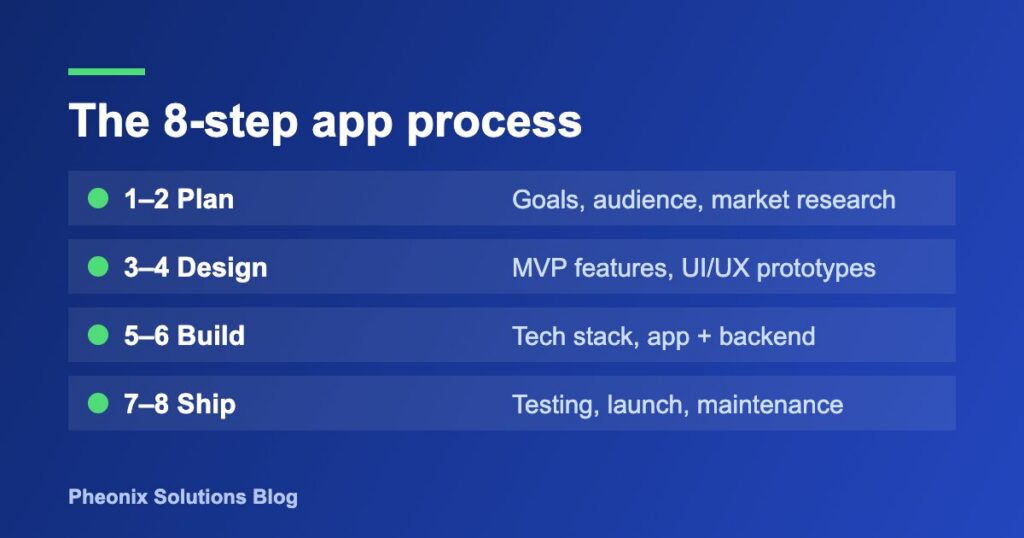
1. Define Your Goals and Audience
Start every mobile app development project by answering three questions: What problem does the app solve? Who will use it? How will you measure success? Write these answers down before any design work begins.
2. Research the Market
Study similar apps on Google Play and the App Store. Read their reviews to learn what users love and what frustrates them. This research shapes your feature list and helps your app stand out.
3. Plan Features and Create an MVP
List every feature, then cut it down to a Minimum Viable Product (MVP), the smallest version that delivers real value. An MVP keeps mobile app development costs low and gets you real user feedback faster.
4. Design the UI/UX
Good design makes an app feel effortless. Designers create wireframes, then clickable prototypes in tools like Figma. Follow Google’s Material Design and Apple’s Human Interface Guidelines so the app feels familiar on each platform.
5. Choose the Right Technology Stack
This is one of the biggest decisions in mobile app development. Compare the options below.
| Approach | Best for | Pros | Cons |
|---|---|---|---|
| Native (Kotlin / Swift) | High-performance, hardware-heavy apps | Best speed and full device access | Two codebases, higher cost |
| Flutter | Most business apps | One codebase, fast UI, near-native speed | Larger app size |
| React Native | Teams with JavaScript skills | Large community, code sharing with web | Some native modules needed |
| PWA | Simple content or catalog apps | Lowest cost, no app store needed | Limited device features |
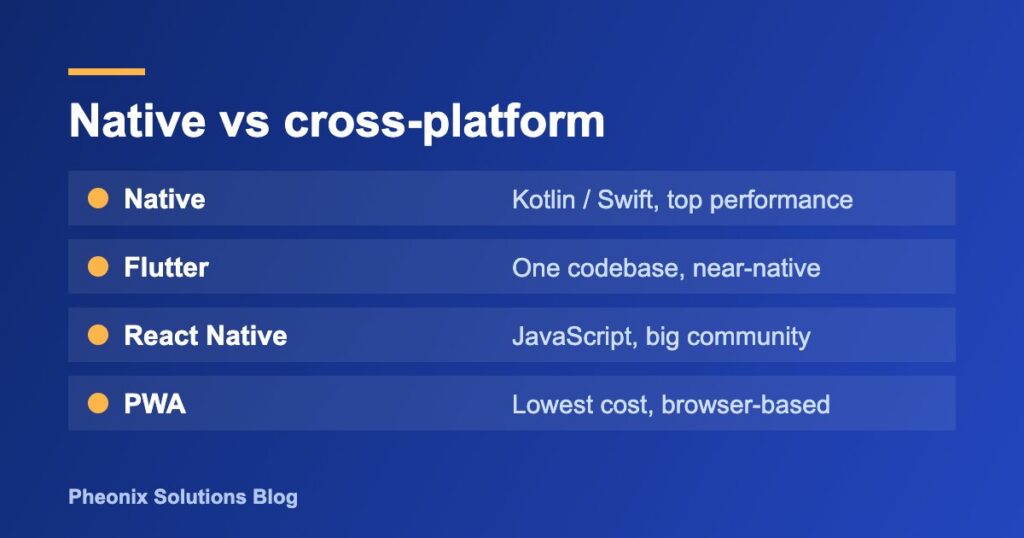
For most startups and SMEs, Flutter offers the best balance of speed, cost and quality. If your team prefers Kotlin, read our guide to Kotlin Multiplatform for iOS and Android apps.
6. Develop the App and Backend
Developers build the front end, plus the backend that powers it: databases, APIs, user login, payments and notifications. Our DevOps and cloud team usually sets up scalable hosting for the backend at this stage. Agile sprints of one to two weeks keep progress visible, and you get a working build to review after every sprint.
7. Test Thoroughly
Quality assurance is a key stage of mobile app development. Test for:
- Functionality: every feature works as expected.
- Performance: fast load times and smooth scrolling.
- Compatibility: different screen sizes and OS versions.
- Security: safe data storage and encrypted API calls.
- Usability: real users can complete tasks without help.
8. Launch and Maintain
Publish the app to Google Play and the Apple App Store with strong screenshots, keywords and a clear description (this is App Store Optimization, or ASO). After launch, track crashes and reviews, and release regular updates. A software maintenance and support plan keeps the app compatible with every new Android and iOS release.
Must-Have Features of a Successful Mobile App
Every mobile app development project is different, but the most successful apps share a few core features. Plan for these early so they don’t become expensive add-ons later.
- Simple onboarding: let users sign up in seconds with email, phone number, Google or Apple sign-in.
- Fast performance: screens should load in under two seconds. Users quickly uninstall apps that feel slow.
- Offline support: cache important data so the app still works with a weak connection.
- Push notifications: send timely, relevant messages such as order updates and reminders. Keep them useful, not noisy.
- In-app search: help users find products, content or settings quickly.
- Secure payments: integrate trusted payment gateways such as Apple Pay or Google Pay.
- Analytics: track screens, events and funnels with tools like Firebase Analytics.
- Feedback and support: an in-app chat, help center or “report a problem” button builds trust and surfaces bugs early.
Prioritize features with your MVP in mind. Start with what solves your users’ main problem, then add the rest in later releases based on real usage data.
Native vs Cross-Platform Apps: Which Should You Choose?
This choice affects your budget, timeline and app quality more than almost any other decision in mobile app development.
Choose native development if:
- Your app depends heavily on device hardware such as the camera, Bluetooth, sensors or AR.
- You need the highest possible performance, for example in games or video editing apps.
- You have the budget and team to maintain two separate codebases.
Choose cross-platform development if:
- You want to launch on Android and iOS at the same time.
- Your budget or timeline is limited.
- Your app is mainly forms, lists, dashboards, e-commerce or content, which covers most business apps.
Frameworks like Flutter and React Native have matured a lot. In 2026, most users can’t tell the difference between a well-built cross-platform app and a native one, so cross-platform mobile app development is now the default choice for startups, SMEs and many enterprise teams. You can still add native modules later for any feature that needs them.
Popular Mobile App Development Tools in 2026
The right tools make mobile app development faster and more reliable. Here are the ones our developers use most often:
- Android Studio: the official IDE for Android, with emulators, profilers and layout tools.
- Xcode: Apple’s IDE for building, testing and submitting iOS apps.
- Flutter and Dart: Google’s UI toolkit for building cross-platform apps from one codebase.
- React Native: a framework for building apps with JavaScript or TypeScript.
- Firebase: authentication, databases, push notifications, crash reporting and analytics. See our guide to Firebase in Android Studio.
- Figma: collaborative UI/UX design and prototyping.
- Postman: testing and documenting the APIs your app depends on.
- Git with CI/CD pipelines: version control, code reviews and automatic builds and tests for every change.
You don’t need every tool on day one. Pick the ones that match your technology stack and team size, and add more as your app grows.
Mobile App Security Best Practices
Users trust your app with personal data, so security must be part of mobile app development from day one, not an afterthought.
- Encrypt data both in transit (HTTPS/TLS) and at rest on the device.
- Use secure authentication with tokens (OAuth 2.0 or JWT), and add biometric login where it makes sense.
- Never hard-code secrets like API keys in the app. Keep them on the server.
- Validate everything on the server. Never trust data just because it came from your own app.
- Obfuscate your code to make reverse engineering harder.
- Keep libraries updated and remove packages you no longer use.
- Follow store and privacy rules such as Google Play’s Data safety section, Apple’s privacy labels and local data protection laws.
Regular security testing before major releases helps you catch problems before attackers do. Our security services can audit your app and backend.
Mobile App Development Cost and Timeline
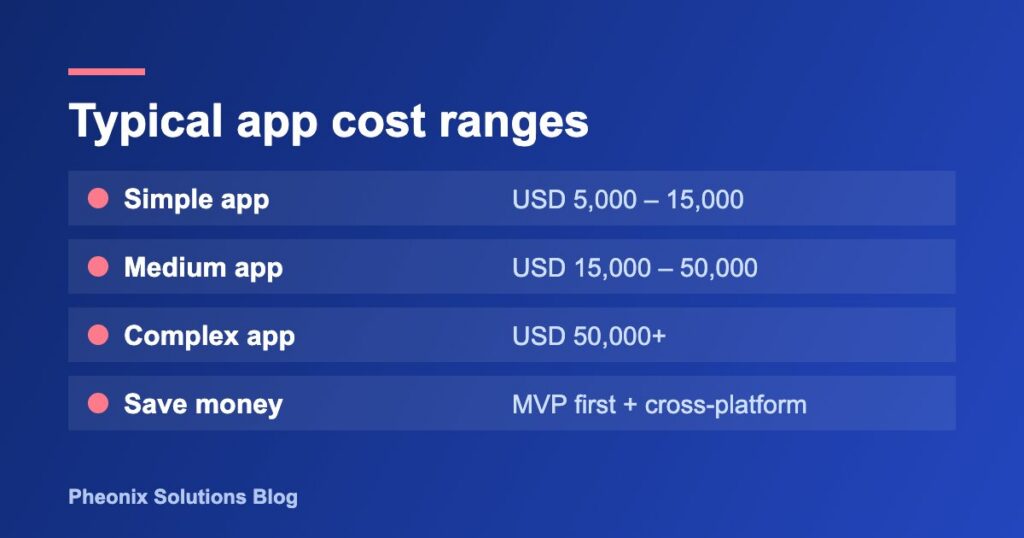
Mobile app development cost depends on complexity, platforms, design and integrations. Typical ranges:
- Simple app (few screens, no backend): USD 5,000–15,000
- Medium app (login, APIs, payments): USD 15,000–50,000
- Complex app (real-time features, AI, custom backend): USD 50,000+
A typical timeline for a medium-sized business app looks like this:
| Phase | Typical duration | Main outputs |
|---|---|---|
| Discovery and planning | 2–3 weeks | Goals, user personas, feature list, project plan |
| UI/UX design | 3–5 weeks | Wireframes, visual design, clickable prototype |
| Development | 8–16 weeks | App front end, backend, APIs, integrations |
| Testing and QA | 2–4 weeks | Bug fixes, performance and security checks |
| Launch | 1–2 weeks | Store listings, review approval, release |
Choosing cross-platform development and starting with an MVP are the two easiest ways to reduce both cost and time.
How to Monetize Your Mobile App
If your app isn’t a free companion to an existing business, you’ll need a clear revenue model. Decide this early, because it affects design and features.
- Freemium: the core app is free, and users pay to unlock premium features.
- Subscriptions: monthly or yearly plans for content, fitness, productivity and SaaS apps.
- In-app purchases: one-time purchases of digital items, credits or upgrades.
- Advertising: show ads to free users. This works best for apps with a very large audience.
- Commission or transaction fees: common in marketplace and booking apps.
Many successful apps combine two models, such as freemium plus subscriptions.
Common Mobile App Development Mistakes to Avoid
Even experienced teams fall into these traps. Avoiding them can save months of work and a large part of your budget.
- Skipping research: building an app nobody needs is the most expensive mistake of all.
- Too many features in version one: a bloated first release takes longer, costs more and confuses users.
- Ignoring UX: a confusing interface leads to poor reviews and uninstalls, even when the app works.
- Weak backend planning: an app that works for 100 users may crash with 10,000. Design APIs and databases to scale.
- Too little testing: test on real devices, not just emulators, and cover older phones and slow networks.
- No post-launch plan: launch is the start, not the finish. Budget for updates, support and marketing.
- Forgetting App Store Optimization: without good keywords, screenshots and reviews, even a great app stays invisible.
Mobile App Development Trends in 2026
Keeping up with trends helps your app stay competitive for longer. These are the trends shaping mobile app development this year:
- AI-powered features: chat assistants, smart search, recommendations and personalization are now expected in many business apps.
- On-device AI: more processing happens on the phone itself, which makes apps faster and keeps personal data private.
- Super apps and mini-apps: businesses bundle several services, such as payments, bookings and support, inside one app.
- 5G and real-time experiences: live video, multiplayer features and instant data sync are easier to deliver.
- Stronger privacy expectations: clear consent screens, minimal data collection and transparent privacy labels build user trust.
- Wearables and foldables: layouts must adapt to smartwatches, foldable phones and tablets.
- Low-code for internal tools: simple internal apps are increasingly built faster with low-code platforms, while customer-facing apps still benefit from custom development.
You don’t need to adopt every trend. Choose the ones that solve a real problem for your users and fit your product roadmap.
After Launch: Growing Your App
Publishing your app is only the first milestone. Growth comes from steady marketing and improvement.
- Optimize your store listing with your main keywords, clear screenshots and a short preview video.
- Ask for reviews at the right moment, for example after a user completes a task successfully.
- Promote across your channels: your website, email newsletter, social media and blog posts.
- Measure retention, not just installs. Track day-1, day-7 and day-30 retention to see whether users stay.
- Release updates regularly. Fresh features and fixes show users and the app stores that the app is actively maintained.
Conclusion
Successful mobile app development comes down to a few key points:
- Start with clear goals and a focused MVP instead of every feature at once.
- Choose the right stack: cross-platform (Flutter or React Native) suits most business apps, while native suits hardware-heavy apps.
- Build security and testing in from day one, not at the end.
- Plan for life after launch: ASO, analytics, updates and support.
Follow the eight steps in this mobile app development guide and you’ll avoid the most common and costly mistakes.
FAQs
1. How long does mobile app development take?
A simple MVP usually takes 2–3 months. A medium app takes 4–6 months, and complex apps can take 9 months or more.
2. How much does mobile app development cost in 2026?
Most business apps cost between USD 15,000 and 50,000. Simple MVPs can start around USD 5,000, while complex apps with custom backends and AI features can go well above USD 50,000.
3. Is Flutter good for mobile app development?
Yes. Flutter lets you build Android and iOS apps from one codebase with near-native performance, which makes it a popular choice for business apps.
4. Should I build for Android or iOS first?
Check where your target users are. Android has a larger global share, while iOS users often spend more in apps. Cross-platform development lets you launch on both at once.
5. Do I need to maintain my app after launch?
Yes. Plan for regular updates to support new OS versions, fix bugs, improve security and add features based on user feedback.
Related Articles
- Kotlin Multiplatform in 2026: Build iOS and Android Apps
- Building Your First Android App in Java with Android Studio
- Firebase in Android Studio
- Basics of Mobile Apps Using WebView
- How to Generate an APK in Android Studio
Official Documentation
- Android Developers: App Development Guide
- Apple Developer Documentation
- Flutter Documentation
- React Native: Get Started
- Google Play Console
- App Store Review Guidelines
Talk to Our Mobile App Experts
Planning an Android, iOS or Flutter app for your business? At Pheonix Solutions, our mobile app development team handles the full journey, from discovery and UI/UX design to backend development, testing, store launch and long-term support. You get a dedicated project manager, regular demos and full ownership of your source code.
Talk to our mobile app team for a free consultation on your app idea.