
Post Date:
Last Updated: November 16, 2026
Introduction
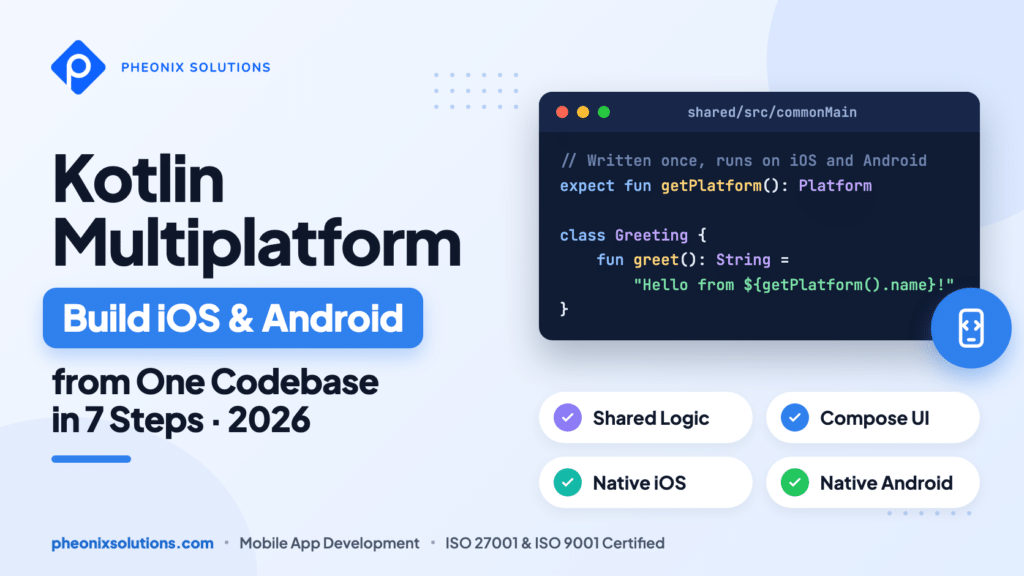
Kotlin Multiplatform lets you build iOS and Android apps from a single, shared Kotlin codebase while keeping a fully native experience on both platforms. Instead of writing every feature twice, once in Kotlin for Android and again in Swift for iOS, your team writes the business logic once and shares it across both apps.
In this guide, you will learn what Kotlin Multiplatform is, why it has become a practical choice for mobile teams in 2026, and how to build and run your first cross-platform app in 7 steps.
Key takeaways:
- One codebase, two platforms: share models, networking, and business logic between iOS and Android.
- Native where it counts: use
expectandactualdeclarations to call platform-specific APIs. - Shared UI is optional: keep native screens, or share the UI too with Compose Multiplatform.
- Adopt it gradually: you can add a shared module to an existing Android or iOS app.
At Pheonix Solutions, we use Kotlin Multiplatform to ship production apps for iOS and Android, so the steps below follow a real-world setup.
On This Page
Why Kotlin Multiplatform Matters in 2026
Most businesses need their app on both the App Store and Google Play. Building two separate native apps doubles the work: every feature, bug fix, and API change has to be written, tested, and released twice. Over time, the two apps also drift apart, and users on one platform get a different experience from users on the other.
Kotlin Multiplatform solves this by sharing the code that should be the same everywhere, such as data models, API calls, validation, and business rules, while letting each platform keep its own native UI and APIs where needed. Because Kotlin compiles to native code on iOS, there is no JavaScript bridge or extra runtime in between.
- Faster delivery: write a feature once and ship it to both platforms.
- Fewer bugs: one implementation of your business logic means one place to fix it.
- Consistent behaviour: iOS and Android users get the same rules and the same results.
- Native performance: shared code compiles to a native binary on iOS and runs as regular Kotlin on Android.
Prerequisites for Kotlin Multiplatform
Before you start, make sure you have the following ready:
- A Mac with macOS: required to build and run the iOS app. The Android app can be built on any operating system.
- IntelliJ IDEA or Android Studio (latest stable version) with the Kotlin Multiplatform IDE plugin installed.
- Xcode (latest stable version), opened at least once so it can install its additional components.
- JDK 17 or newer.
- An Android emulator or device, and an iOS simulator.
- Basic knowledge of Kotlin and Android or iOS development. If you are new to the language, start with our introduction to Kotlin.
7 Steps to Build iOS and Android Apps with Kotlin Multiplatform
Step 1: Create a Kotlin Multiplatform Project
Open IntelliJ IDEA or Android Studio and select File | New | Project. In the panel on the left, select Kotlin Multiplatform, then fill in the project details:
- Name: GreetingKMP
- Project ID: com.example.greetingkmp
- Targets: select Android and iOS, and choose Share UI for iOS.
Click Create. The first Gradle import takes a few minutes. When it finishes, open View | Tool Windows | Project Environment Preflight Checks and make sure every check is green.
Note: If you prefer to keep native UIs (Jetpack Compose on Android and SwiftUI on iOS), choose Do not share UI for iOS. The shared business logic works the same way in both setups. You can also generate the project in your browser with the Kotlin Multiplatform Wizard.
Step 2: Understand the Project Structure
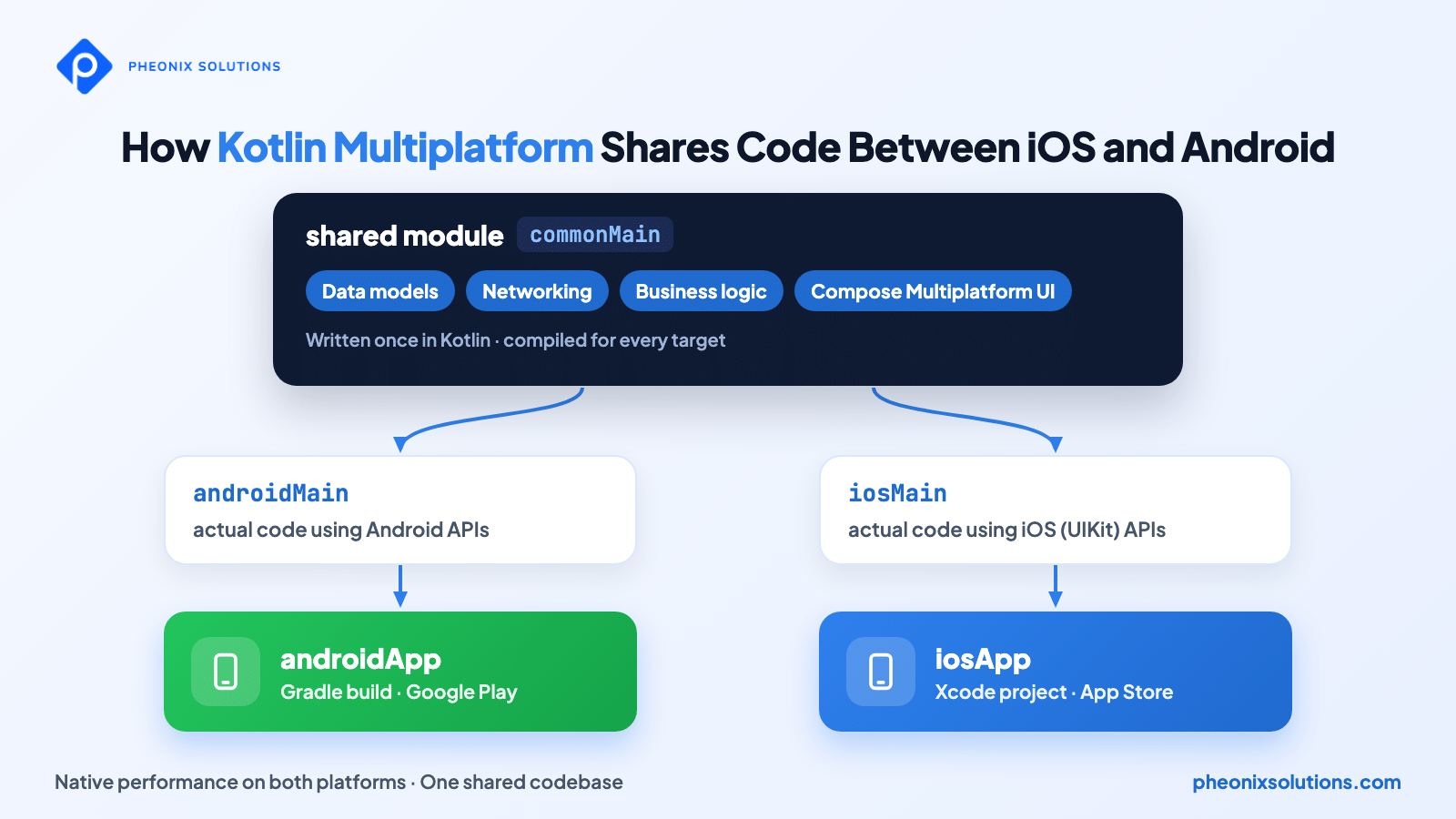
The wizard creates a separate app module for each platform and a shared module that holds the common code:
GreetingKMP/
├── androidApp/              # Android application (entry point)
├── iosApp/                  # Xcode project (iOS entry point)
├── shared/
│   └── src/
│       ├── commonMain/      # code shared by iOS and Android
│       ├── androidMain/     # Android-specific implementations
│       └── iosMain/         # iOS-specific implementations
└── gradle/
    └── libs.versions.toml   # dependency versions
Everything inside commonMain is compiled for both platforms. The androidMain and iosMain folders hold code that runs on only one platform. The iosApp folder is a regular Xcode project that builds the shared Kotlin code into an iOS framework.
Step 3: Add a Multiplatform Library
Multiplatform libraries work in shared code on every platform. For example, to work with dates and time zones, add kotlinx-datetime to the version catalog in gradle/libs.versions.toml:
[versions]
kotlinx-datetime = "0.8.0"

[libraries]
kotlinx-datetime = { module = "org.jetbrains.kotlinx:kotlinx-datetime", version.ref = "kotlinx-datetime" }
Then reference it in the commonMain source set of shared/build.gradle.kts:
kotlin {
    sourceSets {
        commonMain.dependencies {
            implementation(libs.kotlinx.datetime)
        }
    }
}
Note: After editing Gradle files, press Shift twice, search for Sync Project with Gradle Files, and run it. You declare the dependency only once in commonMain; the Kotlin Multiplatform Gradle plugin adds the right artifact for each platform automatically.
Step 4: Write Shared Business Logic
Code that both apps need goes in shared/src/commonMain/kotlin. This Greeting class uses the date library you just added, and it runs unchanged on iOS and Android:
import kotlin.time.Clock
import kotlinx.datetime.TimeZone
import kotlinx.datetime.toLocalDateTime

class Greeting {
    private val platform = getPlatform()

    fun greet(): String {
        val today = Clock.System.now()
            .toLocalDateTime(TimeZone.currentSystemDefault())
            .date
        return "Hello from ${platform.name}! Today is $today."
    }
}
Because this logic lives in one place, a bug fix or a new business rule here reaches both apps at the same time.
Step 5: Handle Platform Differences with expect and actual
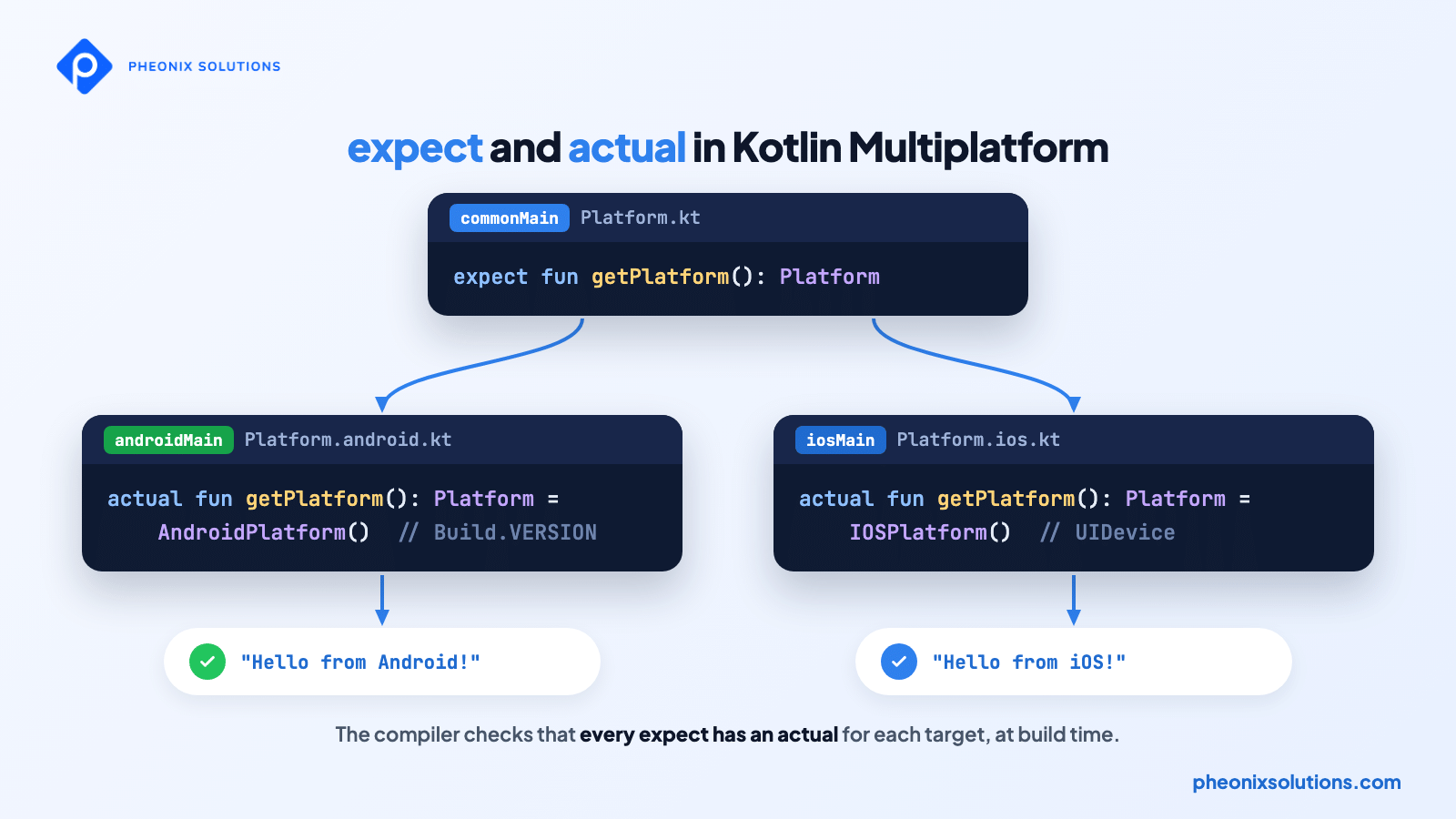
Sometimes shared code needs something only the platform can provide, such as the device name or OS version. Declare an expect function in commonMain, then provide an actual implementation for each platform:
// shared/src/commonMain/kotlin/Platform.kt
interface Platform {
    val name: String
}

expect fun getPlatform(): Platform
// shared/src/androidMain/kotlin/Platform.android.kt
import android.os.Build
class AndroidPlatform : Platform {
override val name: String = "Android ${Build.VERSION.SDK_INT}"
}
actual fun getPlatform(): Platform = AndroidPlatform()// shared/src/iosMain/kotlin/Platform.ios.kt
import platform.UIKit.UIDevice
class IOSPlatform : Platform {
override val name: String =
UIDevice.currentDevice.systemName() + " " + UIDevice.currentDevice.systemVersion
}
actual fun getPlatform(): Platform = IOSPlatform()The compiler checks that every expect declaration has a matching actual for each target, so a missing platform implementation is caught at build time instead of at runtime.
Planning an iOS and Android app and want to avoid building it twice? Our mobile team builds production apps with Kotlin Multiplatform, from architecture to App Store and Google Play release. Talk to our mobile app experts to scope your project.
Step 6: Share the UI with Compose Multiplatform
With Share UI selected, the screen itself is also written once in commonMain using Compose Multiplatform. Open App.kt in shared/src/commonMain/kotlin and replace the App() composable:
@Composable
fun App() {
    MaterialTheme {
        var message by remember { mutableStateOf("Tap the button") }

        Column(
            modifier = Modifier
                .safeContentPadding()
                .fillMaxSize(),
            horizontalAlignment = Alignment.CenterHorizontally,
        ) {
            Text(message)
            Button(onClick = { message = Greeting().greet() }) {
                Text("Say hello")
            }
        }
    }
}
Each platform’s entry point simply calls this shared App() composable: androidApp calls it from its activity, and iosApp displays it through a view controller. On Android, Compose Multiplatform calls translate directly into Jetpack Compose, so there is no extra overhead.
Note: Use the IDE’s quick-fix suggestions (Alt+Enter on Windows and Linux, Option+Return on macOS) to import missing symbols such as Column, Button, and remember.
Step 7: Run the App on Android and iOS
Select the androidApp run configuration and run it on an emulator or device. You can also build a debug APK from the terminal:
./gradlew :androidApp:assembleDebugFor iOS, select the iosApp run configuration in the IDE and choose a simulator, or open the iosApp folder in Xcode and click Run.
Note: Run Gradle commands from the project root. The first iOS build compiles the shared Kotlin code into a native framework and can take a few minutes; later builds are incremental and much faster. If a build fails, run the preflight checks from Step 1 again. To learn more about Android build output, see how to generate an APK in Android Studio.
Tap Say hello on both devices. The same Kotlin code produces the greeting on Android and iOS; only the platform name changes.
Output
// Android emulator
Hello from Android 36! Today is 2026-11-16.

// iOS simulator
Hello from iOS 26.1! Today is 2026-11-16.
The Android and iOS version numbers in the output depend on the emulator, simulator, or device you run the app on.
Conclusion
Kotlin Multiplatform lets you build iOS and Android apps from one shared Kotlin codebase without giving up native performance or platform APIs. In this guide, you created a project, added a multiplatform library, wrote shared logic, handled platform differences, shared the UI, and ran the app on both platforms.
- Write once, ship twice: keep your business logic in
commonMain. - Stay native where needed: use
expectandactualfor platform APIs. - Choose your UI strategy: share the UI with Compose Multiplatform, or keep SwiftUI and Jetpack Compose.
- Start small: share one module first, then expand as your team gains confidence.
FAQs
1. Is Kotlin Multiplatform ready for production apps in 2026?
Yes. Kotlin Multiplatform is stable and supported by both JetBrains and Google, and Compose Multiplatform is stable for sharing UI on iOS and Android. Many teams use it in production apps today.
2. Do I need a Mac to build a Kotlin Multiplatform app?
You need a Mac with Xcode to build and run the iOS app. You can develop the shared code and the Android app on Windows, Linux, or macOS.
3. Can I share the UI, or only the business logic?
Both. You can share only the business logic and keep native UIs in SwiftUI and Jetpack Compose, or share the UI as well with Compose Multiplatform.
4. How is Kotlin Multiplatform different from Flutter and React Native?
Kotlin Multiplatform compiles shared code to native binaries and gives you direct access to platform APIs. You can also adopt it gradually, sharing as much or as little code as you want, instead of rewriting the whole app.
5. Can I add Kotlin Multiplatform to an existing app?
Yes. You can add a shared module to an existing Android or iOS app and move logic into it step by step, without rewriting the app.
Related Articles
- Kotlin
- How to Create an Android Project Using Android Studio
- Building Your First Android App in Java with Android Studio
- 10 Critical Steps for Ensuring Robust Mobile App Testing
Official Documentation
- Get Started with Kotlin Multiplatform
- Expected and Actual Declarations
- Get Started with Compose Multiplatform
- Kotlin Multiplatform Wizard
Talk to Mobile App Experts
Choosing the right cross-platform approach early saves months of rework later. At Pheonix Solutions, our team designs, builds, and maintains iOS and Android apps with Kotlin Multiplatform for businesses of every size.
We can help you with:
- Mobile app development for iOS and Android with a shared Kotlin Multiplatform codebase.
- Moving an existing native app to Kotlin Multiplatform, one module at a time.
- Web development and backend APIs that power your mobile apps.
- Software maintenance and support for releases, updates, and monitoring.
Planning a new app for iOS and Android? Talk to our Kotlin Multiplatform experts and build it once, the right way.