Introduction
Kubernetes provides powerful capabilities for deploying, managing, and scaling containerized applications. However, as clusters grow, infrastructure costs can increase due to oversized CPU and memory requests, underutilized worker nodes, unnecessary replicas, persistent storage, network traffic, and insufficient cost monitoring.
A structured Kubernetes Cost Optimization process helps DevOps engineers, platform engineers, and cloud administrators identify these inefficiencies and reduce infrastructure spending without compromising application performance, reliability, or availability.
The goal is not simply to run fewer nodes or allocate fewer resources. It is to ensure that Kubernetes workloads use the right amount of compute, memory, storage, and networking resources based on actual demand.
This guide covers practical Kubernetes cost optimization steps, including resource right-sizing, autoscaling, node consolidation, storage management, workload scheduling, cost monitoring, and ongoing optimization.
Architecture Overview
The following diagram illustrates a typical Kubernetes cost optimization architecture. Monitoring and cost allocation identify waste, workload autoscaling adjusts application capacity, and node autoscaling adjusts infrastructure capacity.
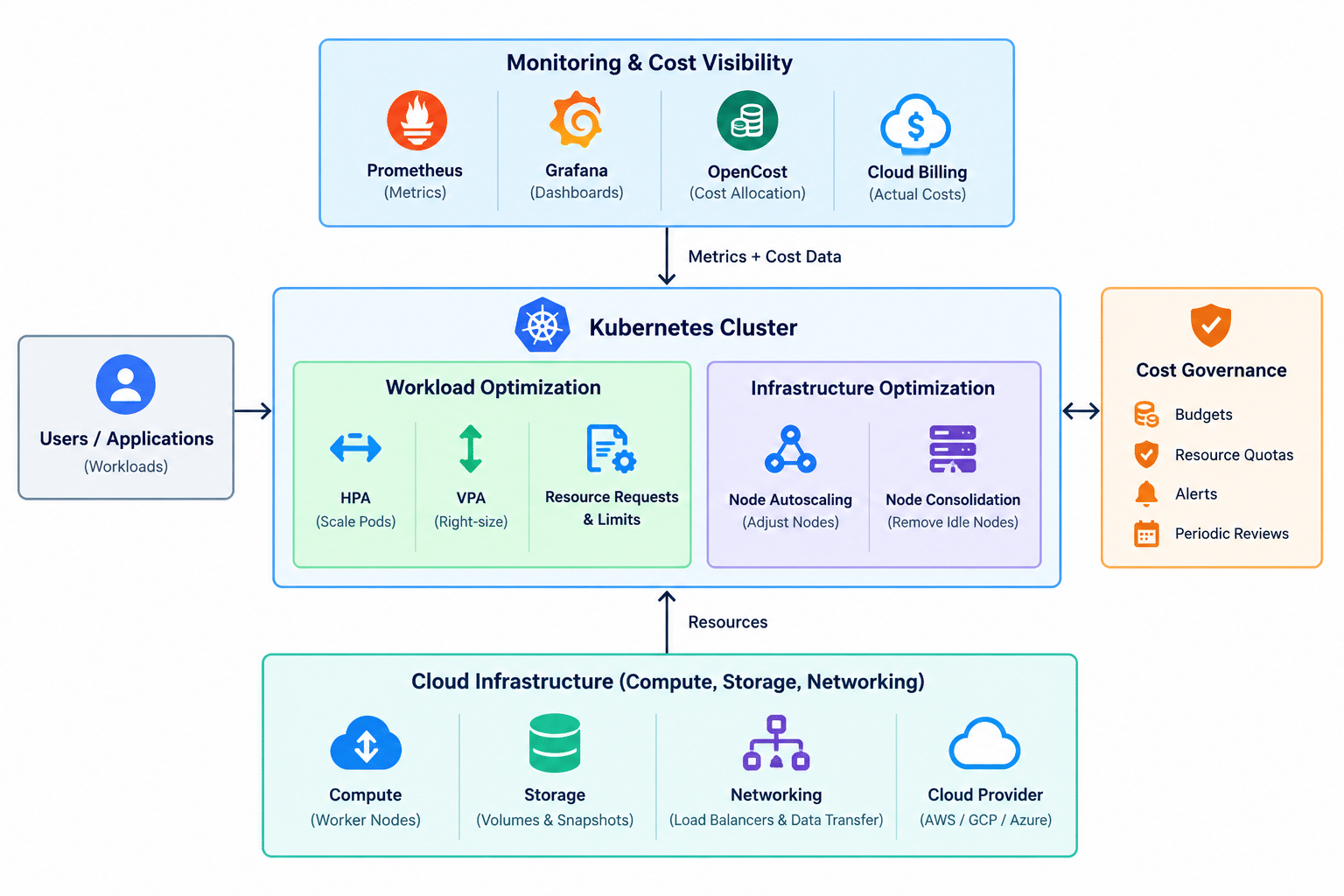
Conceptual architecture: the components and billing integrations vary by Kubernetes platform and cloud provider.
The key principle is to combine workload-level optimization with infrastructure-level optimization. Kubernetes autoscalers make decisions based on resource requests, scheduling constraints, and observed demand, so accurate resource configuration is essential to effective cost management.
Prerequisites
Before starting a Kubernetes cost optimization review, ensure that you have:
- Access to the Kubernetes cluster using
kubectlwith appropriate permissions. - Access to the cloud provider’s billing console or cost management reports.
- Visibility into CPU, memory, network, and storage utilization.
- Knowledge of the applications and workloads running in the cluster.
- Information about traffic patterns, peak workloads, and availability requirements.
- Access to deployment manifests, Helm charts, or GitOps configuration.
- An understanding of node pools, storage classes, persistent volumes, and load balancers.
- A baseline of current infrastructure spending to measure the impact of optimization.
For production environments, document existing performance and availability targets before making changes. Reducing resource allocations without validating application behavior can lead to throttling, memory pressure, restarts, or service degradation.
Implementation
1. Review Current Kubernetes Infrastructure Costs
Start by establishing a baseline of your current Kubernetes spending.
Review the costs associated with:
- Worker nodes and compute instances.
- Managed Kubernetes control-plane fees, where applicable.
- Persistent volumes, snapshots, and storage.
- Load balancers, NAT gateways, and network data transfer.
- Logging, monitoring, and metrics retention.
- Container registries and image storage.
- Development, testing, and staging environments.
Cloud billing reports should be used alongside Kubernetes utilization metrics. Billing data shows what you pay for, while cluster metrics help explain why those resources are needed.
List the nodes in your cluster:
kubectl get nodes -o wide
Review the resource requests and limits of running pods:
kubectl describe nodes
kubectl top nodes
kubectl top pods -A
The kubectl top commands require the Metrics API to be available, commonly through Metrics Server.
Review:
- Nodes with consistently low utilization.
- Workloads requesting substantially more resources than they use.
- Expensive infrastructure running outside business hours.
- Unexpected growth in storage, networking, or observability charges.
- Resources that are provisioned but no longer needed.
Establish a baseline before changing configurations so that savings can be measured accurately.
2. Set Appropriate CPU and Memory Requests and Limits
Incorrect resource requests are a common source of Kubernetes inefficiency.
CPU and memory requests influence scheduling decisions, and node autoscalers use them when deciding whether additional capacity is required. Oversized requests can leave usable capacity stranded and prevent nodes from being consolidated.
Review:
- Containers without resource requests.
- CPU requests that significantly exceed normal workload demand.
- Memory requests that do not reflect observed usage.
- CPU limits that cause throttling during normal traffic.
- Memory limits that trigger out-of-memory terminations.
- Differences between normal usage and peak usage.
Example resource configuration:
apiVersion: apps/v1
kind: Deployment
metadata:
  name: sample-app
  namespace: production
spec:
  replicas: 2
  selector:
    matchLabels:
      app: sample-app
  template:
    metadata:
      labels:
        app: sample-app
    spec:
      containers:
        - name: app
          image: nginx:stable
          resources:
            requests:
              cpu: "250m"
              memory: "256Mi"
            limits:
              cpu: "500m"
              memory: "512Mi"
In this example, each container requests 0.25 CPU cores and 256 MiB of memory. These values are illustrative and should be replaced with workload-specific measurements.
Best practices:
- Use representative historical metrics to estimate resource needs.
- Include startup behavior and peak traffic in sizing decisions.
- Review requests and limits after major application changes.
- Use Vertical Pod Autoscaler (VPA) recommendations where appropriate.
- Test changes under realistic workloads before applying them to production.
3. Identify and Right-Size Underutilized Nodes
Worker nodes often remain underutilized because of oversized workloads, uneven scheduling, restrictive placement rules, or excessive node-pool capacity.
Review node CPU and memory utilization alongside pod requests, scheduling constraints, and the workloads that must remain available.
kubectl top nodes
kubectl describe nodes
kubectl get pods -A -o wide
Look for:
- Nodes with consistently low utilization.
- Nodes with substantial allocatable resources left unused.
- Node pools configured with unnecessarily large instance types.
- Workloads that prevent pods from being packed efficiently.
- Dedicated nodes that could be consolidated safely.
When evaluating node efficiency, compare actual usage with requested resources and allocatable capacity. CPU utilization alone does not determine whether a node can be removed: a node can appear idle while its pods still reserve substantial capacity.
Best practices:
- Select node sizes that fit the actual workload mix.
- Use separate node pools only when workload requirements justify them.
- Consolidate compatible workloads where reliability permits.
- Preserve capacity for system components and unexpected demand.
- Validate application performance before downsizing nodes.
4. Configure Horizontal Pod Autoscaling
The Horizontal Pod Autoscaler (HPA) adjusts the number of pod replicas based on observed metrics such as CPU utilization, memory utilization, or supported custom metrics. This helps workloads respond to changing demand without maintaining unnecessary replicas at all times.
Example HPA configuration:
apiVersion: autoscaling/v2
kind: HorizontalPodAutoscaler
metadata:
  name: sample-app-hpa
  namespace: production
spec:
  scaleTargetRef:
    apiVersion: apps/v1
    kind: Deployment
    name: sample-app
  minReplicas: 2
  maxReplicas: 10
  metrics:
    - type: Resource
      resource:
        name: cpu
        target:
          type: Utilization
          averageUtilization: 70
This example maintains between two and ten replicas and targets average CPU utilization of 70% of the pods’ CPU requests.
Apply and review the configuration:
kubectl apply -f sample-app-hpa.yaml
kubectl get hpa -n production
kubectl describe hpa sample-app-hpa -n production
Review:
- Minimum and maximum replica counts.
- Whether the selected metrics represent real application demand.
- Scale-up and scale-down behavior during traffic changes.
- Whether minimum replicas are higher than necessary.
- Whether aggressive scale-down could affect availability or latency.
Do not reduce replica counts below the level required for the application’s availability and performance objectives.
5. Implement Node Autoscaling
Pod autoscaling and node autoscaling solve different problems.
HPA adjusts the number of pods. A node autoscaler provisions additional nodes when pods cannot be scheduled and removes or consolidates nodes when capacity is no longer needed.
Without appropriate node autoscaling, a cluster may retain excess infrastructure during low-demand periods or lack capacity when workload demand increases.
Common options include:
- Cluster Autoscaler for supported node groups.
- Karpenter for supported cloud environments.
- Managed node-pool autoscaling offered by Kubernetes platforms.
Review:
- Minimum and maximum node counts.
- Node-pool instance types and pricing.
- Pod scheduling constraints and resource requests.
- Scale-down delays and consolidation policies.
- PodDisruptionBudgets and workloads that block node removal.
- Available capacity during traffic spikes.
Best practices:
- Combine workload autoscaling with infrastructure autoscaling.
- Set realistic minimum capacity for critical services.
- Avoid keeping excessive spare nodes without a clear availability requirement.
- Test scale-up and scale-down behavior.
- Use only one coordinated node-scaling strategy for each relevant node group.
Node autoscaling must not be treated as a substitute for accurate resource requests.
6. Use Vertical Pod Autoscaling Where Appropriate
Vertical Pod Autoscaler (VPA) helps determine appropriate CPU and memory requests for individual containers based on observed resource usage.
It is especially useful for workloads with variable resource consumption or applications whose capacity requirements are difficult to estimate manually.
Review:
- Workloads with consistently oversized requests.
- Applications with changing memory requirements.
- Services that are not well suited to horizontal scaling.
- VPA recommendations compared with observed peak usage.
- Whether resource changes require pod restarts or recreation.
Start by evaluating recommendations rather than automatically applying changes to every production workload.
For example, a VPA recommendation might indicate that an application can operate reliably with 300 MiB of requested memory instead of 512 MiB. Validate that recommendation against peak usage and failure behavior before changing the production configuration.
Important: Coordinate VPA with HPA when both target CPU or memory utilization. Changing resource requests can change the utilization percentage used by HPA, potentially affecting scaling behavior. For many workloads, using HPA for replica count and VPA for recommendations or carefully selected resource dimensions is a safer starting point.
7. Optimize Workload Scheduling and Resource Allocation
Poor scheduling can leave resources stranded across nodes, increasing infrastructure costs.
Review node affinity, pod affinity and anti-affinity, taints, tolerations, and topology spread constraints to determine whether workloads are placed efficiently without compromising fault tolerance.
Check pod placement:
kubectl get pods -A -o wide
Review node labels and taints:
kubectl get nodes --show-labels
kubectl describe nodes
Look for:
- Workloads pinned to specific nodes without a current requirement.
- Excessive pod anti-affinity that prevents consolidation.
- Dedicated node pools that remain mostly idle.
- Incompatible resource requests that prevent efficient packing.
- Workloads spread across nodes or zones more widely than required.
Best practices:
- Use scheduling constraints only when justified by operational requirements.
- Consolidate compatible, non-critical workloads.
- Retain zone distribution for services that require high availability.
- Separate latency-sensitive workloads from batch jobs when beneficial.
- Review scheduling rules whenever node pools are redesigned.
Do not remove placement constraints that protect against single-node or single-zone failures merely to improve utilization.
8. Optimize Development and Testing Environments
Development, testing, and staging clusters can accumulate unnecessary costs when they run continuously or use production-sized resources despite having lower demand.
Review:
- Idle development clusters.
- Oversized worker nodes.
- Excessive replica counts.
- Temporary namespaces and test workloads.
- Persistent volumes left behind after testing.
- Non-production services running outside working hours.
Best practices:
- Schedule non-production workloads to scale down outside business hours.
- Use smaller node pools where performance requirements allow.
- Automate cleanup of temporary environments.
- Set reasonable replica defaults in development Helm charts.
- Use separate budgets and cost reports for each environment.
For example, a staging environment may need two replicas during business hours but only one replica overnight, provided its testing and availability requirements permit this.
Avoid scaling critical production services to zero or stopping resources that are needed for scheduled jobs, integration tests, or recovery procedures.
9. Review Persistent Volumes and Storage Costs
Persistent storage can become a significant expense when volumes are oversized, snapshots accumulate, or unused volumes remain attached to cloud infrastructure.
Review:
- Persistent volume claims (PVCs) and their requested capacity.
- Storage classes and their pricing characteristics.
- Unattached or abandoned volumes.
- Snapshot retention and backup policies.
- Storage performance tiers and provisioned IOPS.
- Actual storage growth and application requirements.
List persistent volume claims:
kubectl get pvc -A
kubectl get pv
kubectl get storageclass
Best practices:
- Provision storage according to actual application needs.
- Select storage classes based on performance and cost requirements.
- Remove obsolete volumes only after verifying ownership and data-retention requirements.
- Apply suitable snapshot and backup retention policies.
- Monitor storage growth to anticipate capacity and cost increases.
Persistent volumes may retain data and incur charges even after their original workloads are removed, depending on the storage backend and reclaim policy. Verify the provider’s billing and deletion behavior before removing resources.
10. Reduce Unnecessary Networking Costs
Networking costs may include load balancers, NAT gateways, cross-zone traffic, internet egress, and inter-region data transfer.
Review:
- Unused or duplicate load balancers.
- Unnecessary public IP addresses and network endpoints.
- High volumes of outbound traffic.
- Cross-zone or cross-region communication patterns.
- Repeated transfers between services.
- NAT gateway and data-processing charges.
Check Kubernetes services:
kubectl get services -A
kubectl get ingress -A
Best practices:
- Remove obsolete services and ingress resources after confirming they are unused.
- Avoid creating separate load balancers for every service when a suitable shared ingress architecture meets requirements.
- Keep frequently communicating services close to their dependencies when appropriate.
- Review egress and cross-zone traffic using cloud billing reports.
- Retain network isolation and redundancy required by the application.
Do not consolidate network endpoints without evaluating security boundaries, traffic capacity, availability, and failure impact.
11. Optimize Logging and Monitoring Costs
Observability is essential for managing Kubernetes, but excessive log ingestion, high-cardinality metrics, and unnecessarily long retention periods can increase operating costs.
Review:
- Log volume by namespace and application.
- Debug-level logging enabled in production.
- Duplicate log collection pipelines.
- Metric cardinality and unused metrics.
- Retention settings for logs, metrics, and traces.
- Monitoring agents running on every node.
Best practices:
- Set log retention according to operational and compliance requirements.
- Reduce noisy or redundant application logs.
- Filter unnecessary events before expensive ingestion.
- Remove unused metrics and avoid unbounded label values.
- Monitor observability costs separately from compute costs.
Do not disable important audit logs or production alerts solely to reduce expenses. Instead, optimize collection, filtering, storage, and retention while preserving required visibility.
12. Use Cost Monitoring and Allocation Tools
Cost optimization becomes more effective when teams can identify which workloads, namespaces, and applications are responsible for spending.
Useful tools include:
- OpenCost: Kubernetes cost monitoring and allocation.
- Kubecost: Kubernetes cost visibility and optimization recommendations.
- Prometheus and Grafana: Resource utilization metrics and dashboards.
- Cloud-provider billing tools: Actual infrastructure charges, discounts, and usage reports.
Explore the official resources: OpenCost, Kubecost, and Prometheus.
Review:
- Cost by namespace, workload, and team.
- CPU and memory requests compared with actual usage.
- Infrastructure spending trends.
- Unallocated or shared infrastructure costs.
- Changes in cost per application request or transaction.
For example, if one namespace consistently requests twice the CPU capacity it uses, investigate its deployments and resource recommendations before reducing capacity.
Remember that Kubernetes allocation tools estimate or distribute infrastructure costs according to their configured models. Reconcile them with cloud billing because provider discounts, shared services, storage, networking, and control-plane charges may not be represented identically.
13. Apply Resource Quotas and Limit Ranges
Resource quotas help prevent a namespace or team from consuming more than its permitted share of cluster resources. Limit ranges define defaults and constraints for resource requests and limits.
Example ResourceQuota:
apiVersion: v1
kind: ResourceQuota
metadata:
  name: team-quota
  namespace: development
spec:
  hard:
    requests.cpu: "4"
    requests.memory: 8Gi
    limits.cpu: "8"
    limits.memory: 16Gi
    pods: "30"
This example limits aggregate requested CPU, requested memory, CPU limits, memory limits, and pod count for the namespace.
Apply and review:
kubectl apply -f resource-quota.yaml
kubectl describe resourcequota team-quota -n development
Best practices:
- Set quotas based on team requirements and available capacity.
- Apply stricter guardrails to experimental environments where appropriate.
- Review quota utilization regularly.
- Configure LimitRanges to establish suitable defaults for workloads.
- Monitor rejected pod creation and deployment failures caused by quotas.
Quotas do not directly reduce the bill. They provide guardrails that help prevent uncontrolled resource allocation and support more predictable capacity planning.
14. Evaluate Spot or Preemptible Instances
Cloud providers offer discounted compute capacity through spot or preemptible instances. These can reduce costs for workloads that tolerate interruptions and can be rescheduled safely.
Potential candidates include:
- Batch processing.
- CI/CD build agents.
- Distributed data processing.
- Stateless workers.
- Fault-tolerant background jobs.
Best practices:
- Use separate node pools for interruptible workloads.
- Configure appropriate taints, tolerations, and node affinity.
- Ensure jobs can retry or resume after interruption.
- Use multiple suitable instance types where supported.
- Retain reliable capacity for critical services.
Do not move all production workloads to interruptible capacity. Evaluate interruption behavior, capacity availability, recovery time, and the cost of failed or repeated work before adopting this approach.
15. Review Cloud Pricing and Node Pool Configuration
Choosing the right instance type and pricing model can materially affect Kubernetes infrastructure costs.
Review:
- CPU-to-memory ratios for worker nodes.
- Instance family and generation.
- On-demand versus committed-use or reserved pricing options.
- Node-pool minimum and maximum sizes.
- Regional and availability-zone pricing differences.
- Managed Kubernetes fees and provider-specific charges.
Best practices:
- Match instance types to the resource profile of the workloads.
- Evaluate discounts for stable, predictable baseline demand.
- Keep flexible capacity for variable workloads.
- Compare total costs, including storage and networking, rather than compute prices alone.
- Reassess pricing commitments when workloads or business requirements change.
Long-term commitments should be based on measured, stable demand. Excess commitments can eliminate the expected savings if utilization declines or workloads move to another platform.
16. Establish Budgets, Alerts, and Cost Ownership
A cost optimization process needs clear ownership and a way to detect unexpected spending.
Set up:
- Monthly budgets for clusters, environments, or teams.
- Alerts for unusual cost increases.
- Namespace and workload ownership labels.
- Regular reports on resource efficiency.
- A documented process for investigating cost anomalies.
Useful labels may include:
metadata:
  labels:
    team: platform
    environment: production
    application: sample-app
    cost-center: engineering
These labels improve organization and may support cost allocation, depending on the billing and monitoring tools being used. Cloud resource tags often require separate configuration.
Best practices:
- Assign an owner to each major workload.
- Compare monthly spending with the established baseline.
- Track cost per request, job, or business transaction where useful.
- Investigate unexplained increases in compute, storage, and network charges.
- Document optimization changes and verify their financial impact.
17. Perform Regular Kubernetes Cost Optimization Reviews
Kubernetes cost optimization should be an ongoing process rather than a one-time activity.
A regular review should cover:
- CPU and memory utilization trends.
- Resource requests and limits.
- HPA, VPA, and node autoscaler behavior.
- Underutilized nodes and node-pool sizing.
- Storage, snapshots, and network traffic.
- Logging and monitoring expenses.
- Cloud pricing commitments.
- Application performance and availability after optimization.
After each change, compare spending and operational metrics with the baseline. Revert changes that create unacceptable reliability or performance risks.
Kubernetes Cost Optimization Checklist
Use this checklist to review your cluster before and after implementing cost optimization measures.
| Category | Checklist Item | Done |
|---|---|---|
| Cost visibility | Establish a baseline using cloud billing and cluster metrics | ☐ |
| Identify the highest-cost clusters, namespaces, and workloads | ☐ | |
| Resource allocation | Right-size CPU and memory requests and limits | ☐ |
| Review VPA recommendations and resource utilization | ☐ | |
| Identify oversized or underutilized worker nodes | ☐ | |
| Autoscaling | Configure HPA for workloads with variable demand | ☐ |
| Enable suitable node autoscaling | ☐ | |
| Review scale-down policies and consolidation blockers | ☐ | |
| Scheduling | Review node affinity, taints, and tolerations | ☐ |
| Consolidate compatible workloads without compromising availability | ☐ | |
| Storage and networking | Remove verified obsolete volumes and snapshots | ☐ |
| Review load balancers, NAT, egress, and cross-zone traffic | ☐ | |
| Observability | Optimize log and metric retention | ☐ |
| Monitor observability and data ingestion costs | ☐ | |
| Governance | Set namespace quotas and appropriate defaults | ☐ |
| Configure budgets, alerts, and workload ownership | ☐ | |
| Review cloud pricing options and non-production schedules | ☐ | |
| Validation | Compare spending against the baseline | ☐ |
| Validate application performance and availability | ☐ | |
| Schedule recurring cost reviews | ☐ |
Recommended Tools for Kubernetes Cost Optimization
1. OpenCost
Provides Kubernetes cost allocation and visibility across workloads and namespaces.
Website: opencost.io
2. Kubecost
Helps teams analyze Kubernetes spending, identify waste, and review optimization recommendations.
Website: kubecost.com
3. Prometheus
Collects time-series metrics that help engineers understand workload demand and resource utilization.
Website: prometheus.io
4. Grafana
Visualizes resource metrics, utilization trends, and operational indicators through dashboards and alerts.
Website: grafana.com
Tool selection should depend on your Kubernetes platform, existing observability stack, billing integrations, and cost allocation requirements.
Common Kubernetes Cost Optimization Mistakes to Avoid
- Reducing resource requests too aggressively: Can lead to scheduling problems, contention, and degraded performance.
- Ignoring autoscaling configuration: HPA alone cannot create worker-node capacity when the cluster is full.
- Keeping unused resources: Abandoned volumes, load balancers, snapshots, and development environments may continue to incur costs.
- Using inappropriate node sizes: A cheaper instance is not necessarily more cost-effective if it creates resource fragmentation or performance problems.
- Ignoring network and observability costs: Compute is only one component of the overall Kubernetes bill.
- Using spot capacity for unsuitable workloads: Interruptions can increase failure rates and recovery costs.
- Applying quotas without planning: Incorrect limits can prevent deployments or scheduled jobs from running.
- Optimizing without a baseline: Without billing and utilization measurements, savings cannot be reliably demonstrated.
- Ignoring availability requirements: Reducing replicas or removing nodes can undermine resilience.
- Treating cost optimization as a one-time task: Workload demand, pricing, and application architecture change over time.
Conclusion
Kubernetes cost optimization is an ongoing engineering and financial management process. By right-sizing workloads, implementing appropriate autoscaling, improving node utilization, reviewing storage and networking expenses, and establishing cost visibility, teams can reduce waste while maintaining reliable application delivery.
The most effective approach is to begin with a measurable cost baseline, prioritize high-impact inefficiencies, implement changes incrementally, and validate the results against performance and availability requirements.
A well-optimized Kubernetes environment is not simply one that runs on fewer nodes. It is one that allocates resources efficiently, adapts to changing demand, provides clear cost ownership, and continuously aligns infrastructure spending with business needs.
Frequently Asked Questions (FAQs)
1. What is Kubernetes cost optimization?
Kubernetes cost optimization is the process of reducing unnecessary infrastructure and operational spending by improving resource allocation, scaling, node utilization, storage efficiency, networking, and cost visibility while maintaining application reliability.
2. What is the first step in Kubernetes cost optimization?
Start by reviewing cloud billing and Kubernetes utilization metrics. Establish a cost baseline, identify expensive or underutilized resources, and prioritize the changes that offer meaningful savings with acceptable operational risk.
3. How do HPA and Cluster Autoscaler help reduce costs?
HPA adjusts the number of application pods according to workload demand. Cluster Autoscaler adjusts node-group capacity based on pod scheduling requirements and whether nodes can be removed. Together, they can reduce unnecessary capacity while retaining the resources needed for demand spikes.
4. How can CPU and memory requests affect Kubernetes costs?
Resource requests influence pod placement and the capacity needed to run workloads. Overly high requests can leave node capacity unused and prevent consolidation. Accurate requests help schedulers and autoscalers make better capacity decisions.
5. Which tools help monitor Kubernetes costs?
OpenCost and Kubecost provide Kubernetes cost visibility and allocation. Prometheus and Grafana help monitor resource utilization. Cloud-provider billing tools remain important for reconciling actual infrastructure charges.
6. Can Kubernetes cost optimization affect application performance?
Yes. Reducing resource requests, limits, replicas, or node capacity without adequate testing can increase latency, cause throttling, or result in out-of-memory terminations. Validate changes against application performance and availability objectives.
7. How often should Kubernetes costs be reviewed?
Monitor costs continuously where practical, investigate significant anomalies as they occur, and perform a structured review at least monthly. Review resource sizing after significant traffic, architecture, or deployment changes.
Related Articles
Kubernetes Production Readiness Checklist
Kubernetes Security Checklist: Best Practices to Secure Your Cluster
Talk to Our Technology Experts
Running Kubernetes in production or struggling with rising cloud costs? Our team can help with Kubernetes cost optimization, cluster monitoring, autoscaling configuration, and ongoing cloud infrastructure support.