
Introduction
Kubernetes is a powerful container orchestration platform used to deploy, manage, and scale containerized applications. However, securing Kubernetes in production requires careful planning to protect applications, workloads, cluster resources, and sensitive data.
A misconfigured Kubernetes cluster can expose applications to unauthorized access, privilege escalation, data breaches, and service disruptions. Following a Kubernetes Security Checklist helps DevOps engineers, system administrators, and security teams identify vulnerabilities and implement essential security controls.
This Kubernetes Security Checklist covers key security practices, including API server protection, Role-Based Access Control (RBAC), network policies, container security, secrets management, monitoring, and regular security audits. These practices help organisations reduce security risks and maintain a reliable production environment.
What Is Kubernetes Security?
Kubernetes security refers to the practices and configurations used to protect Kubernetes clusters, containerized applications, workloads, and the underlying infrastructure from security threats.
It includes securing the control plane, worker nodes, container images, network communication, access permissions, and application configurations.
The main objectives of Kubernetes security are:
- Prevent unauthorized access to cluster resources.
- Protect sensitive information such as passwords, tokens, and certificates.
- Restrict communication between applications and namespaces.
- Reduce container vulnerabilities and privilege escalation risks.
- Detect suspicious activity and respond to security incidents.
- Maintain a secure and reliable production environment.
Why Is Kubernetes Security Important?
Kubernetes clusters often run multiple applications, services, and workloads that share infrastructure. A single security misconfiguration can affect several applications.
Here are some reasons why Kubernetes security is important:
- Protect sensitive data: Prevent unauthorized access to application credentials, API tokens, and database passwords.
- Prevent unauthorized access: Ensure users and service accounts have only the permissions they require.
- Reduce container vulnerabilities: Use trusted images and scan them for known security issues.
- Secure application communication: Restrict unnecessary traffic between pods and external networks.
- Improve compliance: Support organizational security policies and regulatory requirements.
- Maintain production stability: Reduce the risk of compromised workloads, unauthorized changes, and service interruptions.
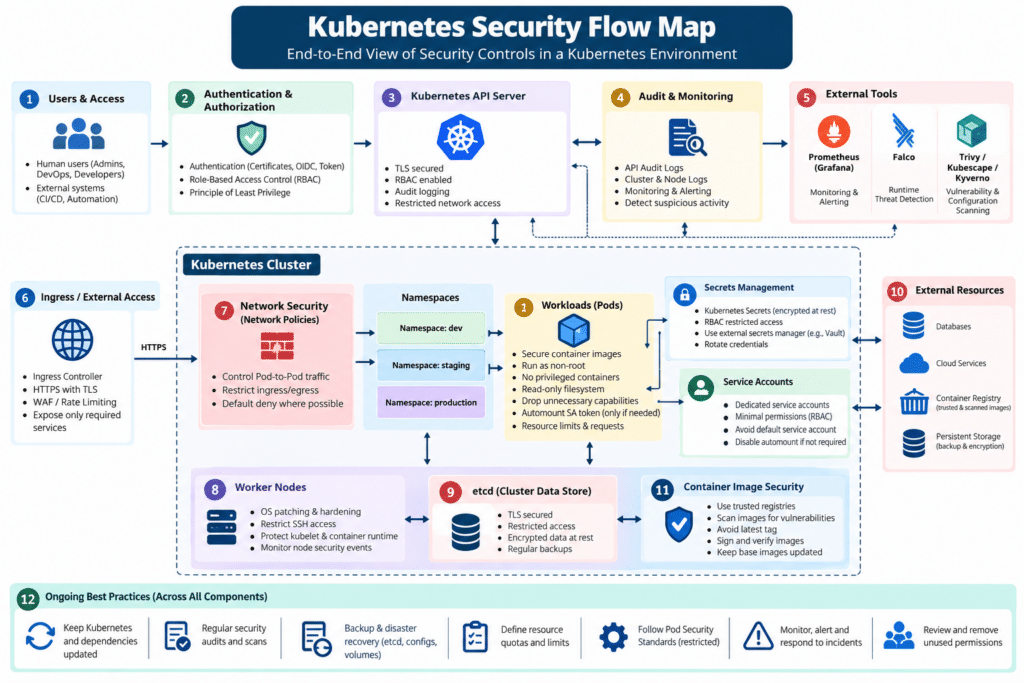
Kubernetes Security Flow Map
Kubernetes Security Checklist
Use the following checklist to review your Kubernetes environment before deploying applications to production.
1. Secure the Kubernetes API Server
The Kubernetes API server is the primary entry point for managing cluster resources. Protecting it is essential to maintaining cluster security.
Security best practices:
- Restrict API server access to trusted networks and authorized clients.
- Use strong authentication mechanisms.
- Enable authorization through RBAC.
- Use valid TLS certificates for API communication.
- Avoid exposing the API server directly to the public internet unless necessary and appropriately protected.
- Review audit logs for suspicious API requests.
- Keep Kubernetes components updated with supported security patches.
Check the current cluster endpoint:
kubectl cluster-info
Review the API server configuration on a self-managed control plane:
sudo grep -E -- '--(anonymous-auth|authorization-mode|audit-log-path)' \
  /etc/kubernetes/manifests/kube-apiserver.yaml
Important: This manifest path applies to common kubeadm installations. Managed Kubernetes services may expose these settings through their provider configuration instead.
The output should be reviewed against your security requirements. Do not assume a missing flag automatically means the cluster is insecure; some settings have secure defaults or are managed by the Kubernetes distribution.
Official documentation: https://kubernetes.io/docs/concepts/security/
2. Implement Role-Based Access Control (RBAC)
RBAC controls who can access Kubernetes resources and which operations they can perform.
Avoid granting administrator permissions to every developer, application, or service account.
Security best practices:
- Follow the principle of least privilege.
- Assign permissions through Roles and RoleBindings wherever possible.
- Use ClusterRoles and ClusterRoleBindings only when cluster-wide access is required.
- Avoid granting
cluster-adminto regular users or application service accounts. - Review existing permissions regularly.
- Remove unused users, bindings, and service accounts.
List cluster-wide role bindings:
kubectl get clusterrolebindings
Review role bindings across namespaces:
kubectl get rolebindings -A
Inspect a particular cluster role binding:
kubectl describe clusterrolebinding <binding-name>
Check the permissions of the current Kubernetes identity:
kubectl auth can-i --list
Best practice: Give each user and application only the permissions required to perform its specific tasks.
Official documentation: https://kubernetes.io/docs/reference/access-authn-authz/rbac/
3. Secure Kubernetes Secrets
Kubernetes Secrets store sensitive information such as passwords, API keys, and authentication tokens.
By default, Secret values are base64-encoded. Base64 encoding is not encryption.
Security best practices:
- Enable encryption at rest for Secret data in etcd.
- Restrict access to Secrets using RBAC.
- Avoid committing passwords and tokens to Git repositories.
- Do not print Secret values in CI/CD logs.
- Rotate credentials regularly.
- Consider an external secrets manager or a supported secrets-management integration.
- Restrict which containers can access sensitive credentials.
List Secrets in all namespaces:
kubectl get secrets -A
Inspect Secret metadata without displaying its values:
kubectl describe secret <secret-name> -n <namespace>
For clusters using a local encryption configuration, verify that the API server’s encryption-at-rest configuration is enabled and correctly applied.
Important: Listing or inspecting Secrets requires appropriate permissions. Avoid commands that decode and print production credentials into terminal logs or shared sessions.
Official documentation: https://kubernetes.io/docs/tasks/administer-cluster/encrypt-data/
4. Use Network Policies to Restrict Pod Communication
By default, Kubernetes networking may allow broad communication between pods, depending on the cluster networking implementation and existing policies.
NetworkPolicies help control which pods can communicate with other pods and external endpoints.
Security best practices:
- Apply default-deny ingress policies where appropriate.
- Restrict traffic between application namespaces.
- Allow only the ports and destinations required by each application.
- Define egress restrictions for sensitive workloads.
- Verify that your Container Network Interface (CNI) plugin supports NetworkPolicy enforcement.
- Test policies before applying them to production.
Example: Deny ingress traffic to pods in a namespace unless another policy explicitly permits it.
apiVersion: networking.k8s.io/v1
kind: NetworkPolicy
metadata:
  name: default-deny-ingress
  namespace: production
spec:
  podSelector: {}
  policyTypes:
    - Ingress
Save the file as default-deny-ingress.yaml and apply it:
kubectl apply -f default-deny-ingress.yaml
Review the configured policies:
kubectl get networkpolicies -A
Warning: A default-deny policy can interrupt application traffic if required allow rules are missing. Identify DNS, ingress, monitoring, and application dependencies before deploying it.
Official documentation: https://kubernetes.io/docs/concepts/services-networking/network-policies/
5. Secure Container Images
Vulnerable or untrusted container images can introduce malware, outdated libraries, and exploitable software into your cluster.
Security best practices:
- Use trusted image registries.
- Scan images for known vulnerabilities before deployment.
- Keep base images and application dependencies updated.
- Prefer minimal images containing only required software.
- Avoid using the
latesttag in production. - Pin images by digest when reproducibility and integrity are important.
- Use image-signing and verification mechanisms where supported.
- Rebuild and redeploy images when critical vulnerabilities are discovered.
Review the images used by a deployment:
kubectl get deployment <deployment-name> \
  -n <namespace> \
  -o jsonpath='{.spec.template.spec.containers[*].image}'
You can integrate vulnerability scanners such as Trivy into your CI/CD pipeline.
Example:
trivy image --severity HIGH,CRITICAL <image-name>:<tag>
Review scan results and assess exploitability, available patches, and application impact before approving an image for production.
Official documentation: https://kubernetes.io/docs/concepts/containers/images/
6. Apply Pod Security Standards
Containers should run with the minimum privileges required by their applications.
Kubernetes Pod Security Standards define three policy levels: Privileged, Baseline, and Restricted.
For production workloads, the Restricted profile provides a strong starting point, although some applications may need controlled exceptions.
Security best practices:
- Avoid privileged containers unless absolutely necessary.
- Disable privilege escalation.
- Run containers as non-root users whenever possible.
- Drop unnecessary Linux capabilities.
- Use a read-only root filesystem when supported.
- Avoid sharing the host’s process, network, or filesystem namespaces without a justified requirement.
- Apply Pod Security Admission policies at the namespace level.
Example: Enforce the Restricted Pod Security Standard for a namespace using the current Kubernetes policy version.
kubectl label namespace production \
  pod-security.kubernetes.io/enforce=restricted \
  pod-security.kubernetes.io/enforce-version=latest
Important: Replace latest with a version matching your cluster’s supported policy version when you need predictable behavior across upgrades. Enforcement may prevent existing workloads from being created or updated if they do not comply. Test the policy in a non-production namespace first.
Official documentation: https://kubernetes.io/docs/concepts/security/pod-security-standards/
7. Configure Secure Pod and Container Settings
Use a secure pod security context to reduce the impact of a compromised application.
Example:
apiVersion: v1
kind: Pod
metadata:
  name: secure-example
  namespace: production
spec:
  automountServiceAccountToken: false
  securityContext:
    runAsNonRoot: true
    runAsUser: 10001
    seccompProfile:
      type: RuntimeDefault
  containers:
    - name: app
      image: nginx:stable
      securityContext:
        allowPrivilegeEscalation: false
        capabilities:
          drop:
            - ALL
        readOnlyRootFilesystem: true
This example demonstrates several hardening controls, but it is not a universal drop-in configuration. The image must support the configured user and read-only filesystem, and the application may need writable volumes for temporary files or runtime data. Use an approved, pinned image digest for production.
8. Secure Kubernetes Worker Nodes
Worker nodes run application containers and provide access to host-level resources. A compromised node can put multiple workloads at risk.
Security best practices:
- Apply operating system security updates regularly.
- Restrict SSH access to trusted administrators.
- Prefer controlled management networks or secure access gateways.
- Disable unused services and unnecessary listening ports.
- Avoid running application containers with host-level privileges.
- Monitor node resource usage and security events.
- Protect kubelet endpoints and credentials.
- Restrict access to the container runtime socket.
- Use supported operating system and Kubernetes versions.
List cluster nodes:
kubectl get nodes -o wide
Inspect a particular node:
kubectl describe node <node-name>
On a self-managed Linux worker node, inspect listening ports:
sudo ss -tulpen
Confirm that only required services are listening and that firewall rules permit only necessary communication between the control plane, worker nodes, and approved management systems.
Official documentation: https://kubernetes.io/docs/concepts/architecture/nodes/
9. Restrict Service Account Permissions
Kubernetes service accounts provide identities for workloads that interact with the Kubernetes API.
Applications that do not need API access should not receive unnecessary credentials.
Security best practices:
- Set
automountServiceAccountToken: falsefor workloads that do not need Kubernetes API access. - Create dedicated service accounts for applications that require API access.
- Bind only the required permissions to each service account.
- Avoid using the default service account for sensitive workloads.
- Rotate or revoke credentials when needed.
- Audit service account permissions regularly.
List service accounts:
kubectl get serviceaccounts -A
Inspect a service account:
kubectl describe serviceaccount <service-account-name> \
  -n <namespace>
For workloads that require API access, use the appropriate supported token mechanism and narrowly scoped permissions.
Official documentation: https://kubernetes.io/docs/concepts/security/service-accounts/
10. Protect Ingress and External Services
Ingress controllers and externally exposed services are common entry points for attacks against Kubernetes-hosted applications.
Security best practices:
- Expose only the services that must be publicly accessible.
- Configure HTTPS with valid TLS certificates.
- Redirect HTTP traffic to HTTPS where appropriate.
- Restrict access to administrative interfaces.
- Apply appropriate request size, timeout, and rate-limit controls.
- Review ingress controller configuration and security advisories.
- Keep ingress controllers updated.
- Use a Web Application Firewall (WAF) where appropriate.
- Avoid exposing internal dashboards, databases, and management endpoints.
List ingress resources:
kubectl get ingress -A
Review Services that may expose applications externally:
kubectl get services -A
Inspect a particular Ingress:
kubectl describe ingress <ingress-name> -n <namespace>
Check that public endpoints use the intended TLS configuration and that backend services are reachable only through approved access paths.
Official documentation: https://kubernetes.io/docs/concepts/services-networking/ingress/
11. Enable Kubernetes Audit Logging
Audit logging records activities performed against the Kubernetes API. It can help security teams investigate unauthorized access, unexpected resource changes, and suspicious API requests.
Security best practices:
- Enable audit logging on self-managed clusters.
- Configure suitable audit policies.
- Capture important authentication, authorization, and resource modification events.
- Protect audit logs from unauthorized modification.
- Forward logs to a centralized logging platform.
- Define retention and alerting requirements.
- Avoid logging sensitive request or response bodies unnecessarily.
On a self-managed cluster, review the API server manifest for audit configuration:
sudo grep -E -- '--audit-(policy-file|log-path|log-maxage|log-maxbackup|log-maxsize)' \
  /etc/kubernetes/manifests/kube-apiserver.yaml
The command checks for common audit-related flags; it does not confirm that the policy is correct or that logs are being retained successfully.
Managed Kubernetes services may provide audit logs through provider-specific logging services.
Official documentation: https://kubernetes.io/docs/tasks/debug/debug-cluster/audit/
12. Monitor Cluster Activity and Security Events
Continuous monitoring helps detect unexpected workload changes, failed authentication attempts, resource abuse, and potential security incidents.
Security best practices:
- Monitor Kubernetes events and pod restarts.
- Collect control-plane and application logs.
- Alert on unauthorized privilege changes.
- Detect unexpected privileged pods and public service exposure.
- Monitor failed authentication and authorization requests.
- Track unusual CPU, memory, and network usage.
- Integrate Kubernetes logs with a centralized monitoring platform.
Useful commands:
kubectl get events -A --sort-by=.metadata.creationTimestamp
kubectl get pods -A
kubectl get pods -A --field-selector=status.phase=Failed
These commands support basic operational reviews. Production environments should also use centralized monitoring and alerting because events may expire and command output alone is not a complete security monitoring solution.
13. Keep Kubernetes and Dependencies Updated
Running unsupported or outdated Kubernetes versions increases exposure to known vulnerabilities and missing security fixes.
Security best practices:
- Use a supported Kubernetes version.
- Apply security patches according to a defined maintenance process.
- Update the operating system and container runtime.
- Upgrade CNI and CSI plugins when required.
- Review ingress controller, DNS, and admission controller updates.
- Test upgrades in a staging environment.
- Review compatibility before upgrading production clusters.
- Maintain rollback and recovery procedures.
Check the Kubernetes client and server versions:
kubectl version
Check node versions:
kubectl get nodes -o wide
Plan upgrades based on official Kubernetes release and version-skew policies.
Official documentation: https://kubernetes.io/releases/
14. Secure etcd and the Kubernetes Control Plane
etcd stores Kubernetes cluster state, including sensitive configuration and Secret objects. Unauthorized access to etcd can compromise the entire cluster.
Security best practices:
- Restrict etcd access to authorized control-plane components.
- Use TLS for etcd client and peer communication.
- Protect etcd certificates and private keys.
- Keep etcd on a trusted network.
- Prevent public exposure of etcd ports.
- Encrypt sensitive data at rest where appropriate.
- Back up etcd securely and test restoration procedures.
- Monitor etcd health and access.
On a self-managed cluster, inspect etcd configuration in the relevant control-plane manifests:
sudo grep -E -- '--(listen-client-urls|advertise-client-urls|client-cert-auth)' \
  /etc/kubernetes/manifests/etcd.yaml
This example assumes etcd is managed through a local kubeadm-style manifest. Managed Kubernetes services may not provide direct etcd access.
Official documentation: https://etcd.io/docs/
15. Scan Kubernetes Configurations for Misconfigurations
Configuration errors can expose applications even when the underlying software is up to date.
Examples include privileged containers, overly broad RBAC permissions, exposed services, missing resource limits, and unrestricted network access.
Security best practices:
- Scan Kubernetes YAML manifests before deployment.
- Include configuration checks in CI/CD pipelines.
- Review security contexts and service account settings.
- Detect privileged containers and host namespace sharing.
- Validate RBAC permissions.
- Check for publicly exposed services.
- Review image tags and resource limits.
Example using Kubescape:
kubescape scan
Example using Trivy to scan Kubernetes configuration files:
trivy config ./kubernetes/
The exact options and available checks depend on the installed tool version. Review findings before applying automated fixes, especially in production.
Official resources:
- Kubescape: https://kubescape.io/
- Trivy: https://trivy.dev/
16. Define Resource Requests and Limits
Resource limits are important for both availability and workload isolation. An application consuming excessive CPU or memory can affect other workloads on the same node.
Security and reliability best practices:
- Define CPU and memory requests.
- Set suitable memory and CPU limits where appropriate.
- Configure namespace resource quotas.
- Use LimitRanges to establish default resource requirements.
- Monitor resource consumption and adjust values based on real workloads.
- Avoid unnecessarily generous resource allocations.
Example:
resources:
  requests:
    cpu: "100m"
    memory: "128Mi"
  limits:
    cpu: "500m"
    memory: "512Mi"
These values are examples only. Set production values based on application requirements and load testing.
Check resource quotas:
kubectl get resourcequotas -A
Check LimitRanges:
kubectl get limitranges -A
Official documentation: https://kubernetes.io/docs/concepts/configuration/manage-resources-containers/
17. Maintain Secure Backup and Disaster Recovery Procedures
Security incidents, accidental deletions, infrastructure failures, and ransomware can affect Kubernetes workloads and cluster configuration.
A tested recovery process helps restore operations after an incident.
Security best practices:
- Back up required cluster configuration and manifests.
- Back up persistent volume data according to application requirements.
- Protect backup storage with access controls and encryption.
- Keep copies separate from the production environment.
- Restrict who can delete or modify backups.
- Document recovery dependencies and procedures.
- Test restoration periodically.
- Verify that restored applications and their dependencies work correctly.
For self-managed Kubernetes clusters, etcd backups may be important for restoring cluster state. However, an etcd snapshot alone does not back up external databases, persistent volume contents, or all application data.
Important: Identify what must be recovered before defining the backup strategy. Validate the complete recovery process instead of assuming a successful backup guarantees a successful restoration.
Official documentation: https://kubernetes.io/docs/tasks/administer-cluster/configure-upgrade-etcd/
Kubernetes Security Audit Commands
The following commands provide a quick starting point for a routine security review.
| Security area | Command |
|---|---|
| Cluster nodes | kubectl get nodes -o wide |
| Namespaces | kubectl get namespaces |
| Cluster role bindings | kubectl get clusterrolebindings |
| Role bindings | kubectl get rolebindings -A |
| Secrets inventory | kubectl get secrets -A |
| Network policies | kubectl get networkpolicies -A |
| Ingress resources | kubectl get ingress -A |
| Services | kubectl get services -A |
| Service accounts | kubectl get serviceaccounts -A |
| Resource quotas | kubectl get resourcequotas -A |
| Recent events | kubectl get events -A --sort-by=.metadata.creationTimestamp |
Run these commands using an authorized account. Some commands require cluster-wide permissions. Inventory commands do not, by themselves, establish that the resources are configured securely.
Kubernetes Security Checklist for Production
Use this checklist during production readiness reviews and periodic security audits.
- Kubernetes API server access is restricted.
- Authentication and authorization are configured appropriately.
- RBAC follows the principle of least privilege.
- Kubernetes Secrets are protected and encrypted at rest where required.
- NetworkPolicies restrict unnecessary traffic.
- Container images are scanned for vulnerabilities.
- Production images are pinned and come from trusted registries.
- Pod Security Standards are enforced or equivalent controls are implemented.
- Containers run as non-root wherever possible.
- Privileged containers and unnecessary capabilities are restricted.
- Unnecessary service account token mounting is disabled.
- Worker nodes are patched and hardened.
- Ingress resources use the intended HTTPS and access controls.
- etcd and control-plane access are restricted.
- Audit logs are collected, protected, and reviewed.
- Security alerts and centralized monitoring are configured.
- Kubernetes and its dependencies are supported and patched.
- Resource requests, limits, and quotas are configured.
- Configuration scans run before production deployment.
- Backups are protected and restoration has been tested.
This Kubernetes Security Checklist helps DevOps engineers protect production workloads, restrict unauthorized access, identify misconfigurations, and reduce cluster vulnerabilities. Review these security controls regularly to maintain a secure and reliable Kubernetes environment.d access, and reducing cluster vulnerabilities.
Recommended Kubernetes Security Tools
The following tools can support Kubernetes security assessments and continuous enforcement.
1. Trivy
Scans container images, filesystems, and supported configuration files for vulnerabilities and misconfigurations.
Website: https://trivy.dev/
2. Kubescape
Assesses Kubernetes environments against security frameworks and helps identify misconfigurations.
Website: https://kubescape.io/
3. Falco
Provides runtime threat detection by observing system and workload activity.
Website: https://falco.org/
4. Kyverno
Provides policy management for Kubernetes, including validation and enforcement of resource configurations.
Website: https://kyverno.io/
5. Prometheus and Grafana
Support metrics collection, dashboards, and alerting for cluster and application health. They complement security monitoring but do not replace dedicated security controls.
Websites:
- Prometheus: https://prometheus.io/
- Grafana: https://grafana.com/
Choose tools according to your cluster architecture, operational requirements, and existing monitoring platform.
Common Kubernetes Security Mistakes to Avoid
Avoid the following mistakes when managing a Kubernetes production environment:
- Granting cluster-admin access unnecessarily: Broad privileges increase the impact of compromised accounts.
- Using privileged containers by default: Excessive privileges can expose the underlying host.
- Storing credentials in Git: Committed secrets may remain accessible in repository history.
- Exposing internal services publicly: Unnecessary public endpoints increase the attack surface.
- Ignoring NetworkPolicies: Unrestricted pod communication can allow attackers to move between workloads.
- Running unscanned images: Vulnerable dependencies can introduce known security risks.
- Skipping security updates: Unsupported versions may miss important patches.
- Failing to test backups: Untested backups may not provide a usable recovery path.
- Ignoring audit logs: Suspicious access or configuration changes may go undetected.
- Applying security policies without testing: Incorrect enforcement can disrupt production workloads.
Frequently Asked Questions (FAQs)
1. What is a Kubernetes security checklist?
A Kubernetes security checklist is a structured list of controls used to review and improve the security of a Kubernetes cluster, including access control, network isolation, container hardening, Secret protection, monitoring, and backup procedures.
2. What are the most important Kubernetes security best practices?
The most important practices include restricting API access, implementing least-privilege RBAC, protecting Secrets, scanning container images, enforcing Pod Security Standards, applying NetworkPolicies, monitoring audit logs, and keeping cluster components updated.
3. How can I secure Kubernetes pods?
Run containers as non-root users, disable unnecessary privilege escalation, drop unneeded Linux capabilities, use seccomp profiles, restrict host access, avoid unnecessary service account tokens, and define appropriate resource requirements.
4. How do I check Kubernetes security?
Start by reviewing RBAC permissions, Secrets access, pod security contexts, network policies, exposed services, audit logging, and cluster version support. Use configuration scanning tools such as Trivy or Kubescape to identify additional issues.
5. Are Kubernetes Secrets encrypted?
Kubernetes Secret data is base64-encoded by default, which is not encryption. Configure encryption at rest and restrict access through RBAC. Consider an external secrets manager when appropriate.
6. What tools can be used for Kubernetes security scanning?
Common options include Trivy for vulnerability and configuration scanning, Kubescape for Kubernetes security assessments, Falco for runtime threat detection, and Kyverno for policy enforcement.
7. How often should Kubernetes security audits be performed?
Perform security reviews before production deployments, after significant cluster or infrastructure changes, when important vulnerabilities are announced, and on a regular schedule defined by your organization’s risk and compliance requirements.
Conclusion
Kubernetes security is an ongoing process that requires secure configurations, restricted access, continuous monitoring, regular updates, and tested recovery procedures.
Following a Kubernetes Security Checklist helps DevOps engineers and administrators identify misconfigurations, reduce attack surfaces, and strengthen production environments.
Start by implementing the most important Kubernetes security best practices, including API server protection, least-privilege Role-Based Access Control (RBAC), Secret encryption, container hardening, and network isolation. Integrate security scanning and policy validation into your deployment workflow to identify potential risks early.
Regularly review your Kubernetes Security Checklist as your infrastructure evolves to maintain secure workloads, protect sensitive data, and build a reliable, production-ready Kubernetes environment.
Related Articles
How to Renew Kubernetes Certificates Using kubeadm (Step-by-Step Guide with Zero Planned Downtime)
How to Configure cert-manager ClusterIssuer with Cloudflare API Token on Kubernetes
Talk to Our Technology Experts
Planning a Kubernetes production rollout or looking to harden an existing cluster? Our team can help with cluster architecture, security, observability, deployment strategy, and ongoing operations.