
Introduction
ConfigServer Mail Manage (CMM) is an interface for managing mail accounts directly within WHM. It is free and can be easily integrated with WHM.
Prerequisites
- cPanel/WHM access.
- Server SSH access.
Implementation
Step 1: Log in to the Server
Log in to the server as the root user.
Step 2: Change to the /usr/src Directory
Run the following command:
cd /usr/src
Step 3: Download CMM
Download CMM using wget:
wget http://download.configserver.com/cmm.tgz
Step 4: Extract the Application
Extract the downloaded archive:
tar -xzf cmm
Step 5: Change to the CMM Directory
Navigate to the CMM directory:
cd cmm
Step 6: Execute the Installer
Run the installation script:
sh install.sh
Step 7: Remove the Installation Files
Remove the CMM directory and downloaded file:
rm -Rfv /usr/src/cmm*
Step 8: Access ConfigServer Mail Manager
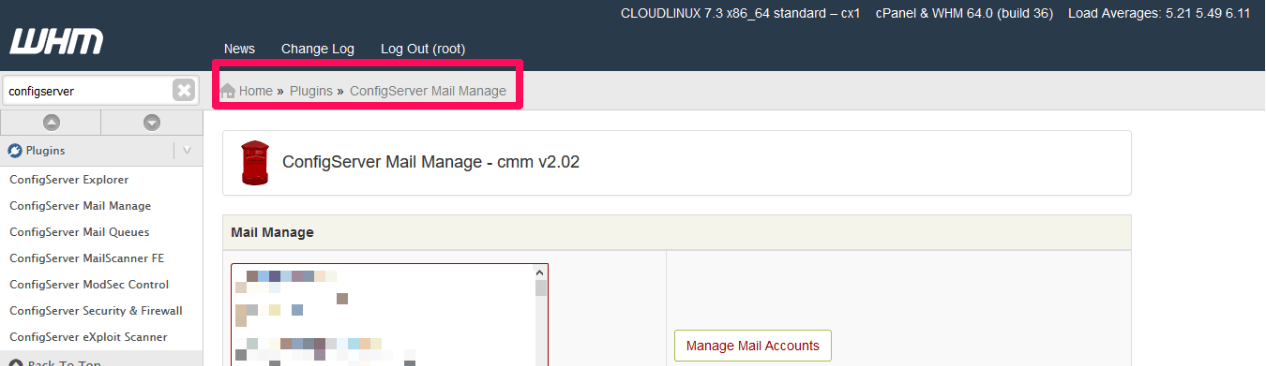
Log in to WHM. After installation, you can see ConfigServer Mail Manager in WHM.
Conclusion
ConfigServer Mail Manage (CMM) provides an interface to manage mail accounts directly from WHM. By following the above steps, CMM can be downloaded, installed, and accessed through the WHM interface.
FAQs
1. What is ConfigServer Mail Manage (CMM)?
CMM is an interface that allows administrators to manage mail accounts directly from WHM.
2. What access is required to install CMM?
You need cPanel/WHM access and SSH access to the server.
3. Where should CMM be downloaded?
The installation files are downloaded to:
/usr/src
4. How do I install CMM?
After extracting the application and entering the CMM directory, run:
sh install.sh
5. Where can I access CMM after installation?
After installation, log in to WHM and look for ConfigServer Mail Manager.
Talk to our experts.
Looking for the right technology solution for your business? Our team of experts can help you with development, cloud, DevOps, design, and a wide range of other technology needs. Get in touch with our team here.