
Introduction
This guide explains how to set up domain redirection with .htaccess, covering the full process — from verifying Apache’s rewrite module is enabled through writing a rule that correctly handles both HTTP and HTTPS traffic, which a lot of quick-reference examples skip entirely.
There are common scenarios where you need to redirect one domain to another: consolidating multiple domains into one, migrating a site to a new domain name, or redirecting a retired domain to its replacement so existing links and bookmarks don’t break. Apache’s .htaccess file, combined with the mod_rewrite module, is the standard way to handle this at the web server level.
Implementation
I. Prerequisites
Before you set up domain redirection with .htaccess, make sure you have:
- An Ubuntu or CentOS server running Apache (2.4 or 2.2)
- Access to the domain’s document root
- The
mod_rewritemodule available (verified in Step III)
II. Architecture Overview
Before editing any files, it helps to understand what actually happens when a redirect rule fires:
- A browser sends an HTTP or HTTPS request for
domain.com - Apache receives the request and, for the matching virtual host, checks whether a
.htaccessfile exists in the document root (and whether it’s permitted to read one — covered in Step V) - If
mod_rewriteis enabled and a matchingRewriteCond/RewriteRulepair is found, Apache generates an HTTP redirect response (301 or 302) pointing the browser to the new domain, instead of serving the requested page - The browser receives that redirect response and automatically issues a new request to the new domain
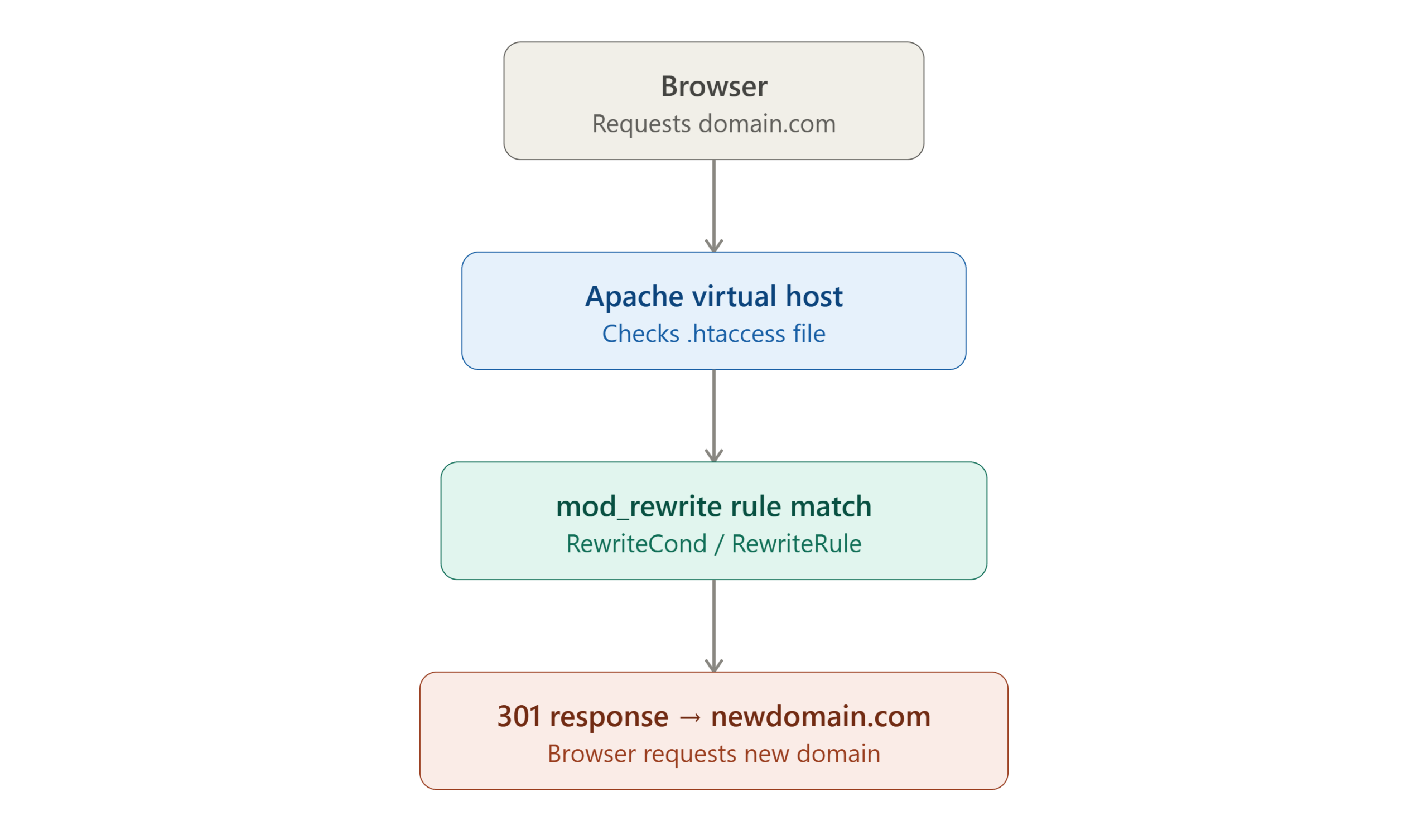
This matters because a .htaccess redirect never actually “serves” the old domain’s content — it’s a server-level instruction that gets caught before the requested page loads at all, which is what makes it reliable for handling every single request to the old domain, regardless of which specific page was requested.
III. Verify the Rewrite Module Is Enabled
Domain redirection via .htaccess depends on Apache’s mod_rewrite module. Confirm it’s loaded:
apachectl -M
Look for rewrite_module in the output. If it isn’t listed, enable it:
On Ubuntu/Debian:
sudo a2enmod rewrite
sudo systemctl restart apache2
On CentOS/RHEL, mod_rewrite is typically compiled in by default with Apache from the standard package, but if it’s missing, ensure the corresponding line in httpd.conf is uncommented:
LoadModule rewrite_module modules/mod_rewrite.so
Then restart Apache:
sudo systemctl restart httpd
IV. Locate the Document Root
You’ll need to know the correct document root to place or edit the .htaccess file in the right location.
On a cPanel server:
/home/username/public_html
On a plain Ubuntu server:
/var/www/html
Alternatively, confirm the exact document root Apache is actually using for a specific virtual host with:
apachectl -S
This lists all configured virtual hosts along with their document root paths — useful when a server hosts multiple domains and you need to be certain you’re editing the right one.
V. Confirm .htaccess Overrides Are Allowed
This step is easy to overlook, and its absence is one of the most common reasons a correctly written redirect rule silently does nothing. By default, some Apache configurations set AllowOverride None for a given directory, which causes Apache to ignore .htaccess files entirely — no error is shown, the rule just never takes effect.
Check your virtual host or Apache configuration file for the relevant <Directory> block, and confirm it allows overrides:
<Directory /var/www/html>
    AllowOverride All
</Directory>
If you had to change this, restart Apache to apply it:
sudo systemctl restart apache2
(Substitute httpd for the service name on CentOS/RHEL.)
VI. Create or Edit the .htaccess File
Navigate to the document root you identified in Step IV, and open (or create) the .htaccess file:
cd /var/www/html
vi .htaccess
VII. Add the Redirect Rule
Here’s a corrected, complete version of the redirect rule. A commonly seen mistake in quick-reference examples is missing the RewriteEngine On directive — without it, mod_rewrite won’t process any RewriteCond or RewriteRule lines at all, even if the module itself is enabled server-wide:
RewriteEngine On
RewriteCond %{HTTP_HOST} ^(www\.)?domain\.com$ [NC]
RewriteRule (.*) https://www.newdomain.com/$1 [R=301,L]
What each line does:
| Line | Purpose |
|---|---|
RewriteEngine On | Turns on the rewrite engine for this .htaccess file — required before any rule will function |
RewriteCond %{HTTP_HOST} ... | Matches requests to domain.com or www.domain.com, with [NC] making the match case-insensitive |
RewriteRule (.*) https://www.newdomain.com/$1 | Redirects to the new domain, preserving the original request path via $1 |
[R=301,L] | R=301 issues a permanent redirect (important for SEO — see Step XI); L stops processing further rewrite rules once this one matches |
Note on HTTPS: The example above hardcodes
https://in the destination. If your old domain serves both HTTP and HTTPS traffic and you want to preserve that dynamically rather than forcing everything to HTTPS, you can reference%{HTTPS}conditionally — though in nearly all modern cases, redirecting everything to HTTPS on the new domain (as shown) is the better practice regardless, given HTTPS is now the standard expectation for any public-facing site.
Replace domain\.com with your actual old domain (keeping the backslash before each literal dot, since . is a special regex character that needs escaping to match a literal period), and newdomain.com with your actual new domain.
VIII. Test the Redirect
Save the file, then test it in a browser by visiting:
http://domain.com
and
http://www.domain.com
Both should automatically redirect to https://www.newdomain.com, preserving whatever path was originally requested — for example, domain.com/blog/post-1 should land on newdomain.com/blog/post-1, not just the new domain’s homepage.
Tip: Browsers aggressively cache 301 redirects. If you’re testing changes and not seeing the expected behavior, test in a private/incognito window or clear your browser cache to rule out a stale cached redirect from a previous test.
IX. Common Redirect Variations
Redirect only a specific subdirectory, not the whole domain:
RewriteEngine On
RewriteCond %{HTTP_HOST} ^(www\.)?domain\.com$ [NC]
RewriteRule ^oldsection/(.*)$ https://www.newdomain.com/newsection/$1 [R=301,L]
Redirect everything to a single fixed URL, without preserving the path:
RewriteEngine On
RewriteCond %{HTTP_HOST} ^(www\.)?domain\.com$ [NC]
RewriteRule ^(.*)$ https://www.newdomain.com/ [R=301,L]
Redirect non-www to www on the same domain (a common companion rule):
RewriteEngine On
RewriteCond %{HTTP_HOST} ^domain\.com$ [NC]
RewriteRule (.*) https://www.domain.com/$1 [R=301,L]
X. Troubleshooting Common Issues
The redirect doesn’t happen at all, and no error appears: This is almost always the AllowOverride None issue from Step V — Apache is silently ignoring the .htaccess file entirely. Double-check the <Directory> block for the relevant document root.
“Internal Server Error” (500) after adding the rule: Check Apache’s error log for specifics:
sudo tail -f /var/log/apache2/error.log
(Path may differ on CentOS — commonly /var/log/httpd/error_log.) A malformed regex or a missing RewriteEngine On combined with other rewrite rules elsewhere in the file are common causes.
The redirect works but creates a redirect loop: This typically happens when the new domain’s own .htaccess also matches the same condition, redirecting back to itself indefinitely. Double-check that your RewriteCond pattern only matches the old domain, not the new one.
The path isn’t preserved after redirecting: Confirm you’re using $1 in the destination (as shown in Step VII) and that your RewriteRule pattern actually captures the path with (.*). Omitting the capture group, as shown in the “fixed URL” variation in Step IX, is sometimes done intentionally but will drop the path if that wasn’t the goal.
XI. Companion Rule: Forcing HTTPS on the New Domain
Once traffic is redirecting to the new domain, it’s worth also confirming the new domain itself forces HTTPS, rather than allowing HTTP access to remain available alongside it. Add this rule to the new domain’s own .htaccess file:
RewriteEngine On
RewriteCond %{HTTPS} off
RewriteRule ^(.*)$ https://%{HTTP_HOST}%{REQUEST_URI} [R=301,L]
This checks whether the request arrived over plain HTTP (%{HTTPS} off), and if so, redirects to the same path over HTTPS instead. Combined with the domain-to-domain redirect from Step VII, this ensures visitors always end up on the new domain over an encrypted connection, regardless of which protocol or domain they originally typed or clicked.
Note: If you already handle HTTP-to-HTTPS redirection elsewhere — for example, in your Apache virtual host configuration or via a reverse proxy/load balancer in front of Apache — adding this same logic again in
.htaccessis redundant. Check your existing setup first to avoid an unnecessary duplicate redirect hop, which adds latency for no benefit.
XII. SEO Considerations for Domain Redirects
- Always use a 301 (permanent), not 302 (temporary), redirect for genuine domain migrations. Search engines treat these very differently — a 301 signals that link equity and rankings should transfer to the new domain, while a 302 does not, and can leave your new domain without the SEO value your old domain had built up.
- Avoid redirect chains. If
domain.comredirects tonewdomain.com, which itself redirects somewhere else, each additional hop adds latency and can dilute the SEO signal. Redirect directly to the final destination in one hop wherever possible. - Update your sitemap and Search Console for the new domain once the redirect is live, and use Google Search Console’s “Change of Address” tool if this is a permanent domain migration, so search engines process the change more efficiently.
- Give it time. Search engines don’t instantly re-index everything after a domain migration — expect a transition period of weeks to a couple of months before rankings fully reflect the new domain.
XIII. Conclusion
Setting up domain redirection with .htaccess comes down to a few key pieces: confirming mod_rewrite is enabled, making sure AllowOverride All is actually permitted for the directory in question, and writing a rule that includes the often-missing RewriteEngine On directive alongside a correctly escaped domain pattern. With HTTPS handled explicitly and a 301 status code in place, this approach reliably redirects an entire domain — preserving paths and SEO value — with a single small file.
For the complete reference on Apache’s rewrite syntax and available flags, see the official mod_rewrite documentation.
Frequently Asked Questions
Why doesn’t my redirect rule work even though the syntax looks correct? The two most common causes are a missing RewriteEngine On directive (required once per .htaccess file, even if mod_rewrite is enabled server-wide) and AllowOverride None on the relevant directory, which causes Apache to ignore .htaccess files entirely without any visible error.
Should I redirect at the .htaccess level or in the main Apache virtual host configuration? Both work, but placing rewrite rules directly in the virtual host configuration (rather than .htaccess) is generally faster, since Apache doesn’t need to check for and parse a .htaccess file on every single request. If you have access to the main server configuration, that’s the more efficient long-term choice — .htaccess remains useful when you only have access to the document root itself, such as on shared hosting.
Will this redirect preserve query strings, like ?ref=email? Not by default with the examples shown here — you’d need to add the QSA (Query String Append) flag to the rule, for example [R=301,L,QSA], to automatically carry query parameters through to the new URL.
Can I redirect multiple old domains to the same new domain? Yes — adjust the RewriteCond pattern to match multiple domains using alternation, for example: RewriteCond %{HTTP_HOST} ^(www\.)?(olddomain1\.com|olddomain2\.com)$ [NC], which matches either old domain and redirects both to the same destination.
What’s the difference between RewriteRule and the simpler Redirect directive? Redirect (and RedirectMatch) is a simpler, more limited directive from mod_alias that handles basic path-based redirects without the pattern-matching power of mod_rewrite. RewriteRule, used throughout this guide, supports conditional logic via RewriteCond, regex capture groups, and far more complex matching — which is why it’s the standard choice for domain-level redirects that need to preserve paths or match multiple conditions.
If you have any questions about this setup or run into an issue not covered here, feel free to reach out to us at Pheonix Solutions — we’re happy to help.
Related Articles: