
Introduction
LiteSpeed Web Server supports multiple PHP versions, allowing different websites hosted on the same cPanel server to use different PHP versions according to their application requirements. On a cPanel server, PHP versions are managed through EasyApache, while LiteSpeed requires the corresponding LiteSpeed PHP (LSAPI) package and configuration.
This article explains how to install and configure multiple PHP versions with LiteSpeed on a cPanel server and how to make the PHP versions available for individual domains through MultiPHP Manager.
Prerequisites:
- WHM access(Default URL will be http://IPaddress:2086)
- LiteSpeed Admin Panel access(Default URL will be http://IPaddress:7080)
- Server root access details.
Implementation:
Install the ea-phpxx-php-litespeed version. In this post, we will show how to install PHP 5.5 on LiteSpeed
yum install ea-php55-php-litespeed
In case we want to install a different version of PHP or multiple versions of PHP, use the following command
yum install ea-php56-php-litespeed ea-php71-php-litespeed
This will create the file if you install PHP 5.5
ls -la /opt/cpanel/ea-php55/root/usr/bin/lsphp
If we install multiple versions of PHP, then the corresponding file will be created in/opt/cpanel/ea-phpxx/root/usr/bin.
Log in to the LiteSpeed panel using the IP address(http://IPaddress:7080)
Go to Configuration > External App > Add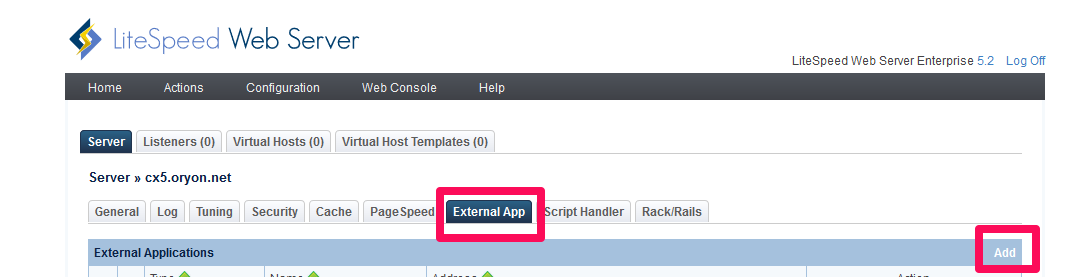
Select New External App and click Next
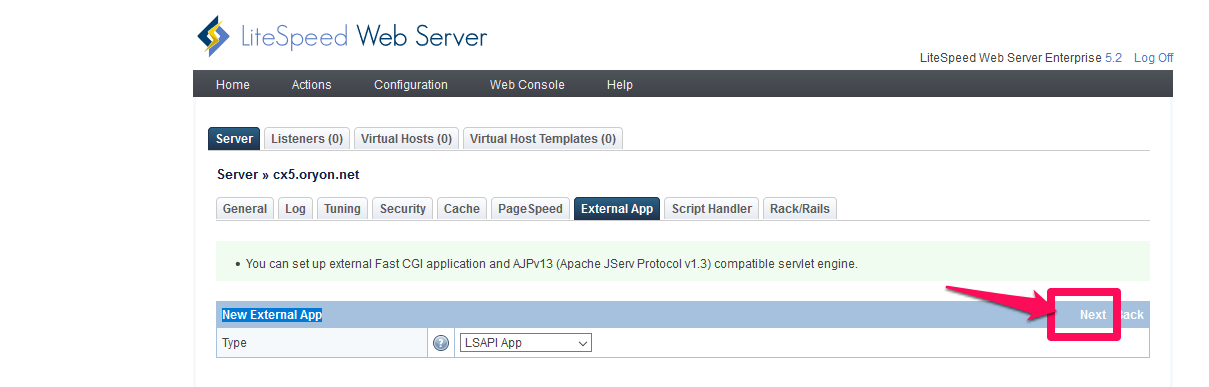
Add the following information
Name: php55
Command:/opt/cpanel/ea-php55/root/usr/bin/lsphp
Leave the remaining options at default.
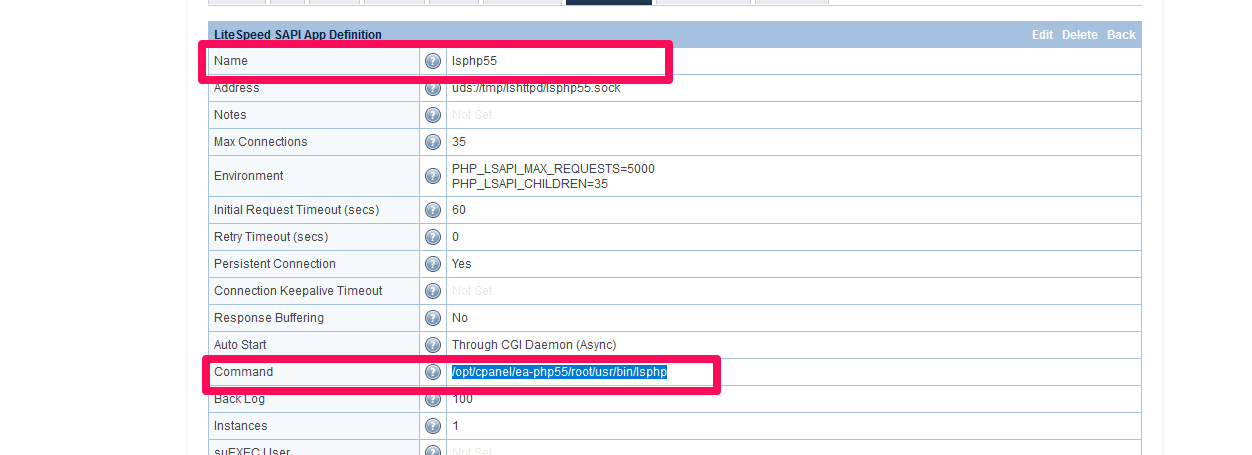
Click on Save to complete the app
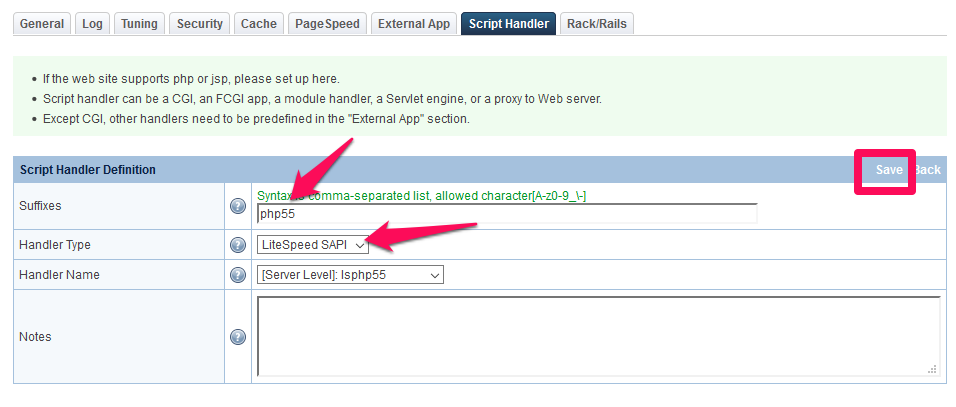
Under Script handler, click on Add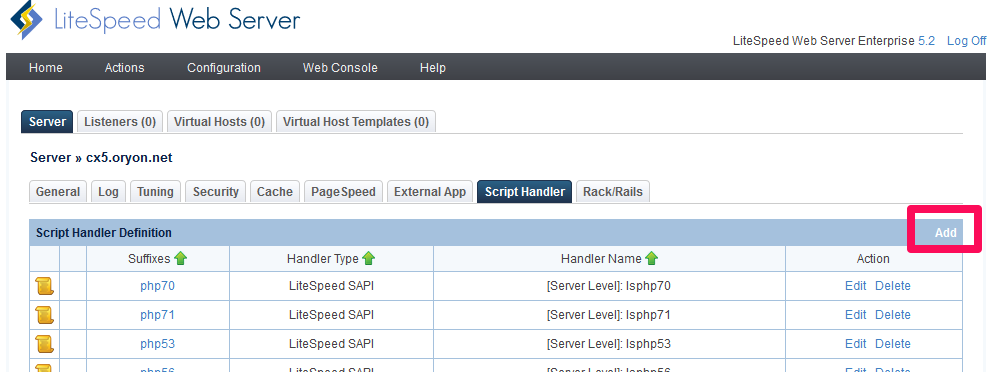
Add the following information.
Suffixes:php55
Handler Type: LiteSpeed SAPI
Handler Name: lsphp55
Restart the LiteSpeed service from WHM(Home >> Plugins >> LiteSpeed Web Server Plugin)
Now, you can switch the PHP version from WHM for any domain(Home >> Software >> MultiPHP Manager.
Conclusion
Configuring multiple PHP versions with LiteSpeed allows different domains on the same cPanel server to run the PHP version required by their applications. By installing the appropriate ea-phpXX-php-litespeed packages and configuring the corresponding LiteSpeed external applications and script handlers, administrators can make multiple PHP versions available to cPanel accounts.
After completing the configuration, the required PHP version can be selected for individual domains through WHM → Software → MultiPHP Manager, providing greater flexibility and compatibility for websites hosted on the server.
FAQs
1. Can multiple PHP versions be used on the same LiteSpeed cPanel server?
Yes. LiteSpeed supports multiple PHP versions, and each domain can use a different PHP version through cPanel MultiPHP Manager.
2. How do I change the PHP version for a domain?
You can change it from WHM → Software → MultiPHP Manager after the required PHP versions have been configured.
3. Do I need to restart LiteSpeed after configuring a new PHP version?
Yes. Restart LiteSpeed after completing the external application and script handler configuration so the changes take effect.
Related Articles
How to view PHP version for the domain in cPanel
Talk to our experts:
Looking for the right technology solution for your business?. Our experts can help with web hosting, domain registration, DevOps and cloud, software development, web applications, mobile applications, and enterprise solutions. Get in touch with our team here.