Post Date: May 07, 2018
Last Updated: September 21, 2026
Introduction
ConfigServer Firewall (CSF) is a popular security solution used to protect Linux servers from unauthorized access and malicious activities. However, on OpenVZ-based VPS environments, CSF may fail to start or function correctly if the required iptables kernel modules are not available on the host node.
When running the CSF diagnostic tool (csftest.pl), administrators may encounter errors indicating missing iptables modules such as ipt_state, xt_connlimit, or iptable_nat. Since OpenVZ containers rely on the host node’s kernel, these modules must be enabled at the host level before CSF can operate properly inside the VPS.
This guide explains how to identify the issue, enable the required modules, apply the necessary OpenVZ configuration changes, and verify that CSF is functioning correctly.
Issue Overview
Symptoms include:
- CSF fails to start or load firewall rules.
csftest.plreports missing iptables modules.- NAT-related features such as Messenger or Redirect do not work.
- Connection limiting features are unavailable.
Example error:
Testing ipt_state/xt_state...FAILED
Testing xt_connlimit...FAILED
Testing iptable_nat/ipt_REDIRECT...FAILED
Solution Workflow
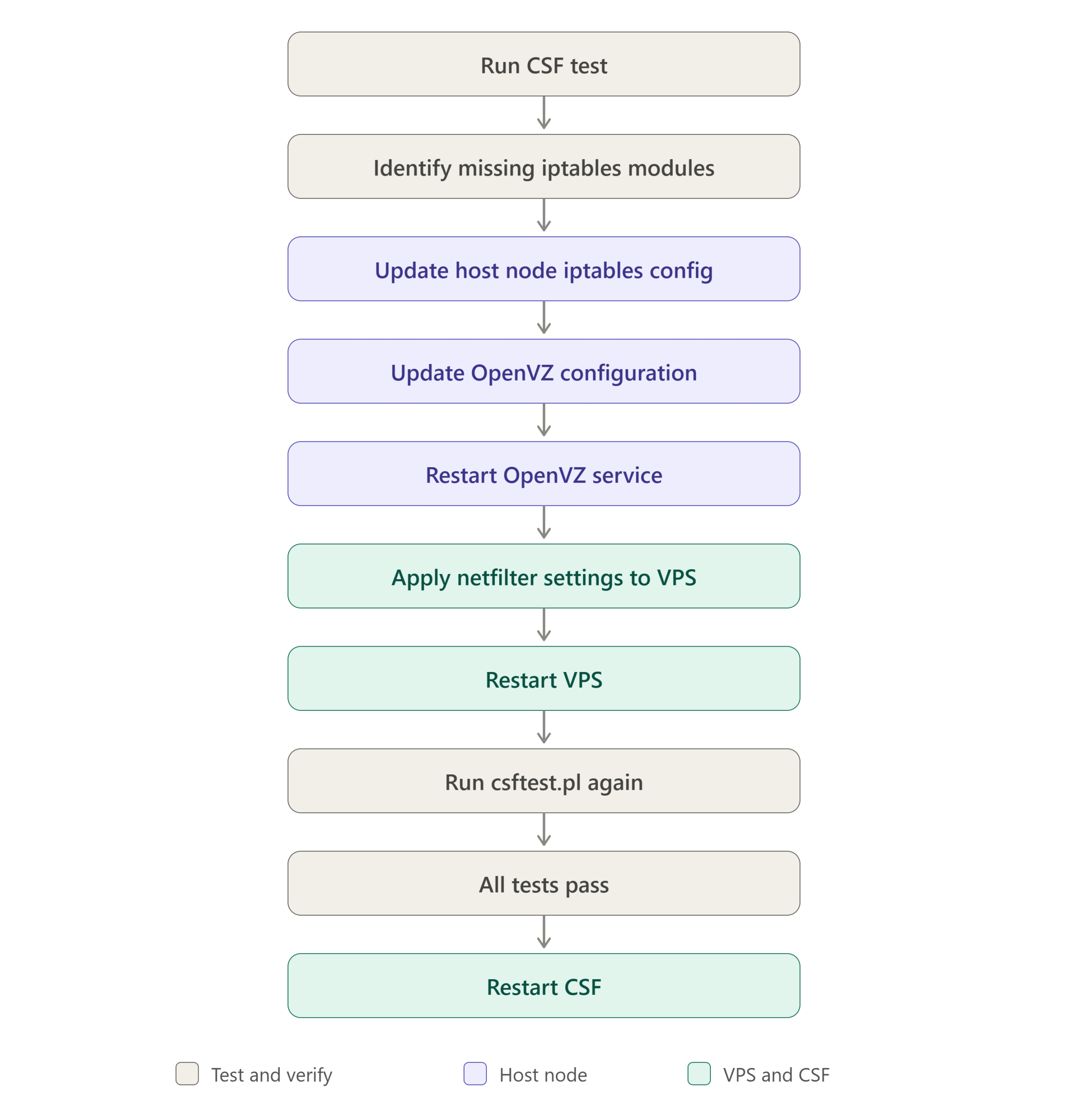
Step 1: Verify the Issue
Run the CSF test script:
/etc/csf/csftest.pl
Review the output and note any failed module checks.
Step 2: Update Host Node iptables Configuration
Edit:
/etc/sysconfig/iptables-config
Add:
IPTABLES_MODULES="ipt_REJECT ipt_tos ipt_TOS ipt_LOG ip_conntrack ipt_limit ipt_multiport iptable_filter iptable_mangle ipt_TCPMSS ipt_tcpmss ipt_ttl ipt_length ipt_state iptable_nat ip_nat_ftp"
Step 3: Update OpenVZ Configuration
Edit:
/etc/sysconfig/vz
Add:
IPTABLES="ipt_REJECT ipt_tos ipt_TOS ipt_LOG ip_conntrack ipt_limit ipt_multiport iptable_filter iptable_mangle ipt_TCPMSS ipt_tcpmss ipt_ttl ipt_length ipt_state iptable_nat ip_nat_ftp"
Step 4: Restart OpenVZ Service
service vz restart
Step 5: Enable Netfilter Support for the VPS
Replace 101 with your VPS Container ID.
vzctl set 101 --netfilter full --save --setmode restart
Step 6: Verify CSF Requirements
Run:
/etc/csf/csftest.pl
Expected output:
RESULT: csf should function on this server
Step 7: Restart CSF
service csf restart
Verify CSF status:
csf -l
Conclusion
CSF firewall issues on OpenVZ VPS instances are commonly caused by missing iptables modules on the host node. Because OpenVZ containers share the host kernel, enabling the required netfilter and iptables modules at the host level is essential. After updating the OpenVZ and iptables configurations, enabling netfilter support, and restarting the services, CSF should pass all validation checks and function normally.
Following the steps in this guide will help ensure that your VPS can fully utilize CSF’s firewall, connection tracking, NAT, and security features.
Frequently Asked Questions (FAQ)
1. Why does CSF fail on OpenVZ but work on dedicated servers?
OpenVZ containers share the host node’s kernel. If the required iptables modules are not loaded on the host, the VPS cannot access them, causing CSF tests to fail.
2. How can I check whether my VPS is running OpenVZ?
Run:
virt-what
or
cat /proc/user_beancounters
If OpenVZ-related information is displayed, the server is running inside an OpenVZ container.
3. Do I need to reboot the host server after enabling modules?
In most cases, restarting the OpenVZ service and applying netfilter settings to the container is sufficient. A full reboot is generally not required unless kernel-level changes fail to load properly.
Related Articles
- How to Manage the CSF Firewall in WHM/cPanel
- Error lfd will not run with TESTING enabled in /etc/csf/csf.conf, at line 83
- CSF error some missing iptables modules [4] ipt_REDIRECT…FAILED, ipt_owner, ipt_recent, iptables_nat
Talk to our experts
Have a technology challenge or looking for the right solution for your business? Our team can help you with cloud, DevOps, development, infrastructure, design, and more. Feel free to reach out to our experts here.