
Post Date: December 7, 2019
Last Updated: November 13, 2026
Introduction
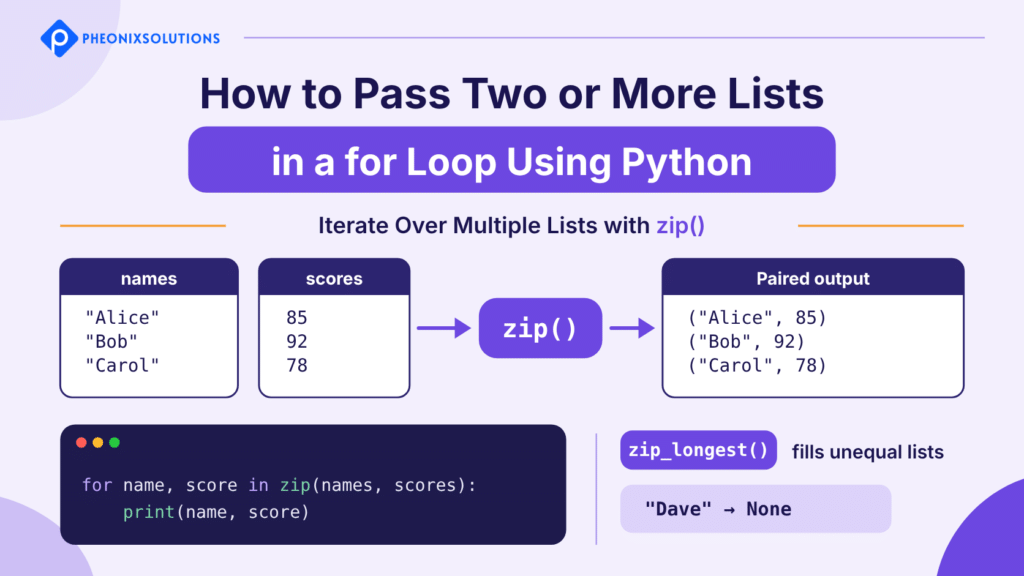
Python provides several built-in functions that make working with lists and other iterables easier. One such function is zip(), which allows you to iterate over two or more lists simultaneously using a single for loop.
In this article, we will explore how to use Python’s zip() function to iterate over multiple lists, match corresponding values, and handle lists with different lengths using itertools.zip_longest().
How to Iterate Over Multiple Lists Using the zip() Function
Let’s take an example using Avengers characters. Suppose we want to match the names of some Avengers characters with the actors who played those roles.
We will use four characters: Iron Man, Captain America, Thor, and Groot.
First, define two lists:
avengers_characters = [
    "Iron Man",
    "Captain America",
    "Thor",
    "Groot"
]

avengers_personalities = [
    "Robert Downey Jr.",
    "Chris Evans",
    "Chris Hemsworth",
    "Vin Diesel"
]
Now, we want to print each character along with the corresponding actor.
We can use a for loop with the zip() function:
for characters, personalities in zip(
    avengers_characters,
    avengers_personalities
):
    print("{} played by {}".format(characters, personalities))
Output:
Iron Man played by Robert Downey Jr.
Captain America played by Chris Evans
Thor played by Chris Hemsworth
Groot played by Vin Diesel
What Is the zip() Function in Python?
The zip() function takes two or more iterables and combines their corresponding elements into tuples.
In a for loop, it allows us to process multiple lists in parallel. The first element of each iterable is paired together, followed by the second element of each iterable, and so on.
Syntax:
zip(iterable1, iterable2, iterable3, ...)
The zip() function returns an iterator of tuples in Python 3. You can convert it into a list if you need to view all the generated pairs:
result = list(zip(avengers_characters, avengers_personalities))

print(result)
Output:
[
    ('Iron Man', 'Robert Downey Jr.'),
    ('Captain America', 'Chris Evans'),
    ('Thor', 'Chris Hemsworth'),
    ('Groot', 'Vin Diesel')
]
What Happens When Two Lists Have Different Lengths?
By default, the zip() function stops when the shortest iterable is exhausted.
For example, consider the following lists:
avengers_characters = [
    "Iron Man",
    "Captain America",
    "Thor",
    "Groot"
]

avengers_personalities = [
    "Robert Downey Jr.",
    "Chris Evans",
    "Chris Hemsworth"
]
The first list contains four elements, whereas the second list contains only three.
Now, execute the following code:
for characters, personalities in zip(
    avengers_characters,
    avengers_personalities
):
    print("{} played by {}".format(characters, personalities))
Output:
Iron Man played by Robert Downey Jr.
Captain America played by Chris Evans
Thor played by Chris Hemsworth
As you can see, Groot is not included because the second list does not contain a corresponding actor.
The zip() function does not raise an error in this situation. It simply stops when the shortest iterable has been processed.
How to Iterate Over Lists with Different Lengths Using zip_longest()
What if we want to process every element, even when the lists have different lengths?
Python provides the zip_longest() function through the itertools module.
Unlike zip(), zip_longest() continues until the longest iterable is exhausted. Missing values are filled with None by default, or with a custom value specified using the fillvalue parameter.
Example:
from itertools import zip_longest

avengers_characters = [
    "Iron Man",
    "Captain America",
    "Thor",
    "Groot"
]

avengers_personalities = [
    "Robert Downey Jr.",
    "Chris Evans",
    "Chris Hemsworth"
]

for characters, personalities in zip_longest(
    avengers_characters,
    avengers_personalities
):
    print("{} played by {}".format(characters, personalities))
Output:
Iron Man played by Robert Downey Jr.
Captain America played by Chris Evans
Thor played by Chris Hemsworth
Groot played by None
Here, zip_longest() processes all four characters. Since there is no corresponding actor for Groot, Python uses None as the default value.
Using a Custom Fill Value
You can also specify a custom value instead of None by using the fillvalue parameter.
from itertools import zip_longest

for characters, personalities in zip_longest(
    avengers_characters,
    avengers_personalities,
    fillvalue="Not Available"
):
    print("{} played by {}".format(characters, personalities))
Output:
Iron Man played by Robert Downey Jr.
Captain America played by Chris Evans
Thor played by Chris Hemsworth
Groot played by Not Available
Note: In Python 3, use itertools.zip_longest() instead of itertools.izip_longest(). The older izip_longest() name was used in Python 2 and is not available in Python 3.
How to Iterate Over Three or More Lists Using zip()
The zip() function is not limited to two lists. You can pass three or more iterables and access their corresponding elements in the same for loop.
For example:
characters = ["Iron Man", "Thor", "Hulk"]

actors = ["Robert Downey Jr.", "Chris Hemsworth", "Mark Ruffalo"]

movies = [
    "Avengers: Endgame",
    "Thor: Ragnarok",
    "Avengers: Age of Ultron"
]

for character, actor, movie in zip(characters, actors, movies):
    print("{} played by {} in {}".format(character, actor, movie))
Output:
Iron Man played by Robert Downey Jr. in Avengers: Endgame
Thor played by Chris Hemsworth in Thor: Ragnarok
Hulk played by Mark Ruffalo in Avengers: Age of Ultron
This approach makes it easier to process related information stored in multiple lists without using separate loops.
Using zip(strict=True) to Check List Lengths
Python 3.10 and later support the strict=True parameter in zip().
When enabled, Python raises a ValueError if the input iterables have different lengths instead of silently stopping at the shortest one.
Example:
characters = ["Iron Man", "Thor", "Hulk"]
actors = ["Robert Downey Jr.", "Chris Hemsworth"]

for character, actor in zip(characters, actors, strict=True):
    print("{} played by {}".format(character, actor))
This raises a ValueError because the lists have different lengths.
Use strict=True when every list is expected to contain the same number of elements and you want Python to detect mismatches.
Conclusion
Python’s zip() function provides a simple and efficient way to iterate over two or more lists simultaneously using a single for loop.
Here is a quick summary:
- Use
zip()to combine corresponding elements from multiple lists. - Remember that
zip()stops when the shortest iterable is exhausted. - Use
itertools.zip_longest()when you need to process all elements from the longest iterable. - Use
fillvalueto specify a replacement for missing values. - Use
zip(strict=True)in Python 3.10 and later when mismatched iterable lengths should raise an error.
Choosing the right function helps you write cleaner and more reliable Python code when working with multiple lists.
Frequently Asked Questions
1. How do you iterate over two lists simultaneously in Python?
Use the zip() function with a for loop:
for item1, item2 in zip(list1, list2):
    print(item1, item2)
2. What happens if two lists have different lengths when using zip()?
The zip() function stops when the shortest iterable is exhausted. Remaining elements in longer lists are not processed.
3. What is the difference between zip() and zip_longest()?
zip() stops at the shortest iterable, whereas itertools.zip_longest() continues until the longest iterable is exhausted and fills missing values with None or a specified custom value.
4. Is itertools.izip_longest() available in Python 3?
No. In Python 3, use itertools.zip_longest(). The izip_longest() name belongs to Python 2.
5. Can we pass more than two lists to zip()?
Yes. You can pass any number of iterables to zip(). It combines corresponding elements from each iterable into tuples.
References
Related Articles
Need Assistance?
Need help with Python development, debugging, or optimizing your application?
The Pheonix Solutions technical team can assist you with Python development, application maintenance, and troubleshooting.
For assistance, contact us.