
Post Date: April 11, 2019
Last Updated: October 16, 2026
Introduction
phpMyAdmin Blowfish Secret and TempDir errors are common configuration issues that may appear after installing phpMyAdmin. These warnings can be resolved by configuring a secure Blowfish secret and ensuring that the temporary directory exists and is accessible to the web server.
The Blowfish secret warning occurs when the authentication secret is missing, too short, or incorrectly configured. The TempDir warning appears when phpMyAdmin cannot access its configured temporary directory.
In this article, we will explain how to resolve both issues by updating the phpMyAdmin configuration file and setting the appropriate directory permissions.
Prerequisites
Before proceeding, ensure that you have:
- phpMyAdmin installed on your Linux server.
- SSH access to the server.
- Sufficient permissions to edit the phpMyAdmin configuration file.
- Access to the server’s terminal with permission to create directories and modify ownership and permissions.
- OpenSSL installed to generate a secure random secret.
Steps to Resolve the Errors
Step 1: Fix the Blowfish Secret Error
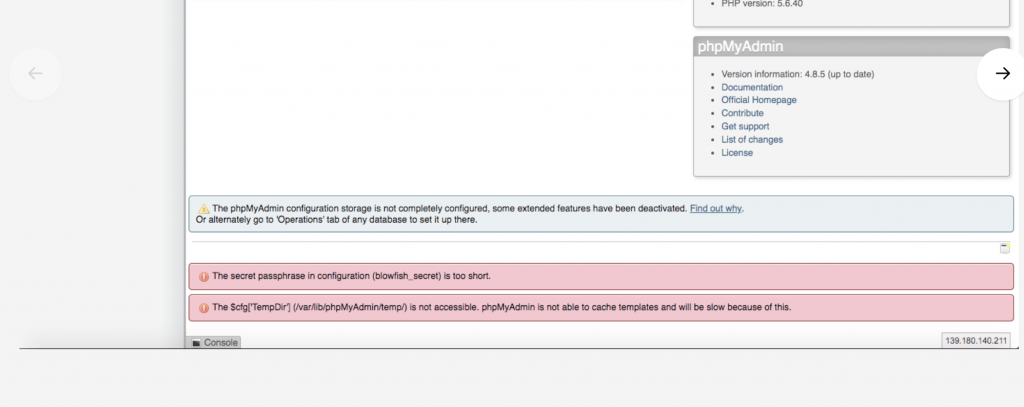
After logging in to phpMyAdmin, you may encounter the following warning:
Blowfish Secret Password Too Short Fix
This warning indicates that the Blowfish secret configured for cookie authentication is missing or does not meet the requirements of your phpMyAdmin version.
Open the phpMyAdmin configuration file. The original article uses the following path:
Command:
sudo nano /etc/phpMyAdmin/config.inc.php
The configuration file may be located elsewhere depending on your operating system and installation method.
Locate the following setting:
$cfg['blowfish_secret'] = 'xyzxyz';
Generate a secure random secret using OpenSSL:
openssl rand -hex 16
Copy the generated value and update the configuration:
$cfg['blowfish_secret'] = 'REPLACE_WITH_YOUR_GENERATED_SECRET';
Replace the placeholder with the generated value. Do not use the placeholder as the actual secret.
Save the configuration file and reload phpMyAdmin to check whether the warning has disappeared. Ensure the secret meets the requirements of your installed phpMyAdmin version.
Step 2: Fix the TempDir Is Not Accessible Error
After logging in to phpMyAdmin, you may see the following warning:
The $cfg[‘TempDir’] is not accessible.sudo mkdir -p /var/lib/phpmyadmin/tmp
This warning indicates that phpMyAdmin cannot access its configured temporary directory. The directory must exist and be writable by the web server process.
Create a dedicated temporary directory:
sudo mkdir -p /var/lib/phpmyadmin/tmp
Next, identify the user under which your web server runs. On many Debian or Ubuntu systems, it is www-data. On many RHEL-based systems, it is apache.
For Debian or Ubuntu, use:
sudo chown www-data:www-data /var/lib/phpmyadmin/tmp sudo chmod 700 /var/lib/phpmyadmin/tmp
For RHEL-based systems where the web server runs as apache, use:
sudo chown apache:apache /var/lib/phpmyadmin/tmp sudo chmod 700 /var/lib/phpmyadmin/tmp
Use only the commands appropriate for your server’s web server account.
Step 3: Update the TempDir Configuration
Open the phpMyAdmin configuration file:
sudo nano /etc/phpMyAdmin/config.inc.php
Locate the section for directories used to save and load files. Add the following configuration setting:
$cfg['TempDir'] = '/var/lib/phpmyadmin/tmp';
If a TempDir setting already exists, update it instead of adding a duplicate.
Save the file and reload phpMyAdmin. The temporary directory warning should disappear if the configured path exists and the web server has the required permissions.
Conclusion
The Blowfish secret and TempDir warnings are common phpMyAdmin configuration issues. The Blowfish secret must be configured appropriately for cookie authentication, while the temporary directory must exist and be accessible to the web server.
By updating the configuration file, generating a secure secret, and setting the correct directory ownership and permissions, you can resolve these warnings while maintaining a secure server configuration.
Frequently Asked Questions
1. What is the purpose of the Blowfish secret in phpMyAdmin?
The Blowfish secret is a configuration value used by phpMyAdmin’s cookie authentication mechanism to protect authentication cookies. It should be generated randomly and kept private.
2. Why does phpMyAdmin display the TempDir warning?
The warning appears when the configured temporary directory does not exist or the web server process cannot access it with the required permissions.
3. Can I use /tmp as the phpMyAdmin temporary directory?
Yes, provided the directory is accessible to the PHP process and permitted by the server configuration. A dedicated directory with restricted permissions is generally preferable for production environments.
Related Articles
- Resolve phpMyAdmin Configuration Storage Warning and Enable Extended Features
- Install PhpMyAdmin on Ajenti Control Panel
Talk to Our Experts
Need help resolving PHPMyAdmin configuration issues or managing your MySQL database? Our experts can help you troubleshoot server configuration problems and implement suitable solutions for your environment.
Get in touch with us: Contact our team