
Post Date: October 09, 2019
Last Updated: October 30, 2026
Introduction
Remote MySQL Database in CodeIgniter allows developers to connect their CodeIgniter applications to a MySQL database hosted on another server. This is particularly useful when developing and testing applications locally while managing data on a remote database server.
To establish a successful CodeIgniter remote database connection, you need to configure the database credentials, enable remote MySQL access, verify MySQL network settings, and configure firewall permissions. In this guide, we will explain the essential steps to connect a remote MySQL database to your CodeIgniter application securely.
Prerequisites
Before configuring a remote MySQL database connection in CodeIgniter, ensure the following requirements are met:
- Database credentials: Keep the correct database name, username, password, and remote database hostname or IP address ready.
- CodeIgniter configuration: Ensure you have access to the
database.phpconfiguration file in your CodeIgniter project. - Remote MySQL access: Make sure remote database access is enabled on the database server.
- Allowed IP address: Add your local machine’s public IP address to the Remote MySQL Access section in cPanel.
- MySQL configuration: Verify that the MySQL server is configured to listen for remote connections.
- Firewall permissions: Ensure the remote server firewall allows incoming MySQL connections on port
3306from your authorized IP address. - Network connectivity: Confirm that your local machine can reach the remote database server.
Implementation
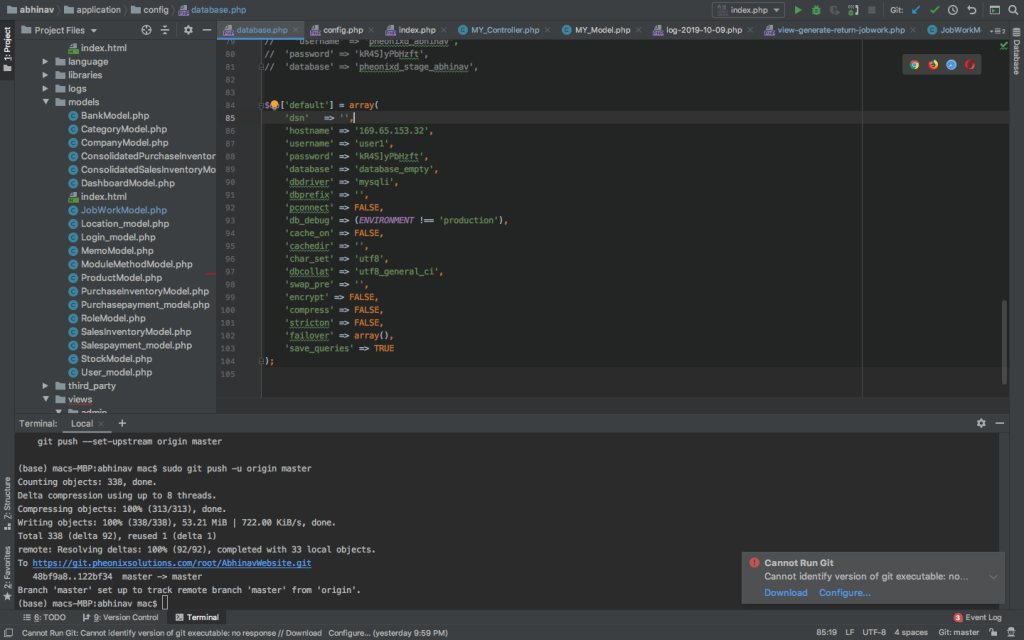
Configuring the Remote MySQL Database in CodeIgniter starts with updating the database connection settings in the application/config/database.php file. Make sure the hostname, username, password, and database name are correct to establish a successful connection.
There are few things have to checked to connect remote database for your codeigniter project.
The checks are summarised in the following.
Enter valid details in database.php file
Check you have entered right details about the database in your database.php file.
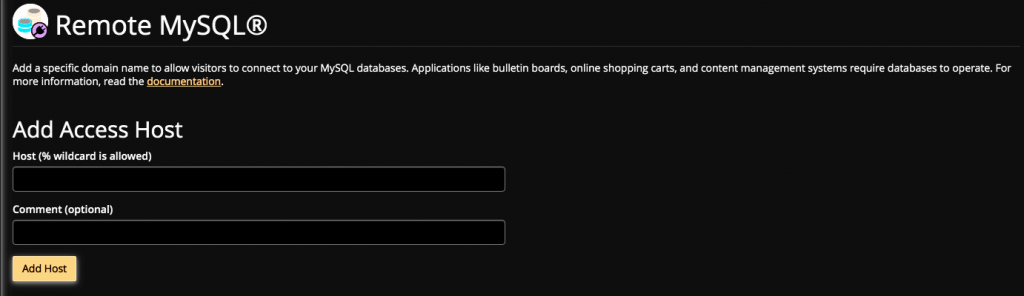
Allow host address for remote database
Make sure your host address allowed to access the database in remote server. Probably via Cpanel.
Check your local machine
Ensure your local machine was being allowed to access remote database.
To verify mysql configuration file check bind-address line in it. If it points to 127.0.0.1, change it to 0.0.0.0. 0.0.0.0 means allowing all IP addresses.
If your are using mac, check inside my.cnf.
Check remote server firewall
Make sure your IP allowed in the remote server firewall rules.
Conclusion
Connecting a remote MySQL database to a CodeIgniter application requires proper database credentials, remote access permissions, MySQL configuration, and firewall settings. By verifying these configurations, you can establish a successful connection between your local development environment and the remote database server.
Always restrict remote database access to trusted IP addresses instead of allowing connections from all locations. This helps protect your database from unauthorized access.
For detailed information about connecting to a remote MySQL database in CodeIgniter, including database configuration, remote access permissions, MySQL bind-address settings, and firewall configuration, refer to the official CodeIgniter Documentation Link.
For more CodeIgniter tutorials, MySQL database configuration, remote database connectivity troubleshooting, and web development guides, visit pheonixsolutions.com.
FAQs
1. How can I connect a remote MySQL database in CodeIgniter?
Configure the remote database hostname, database name, username, and password in the application/config/database.php file. Ensure remote access is enabled on the database server.
2. How do I enable remote MySQL access in cPanel?
Log in to cPanel, navigate to Remote MySQL, add your local machine’s public IP address, and save the configuration.
3. Which port is used for remote MySQL connections?
MySQL uses port 3306 by default. Ensure this port is allowed through the remote server firewall.
Related Articles
How to Copy a Table from One Database to Another in MySQL?
How to Disable/Lock a MySQL User Account from CLI?
Need Help with Remote MySQL Database Connectivity in CodeIgniter?
Need help configuring remote MySQL database connections, setting up database access permissions, or troubleshooting CodeIgniter database connectivity issues? Our experts can assist with MySQL configuration, cPanel Remote MySQL setup, firewall configuration, database security, and CodeIgniter development requirements. Get in touch with our team here.