
Post Date: February 22, 2019
Last Updated: October 09, 2026
Introduction
Roundcube is a web-based email client that allows users to access and manage their email accounts through a browser. It is commonly deployed with Postfix, Dovecot, and a database backend.
After installing VestaCP on Ubuntu, you may encounter the following error when opening Roundcube:
DATABASE ERROR: CONNECTION FAILED
One possible cause, particularly in the older VestaCP installations described in this guide, is a Dovecot configuration conflict. The related log message may be:
Error: User initialization failed: namespace configuration error: Duplicate namespace prefix: ""
This indicates that Dovecot is encountering conflicting namespace definitions. Dovecot namespaces define how mail folders such as INBOX and Sent are presented to email clients.
This guide explains how to inspect the configuration, identify duplicate namespace settings, apply the appropriate fix, and verify that the mail services work correctly.
Symptoms of the Problem
You may experience one or more of the following symptoms:
- Roundcube displays “DATABASE ERROR: CONNECTION FAILED.”
- Webmail login fails or does not load correctly.
- Dovecot logs report a duplicate namespace prefix.
- IMAP authentication or mailbox initialization fails.
- The problem appears after a fresh VestaCP installation or a configuration change.
Important: A Roundcube database connection error can also result from incorrect database credentials, unavailable PostgreSQL/MySQL services, or network connectivity problems. Check the logs before assuming Dovecot is the cause.
Root Cause
Dovecot uses namespaces to organize mail folders. In the reported VestaCP configuration, the default inbox namespace was already defined in /etc/dovecot/dovecot.conf, while another configuration file, /etc/dovecot/conf.d/15-mailboxes.conf, was suspected of introducing a conflicting definition.
When namespace definitions conflict, Dovecot may fail to initialize a user’s mailbox.
Dovecot documentation explains that namespaces have prefixes and that the empty prefix is commonly used for the default namespace. Only one namespace can be designated as the inbox namespace with inbox = yes.
Step-by-Step Solution
Step 1: Check the Dovecot service
Run:
systemctl status dovecot
Check recent service logs:
journalctl -u dovecot -n 50 --no-pager
Look for messages containing Duplicate namespace prefix or other configuration errors.
Step 2: Inspect the namespace configuration
Check the main configuration file:
grep -n -A15 -B5 'namespace' /etc/dovecot/dovecot.conf
Inspect the additional mailbox configuration:
cat /etc/dovecot/conf.d/15-mailboxes.conf
Check which configuration files are included:
grep -n '15-mailboxes.conf' /etc/dovecot/dovecot.conf
Dovecot’s effective configuration can also be inspected with:
doveconf -n
Step 3: Back up the configuration
Before changing any settings, create a backup:
cp -a /etc/dovecot/dovecot.conf \
  /etc/dovecot/dovecot.conf.bak

cp -a /etc/dovecot/conf.d/15-mailboxes.conf \
  /etc/dovecot/15-mailboxes.conf.bak
Step 4: Correct the duplicate namespace definition
If the logs and configuration confirm that 15-mailboxes.conf is being included and introduces the conflicting namespace, remove the duplicate definition or disable the relevant include.
The original workaround for the affected VestaCP installation was to remove the reference to:
/etc/dovecot/conf.d/15-mailboxes.conf
Do not remove the file or disable its include without confirming its contents and purpose. It may contain valid mailbox settings required by your installation. Preserve the existing mailbox configuration and ensure that exactly one appropriate default inbox namespace is defined.
Step 5: Validate the configuration
Run:
doveconf -n
Review the output for duplicate namespace definitions and configuration errors. If the configuration is invalid, restore the backup or correct the conflicting settings before restarting the service.
Step 6: Restart Dovecot
After correcting the configuration, restart the service:
systemctl restart dovecot
Verify that it is running:
systemctl status dovecot
Review the latest logs:
journalctl -u dovecot -n 50 --no-pager
Step 7: Verify Roundcube and database connectivity
Open Roundcube in your browser and try logging in.
If the error remains, check the Roundcube configuration and logs. Confirm that the configured database host, port, database name, username, and password are correct. Verify that the database service is reachable from the Roundcube server.
For installations using an external PostgreSQL server, test connectivity with the appropriate PostgreSQL client and confirm that the database permits connections from the Roundcube server.
Also check the web server and PHP logs for additional errors.
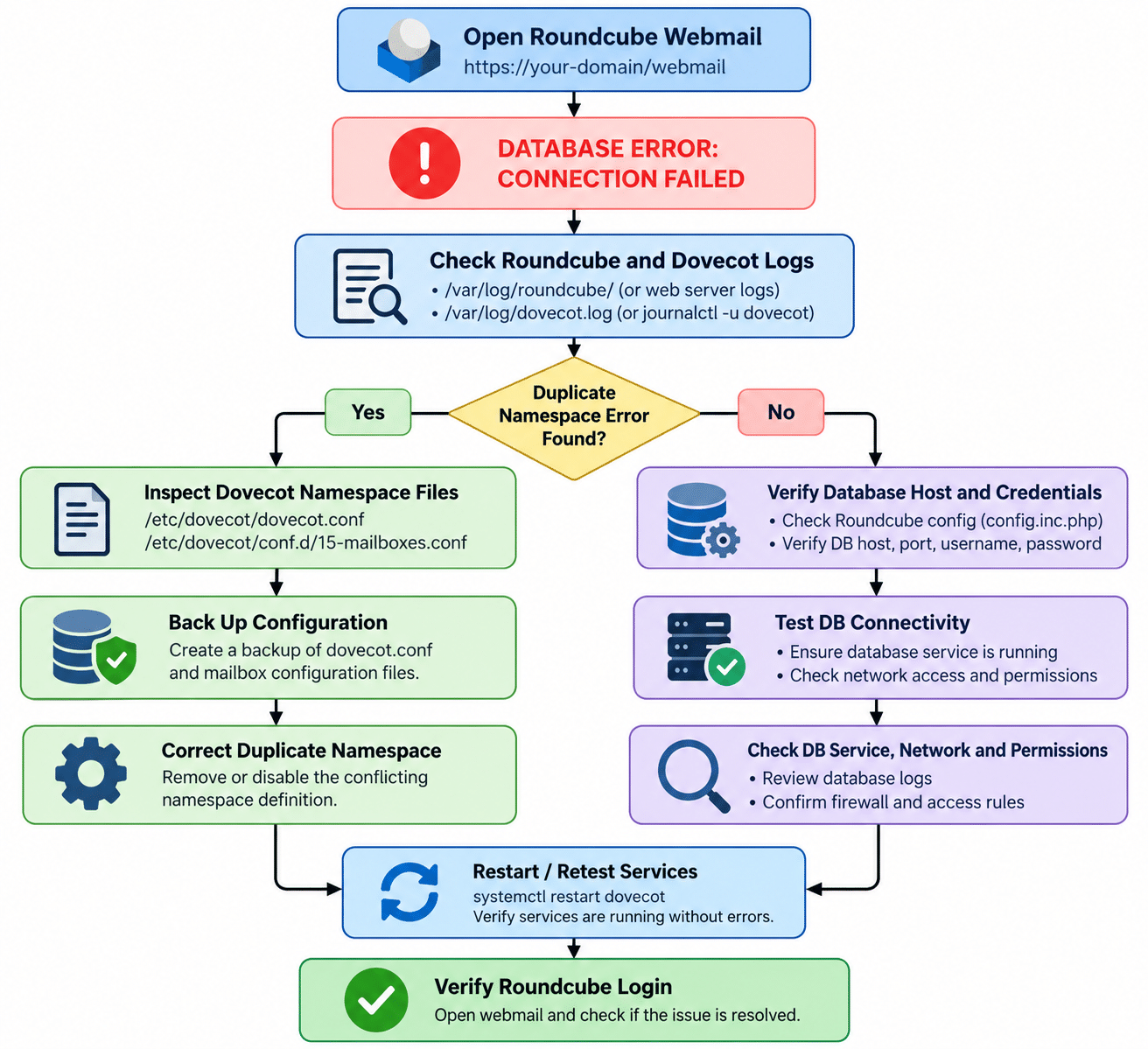
Troubleshooting Flow Map
Use the following flow to identify the cause of the failure:
Conclusion
The Roundcube “DATABASE ERROR: CONNECTION FAILED” message can have several causes. In the older VestaCP scenario covered here, a duplicate Dovecot namespace definition was a suspected cause of the failure.
Inspect the Dovecot logs, identify the conflicting namespace, back up the configuration, and validate the corrected settings before restarting the service. If the error continues, investigate Roundcube’s database connection separately.
Following these steps helps administrators troubleshoot webmail failures systematically while reducing the risk of disrupting existing email services.
Frequently Asked Questions
1. Why does Roundcube show “DATABASE ERROR: CONNECTION FAILED”?
This message indicates a database connection problem reported by Roundcube. Possible causes include incorrect database credentials, an unavailable database, network restrictions, or a related mail-server configuration problem. Check the logs to determine the actual cause.
2. What does “Duplicate namespace prefix: “”” mean?
It means Dovecot has encountered conflicting namespace definitions using the same empty prefix. Inspect the active namespace configuration and ensure that the default inbox namespace is configured correctly.
3. Is it safe to remove 15-mailboxes.conf?
Not in every installation. The file may contain valid mailbox definitions. First inspect the file and the main Dovecot configuration, then remove or disable only the conflicting configuration. Back up the files before making changes.
Related Articles
- Find roundcube version provided by the cPanel and upgrade the roundcube
- Disable server in roundcube login page
Talk to our experts
Have a technology challenge or looking for the right solution for your business? Our team can help you with cloud, DevOps, development, infrastructure, design, and more. Feel free to reach out to our experts here.