
Introduction
Kubernetes provides powerful capabilities for deploying, managing, and scaling containerized applications. However, as clusters grow, infrastructure costs can increase due to oversized CPU and memory requests, underutilized worker nodes, unnecessary replicas, persistent storage, network traffic, and insufficient cost monitoring.
A structured Kubernetes Cost Optimization process helps DevOps engineers, platform engineers, and cloud administrators identify these inefficiencies and reduce infrastructure spending without compromising application performance, reliability, or availability.
The goal is not simply to run fewer nodes or allocate fewer resources. It is to ensure that Kubernetes workloads use the right amount of compute, memory, storage, and networking resources based on actual demand.
This guide covers practical Kubernetes cost optimization steps, including resource right-sizing, autoscaling, node consolidation, storage management, workload scheduling, cost monitoring, and ongoing optimization.
Architecture Overview
The following diagram illustrates a typical Kubernetes cost optimization architecture. Monitoring and cost allocation identify waste, workload autoscaling adjusts application capacity, and node autoscaling adjusts infrastructure capacity.
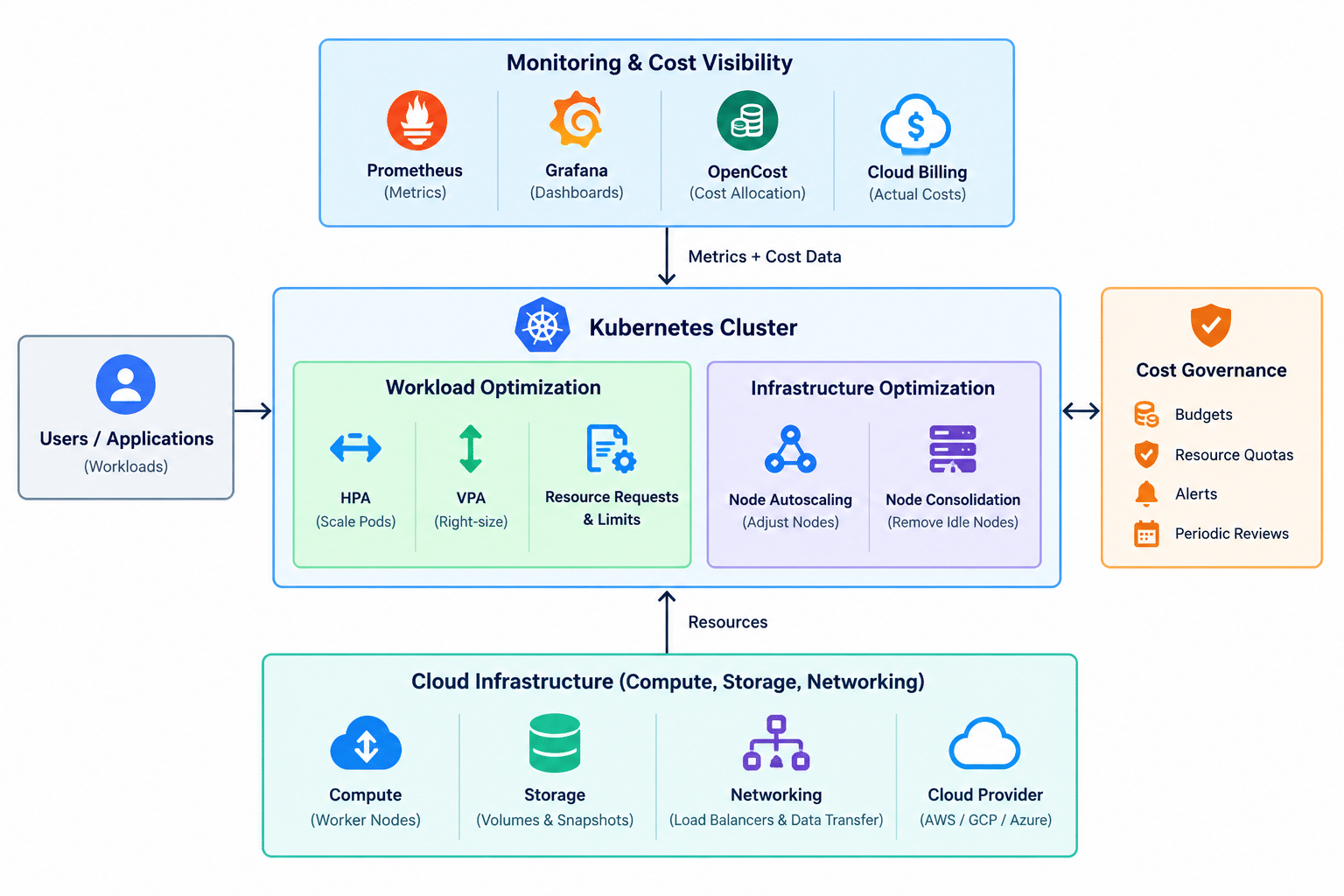
Conceptual architecture: the components and billing integrations vary by Kubernetes platform and cloud provider.
The key principle is to combine workload-level optimization with infrastructure-level optimization. Kubernetes autoscalers make decisions based on resource requests, scheduling constraints, and observed demand, so accurate resource configuration is essential to effective cost management.
Prerequisites
Before starting a Kubernetes cost optimization review, ensure that you have:
- Access to the Kubernetes cluster using
kubectlwith appropriate permissions. - Access to the cloud provider’s billing console or cost management reports.
- Visibility into CPU, memory, network, and storage utilization.
- Knowledge of the applications and workloads running in the cluster.
- Information about traffic patterns, peak workloads, and availability requirements.
- Access to deployment manifests, Helm charts, or GitOps configuration.