Introduction
An Addon Domain in cPanel allows you to host multiple websites under a single hosting account. Each addon domain functions as a separate website with its own content, while sharing the same control panel.
Prerequisites
Before adding an addon domain, ensure the following:
- You have access to your cPanel account
- Your hosting plan supports addon domains
- The domain name is already registered
- The domain’s DNS is pointed to your hosting server
Implementation
Step : 1
Login to your cPanel.
Step : 2
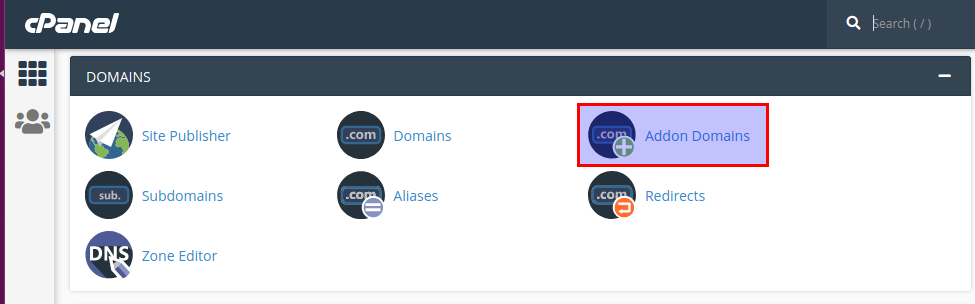
Click addon domain icon under the domain section.
Step : 3
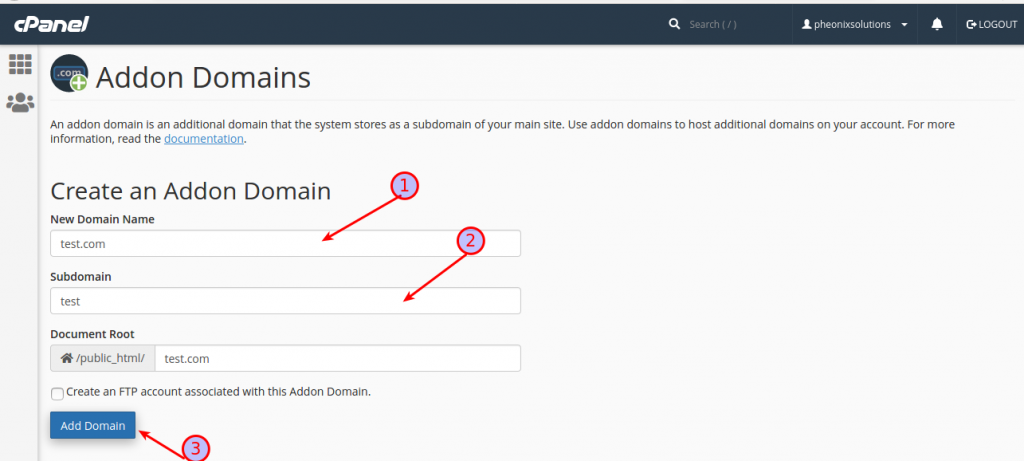
- Add new domain name
- You can also create subdomain
- Add all information the click the add domain option .
The notification will appear in the topic right cornor of the screen in “Successfully created the new domain”.
Notes
- The addon domain will have its own folder inside your public_html directory
- You can upload website files to the assigned document root
- DNS propagation may take some time after setup
- Ensure the domain is properly pointed to your server
Conclusion
Adding an addon domain in cPanel is a quick and efficient way to manage multiple websites under a single hosting account. With proper configuration, each domain can operate independently while sharing the same resources.