Introduction
Nowadays, securing websites with HTTPS is very important for data protection and user trust. HTTPS encrypts the communication between the visitor’s browser and the website server, helping protect sensitive information such as login details and personal data. In cPanel, enabling automatic redirection from HTTP to HTTPS ensures that all visitors access the secure version of the website.
Prerequisites
Before enabling HTTP to HTTPS redirection in cPanel, make sure the following requirements are met:
- A valid SSL certificate must be installed for the domain.
- Access to the cPanel account is required.
- The domain should be properly pointed to the hosting server.
- HTTPS should already be working when accessed manually in the browser.
Steps to Enable Redirect from HTTP to HTTPS in cPanel
Step 01:
Login to your cPanel account.
Step 02:
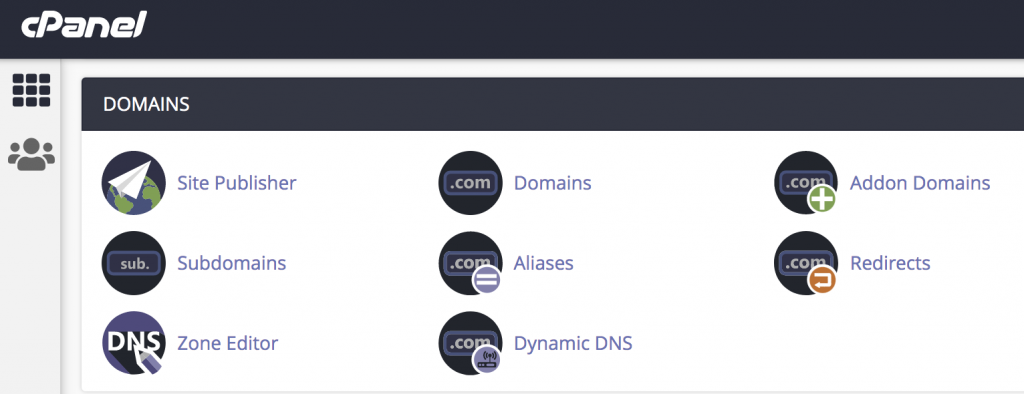
Under the Domains section, click on Domains.
Step 03:
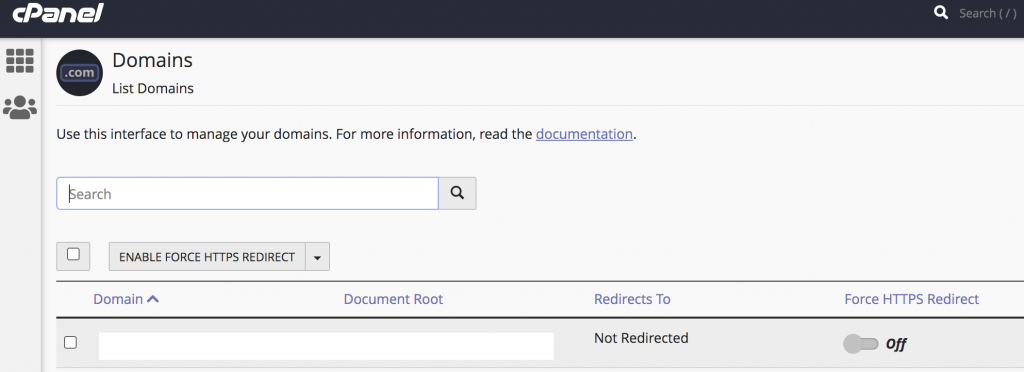
Locate your domain and find the Force HTTPS Redirect option.
Click on Off to enable it. Once enabled, it will change to On.
Step 04:
Now your website will automatically redirect visitors from http:// to https:// in the browser.
Conclusion
Enabling HTTP to HTTPS redirection in cPanel is a simple but important step to improve website security and user trust. Once the redirect is enabled, all visitors will automatically access the secure HTTPS version of the website, ensuring safer communication and better SEO performance.