Introduction
Changing the mount point of a disk drive allows you to use the drive from a different directory location on your server. This is commonly done when adding additional storage for hosting accounts or application data.
Prerequisites
- Root or SSH access to the server
- An additional disk is attached to the server
- Basic knowledge of Linux file systems and mount points
Implementation
Please follow the steps below to change the mount point of your drive to another location.
First, identify the newly added drive on the server using the following command:
df
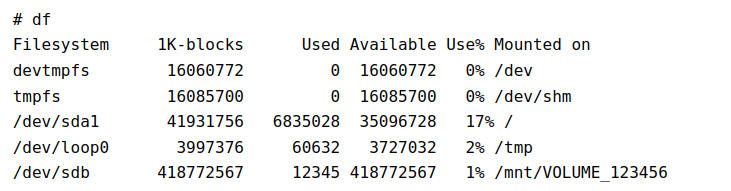
From the output, identify the new disk attached to the server.
Example:
/dev/sdb → mounted at /mnt/VOLUME_123456
In this example, the drive /dev/sdb is currently mounted at /mnt/VOLUME_123456. Suppose you want to change the mount point to /home2 so it can be used for cPanel accounts.
Step 1: Unmount the existing drive

Step 2: Create the new mount-point directory

Step 3: Mount the drive to the new location

Step 4: Verify the new mount point
Run the following command again to confirm that the mount point has been changed successfully:

Step 5: Make the mount permanent
To ensure the drive is automatically mounted after every reboot, add the appropriate entry to the /etc/fstab file.
Conclusion
By changing the mount point of the disk drive, you can efficiently utilize additional storage on your Linux server for hosting accounts, backups, or application data.