Introduction
The expose_php setting in PHP controls whether the PHP version information is displayed in HTTP headers. This setting can be managed easily from WHM using the MultiPHP INI Editor.
Prerequisites
- Root access to WHM
- Basic knowledge of PHP configuration settings
- SSH access to the server for verification
Implementation
How to Enable the expose_php Extension Using WHM
Step 1
Log in to WHM as the root user.
Step 2
Under the Software section, select:
MultiPHP INI Editor
Step 3
Click on the Editor Mode tab.
Step 4
Select the required PHP version.
Step 5
Search for the following parameter:
expose_php
Step 6
Change the value from:
Off → On
Save the changes.
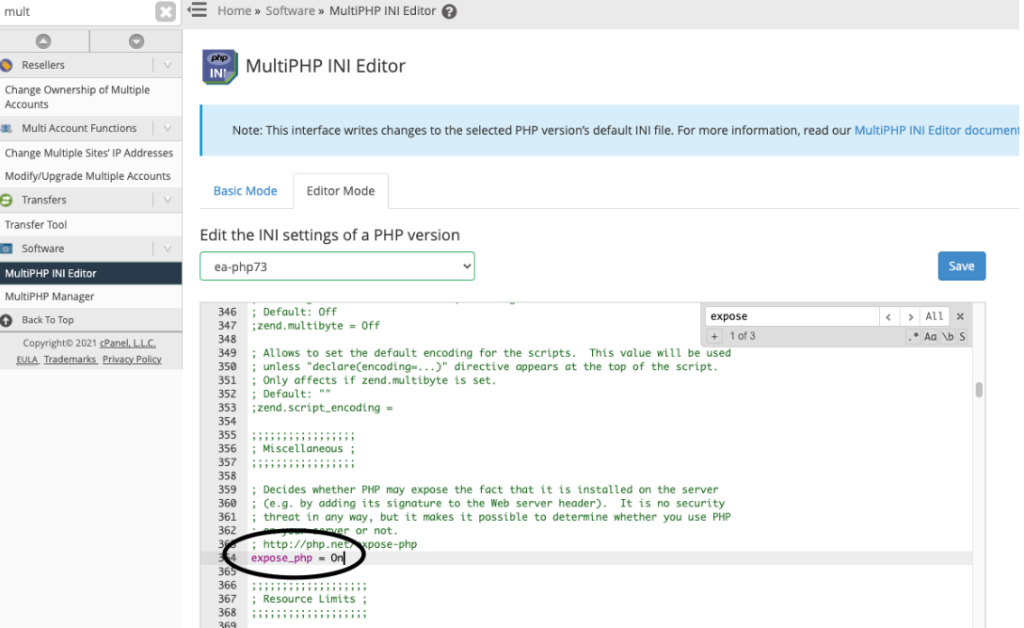
How to Confirm if expose_php is Enabled
You can verify the setting using the following command through SSH:
curl -IL domain.com
If expose_php is enabled, you will see the following header starting with X-Powered-By:
curl -IL domain.com/info.php
HTTP/1.1 200 OK
Date: Sun, 23 May 2021 12:49:22 GMT
Server: Apache
X-Powered-By: PHP/7.3.27
Conclusion
Using the MultiPHP INI Editor in WHM, you can easily enable the expose_php setting and verify it through HTTP response headers using SSH commands.