Introduction
ProxyErrorOverride is an Apache directive that allows custom error pages to be displayed instead of the default error messages returned by a backend server or proxy service. In a WHM/cPanel environment, enabling ProxyErrorOverride can improve the user experience by ensuring that visitors see branded and customized error pages when backend services encounter issues. This is particularly useful for websites that use reverse proxies, load balancers, or application servers behind Apache.
Prerequisites
Before enabling ProxyErrorOverride in WHM, ensure the following requirements are met:
- Root or reseller access to WHM with sufficient privileges.
- A server running Apache with the required proxy modules enabled.
- Access to Apache configuration files or WHM’s Apache Configuration interface.
- A backup of the current Apache configuration.
- Custom error pages configured or available for use.
IMPLEMENTATION
Procedure
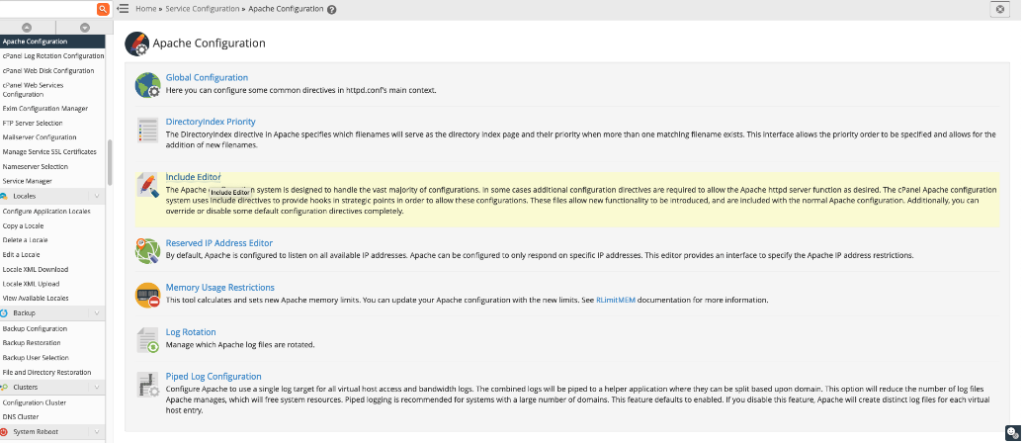
- Login to WHM and navigate to WHM » Service Configuration » Apache Configuration » Include Editor:
2. Scroll down to Post VirtualHost Include and insert the following:
ProxyErrorOverride On
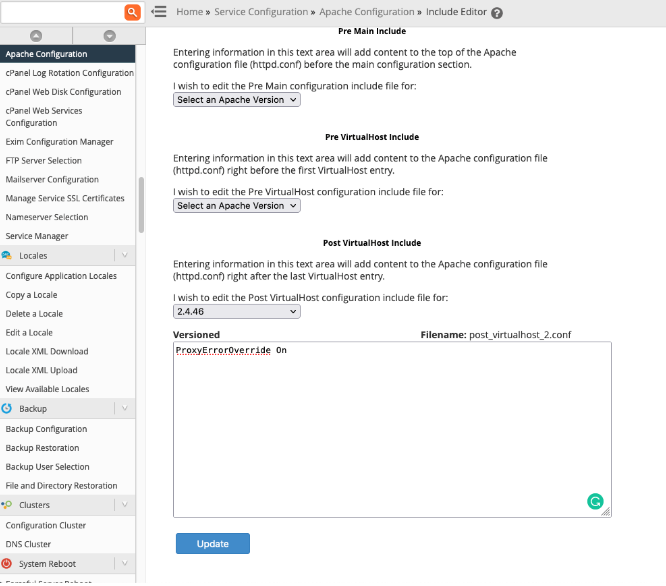
3. Press the Update button and then the Restart Apache button.
Conclusion
Enabling ProxyErrorOverride in WHM allows administrators to replace backend-generated error messages with custom error pages, creating a more professional and consistent experience for website visitors. By ensuring the necessary prerequisites are met and properly configuring the Apache settings, administrators can improve error handling, branding, and overall website usability while maintaining better control over how errors are presented to users.