Introduction
A DNS Cluster in WHM is a group of nameservers that share DNS records with each other. It helps improve DNS reliability, availability, and management by allowing DNS records to be synchronized across multiple servers.
Using DNS clustering, you can separate DNS services from the main web server and manage DNS records more efficiently. This is useful for hosting environments where multiple servers need to share and maintain the same DNS zone records.
Prerequisites
Before enabling DNS Clusters in WHM, make sure you have the following:
- Root access to the WHM server.
- A valid WHM/cPanel server.
- At least one additional DNS server or nameserver, if you plan to configure clustering between multiple servers.
- Stable network connectivity between the servers.
- Required firewall ports allowed for cPanel/WHM communication.
Steps to Enable DNS Clusters in WHM
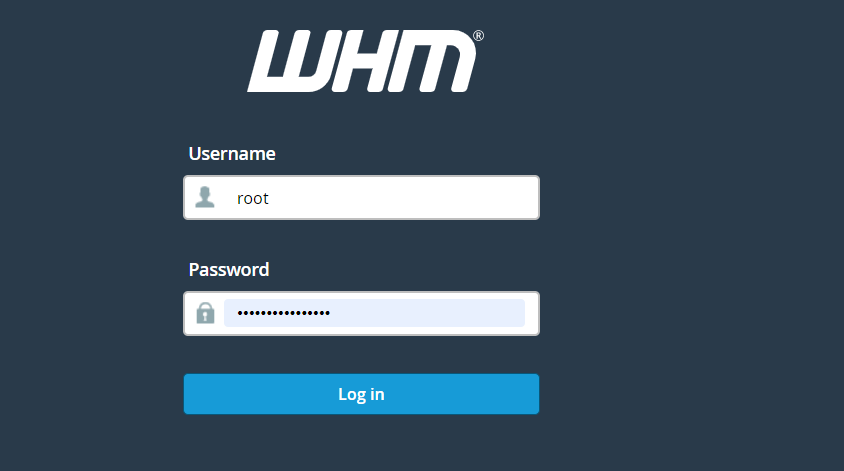
Step 1: Log in to WHM
Log in to your WHM account using the root credentials.
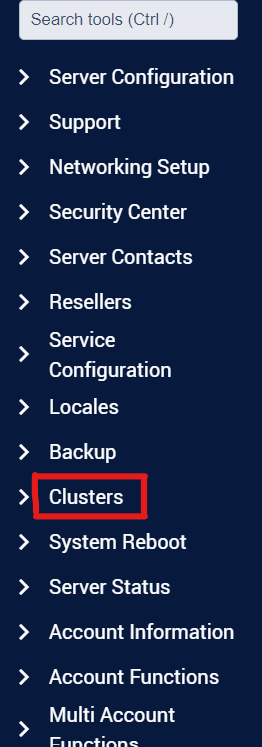
Step 2: Go to Clusters
In the WHM dashboard, search for or find the Clusters option from the left-side menu.
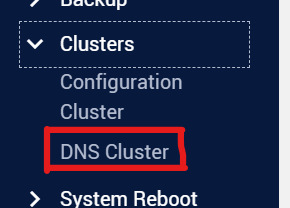
Step 3: Select DNS Cluster
Under the Clusters section, click on the DNS Cluster option.
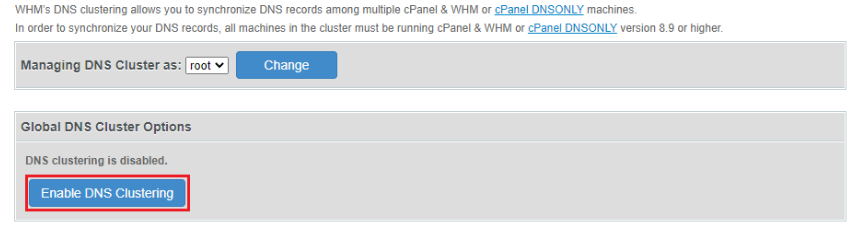
Step 4: Enable DNS Clustering
Click the Enable DNS Clustering button to activate DNS clustering on the server.
Step 5: Confirmation
Once DNS clustering is enabled successfully, WHM will display a success message.
Conclusion
DNS Clustering in WHM helps improve DNS management and reliability by synchronizing DNS records across multiple nameservers. After enabling DNS clustering, you can add and configure additional DNS servers to share DNS zone records between servers. This setup is useful for maintaining better DNS availability and separating DNS services from web hosting servers.