Introduction
In shared hosting environments, the main shared IP address plays a critical role in how new hosting accounts are created and managed. In cPanel & WHM, this IP is automatically assigned to every new shared hosting account, making server administration faster and more efficient.
However, there are situations where changing the main shared IP becomes necessary—such as IP reputation issues, infrastructure upgrades, provider changes, or better network routing. Fortunately, cPanel & WHM provide built-in tools that allow server administrators to safely add a new IP address, set it as the primary shared IP, and migrate existing hosting accounts with minimal disruption.
This guide walks you through a clear, step-by-step process to change the main shared IP address on your cPanel server while ensuring service continuity and proper DNS handling.
Add a New IP Address to Your Server
Before making any changes, request a new IP address from your hosting provider. Along with the IP, you’ll also need the subnet mask, which depends on your provider’s network configuration.
Add the IP in WHM
- Log in to WHM as root
- Navigate to IP Functions → Add a New IP Address
- Enter:
- New IP address
- Subnet mask
- Click Submit
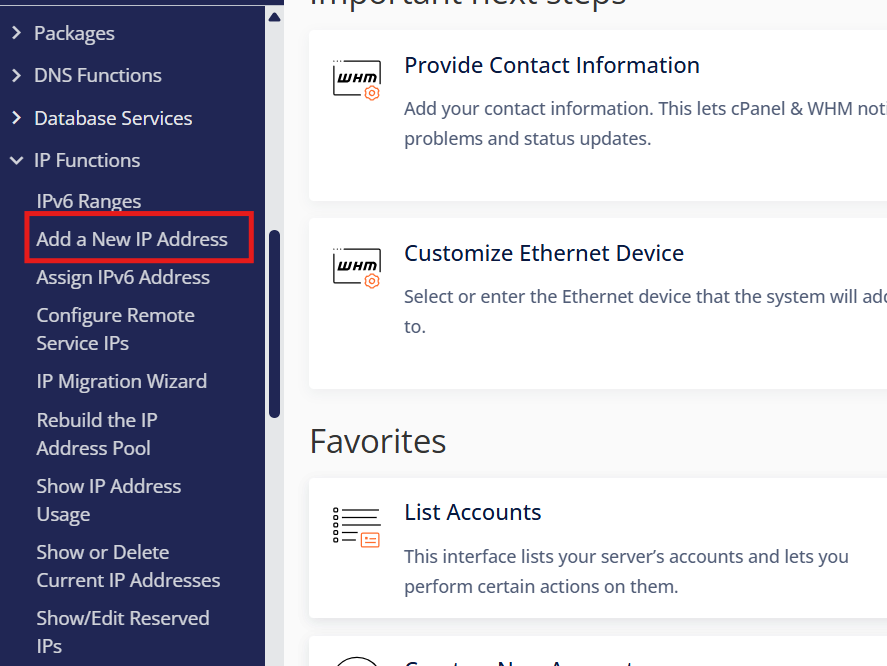
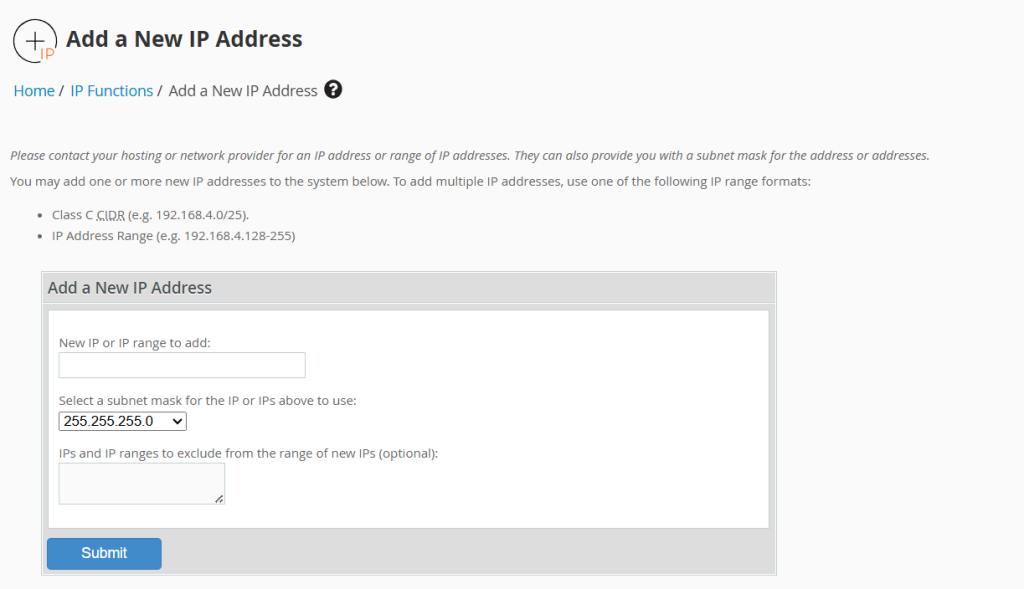
Once completed, the IP becomes available for use across the server.
Conclusion
Changing the main shared IP address on a cPanel & WHM server is a routine but critical administrative task that can significantly improve server reliability, email deliverability, and overall network performance. By first adding a new IP address through WHM and then carefully assigning it as the primary shared IP, administrators can ensure a smooth transition with minimal impact on hosted accounts.
Following a structured, step-by-step approach helps avoid common pitfalls such as DNS mismatches, service interruptions, or account misconfigurations. With proper planning, verification, and DNS updates, existing websites and services continue to function seamlessly while benefiting from the new IP address.
In short, cPanel & WHM provide all the necessary tools to handle this process safely and efficiently—making shared IP changes a manageable task even in production environments.