Introduction
Changing a cPanel username is useful when you need to standardize account names, resolve naming conflicts, or update an account to follow your organization’s naming conventions. cPanel provides the WHM API (modifyacct) command, which allows administrators to safely rename an existing cPanel account from the command line.
When a cPanel username is changed, the associated system user, home directory, and account configuration are updated automatically. However, you should verify your websites, email accounts, cron jobs, and any applications that reference the old username after the rename.
Prerequisites
Before proceeding, ensure that:
- You have root SSH access to the server.
- A full backup of the cPanel account has been created.
- The new username:
- Contains only lowercase letters and numbers.
- Does not exceed 16 characters.
- Does not already exist on the server.
IMPLEMENTATION
Step 1: Verify the Existing Account
Before renaming the account, verify that the current cPanel account exists.
whmapi1 accountsummary user=oldusernameExample:
whmapi1 accountsummary user=example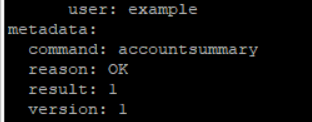
If the account exists, WHM returns its account information.
Step 2: Rename the cPanel Username
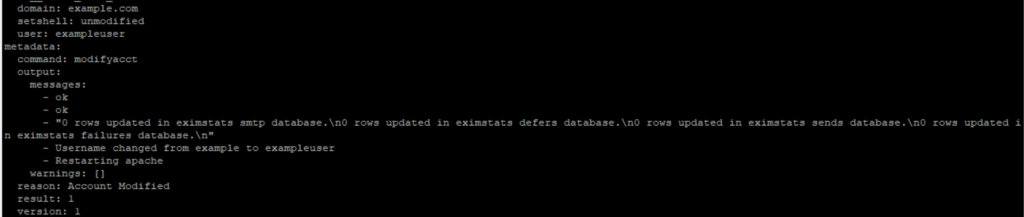
Use the modifyacct API command to rename the account.
whmapi1 modifyacct user=oldusername newuser=newusernameExample:
whmapi1 modifyacct user=example newuser=exampleuser
Step 3: Verify the Renamed Account
Confirm that the account has been renamed successfully.
whmapi1 accountsummary user=exampleuser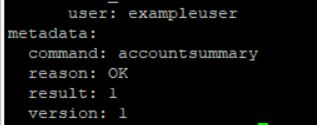
Step 4: Verify the Home Directory
Ensure that the home directory has been renamed.
ls -ld /home/exampleuserExample output:
drwx--x--x 25 exampleuser exampleuser 4096 Jul 18 10:30 /home/exampleuserConclusion
Renaming a cPanel username using the WHM API is a straightforward process that can be completed with the modifyacct command. Before making the change, ensure you have a recent backup and verify that the new username meets cPanel’s naming requirements. After the rename, confirm that the account, websites, email services, databases, and scheduled tasks are functioning correctly. Performing these verification steps helps ensure a smooth transition with minimal service interruption.