
Post Date: April 28, 2018
Last Updated: September 19, 2026
Introduction
When Apache (httpd) is configured as a reverse proxy, load balancer, or needs to communicate with backend services such as Tomcat, Node.js, Docker containers, Kubernetes services, or external APIs, SELinux may block outbound network connections even if the proxy configuration is correct.
A common symptom is that Apache starts successfully, but requests fail with errors such as 503 Service Unavailable, Connection Refused, or Permission Denied in the Apache error logs.
This article explains how to identify the issue and enable Apache network connectivity through SELinux.
Understanding the Issue
SELinux (Security-Enhanced Linux) provides mandatory access controls on Linux systems. By default, Apache runs under the httpd_t security context, which restricts outbound network access.
As a result, Apache may be unable to connect to:
- Backend application servers
- Reverse proxy targets
- External APIs
- Database servers (in some configurations)
- Docker or Kubernetes services
- Internal microservices
Even when firewall rules and proxy settings are correct, SELinux can silently block the connection.
Common Symptoms
You may encounter errors similar to:
AH00957: HTTP: attempt to connect to 127.0.0.1:8080 failed
AH01114: HTTP: failed to make connection to backend
Permission denied
503 Service Unavailable
Check SELinux status:
getenforce
Example output:
Enforcing
If SELinux is enforcing, continue with the steps below.
Step 1: Temporarily Allow Apache Network Connections
Run the following command:
/usr/sbin/setsebool httpd_can_network_connect 1
Verify the value:
getsebool httpd_can_network_connect
Expected output:
httpd_can_network_connect --> on
This change remains active until the server is rebooted.
Step 2: Test the Proxy Configuration
After enabling the SELinux boolean temporarily:
- Restart Apache
systemctl restart httpd
- Test the application URL.
- Review Apache logs:
tail -f /var/log/httpd/error_log
If the proxy begins working correctly, SELinux was blocking the connection.
Step 3: Make the Change Permanent
Once confirmed, enable it permanently:
/usr/sbin/setsebool -P httpd_can_network_connect 1
Verify:
getsebool httpd_can_network_connect
Output:
httpd_can_network_connect --> on
The -P option writes the configuration permanently so it survives reboots.
Troubleshooting Flow
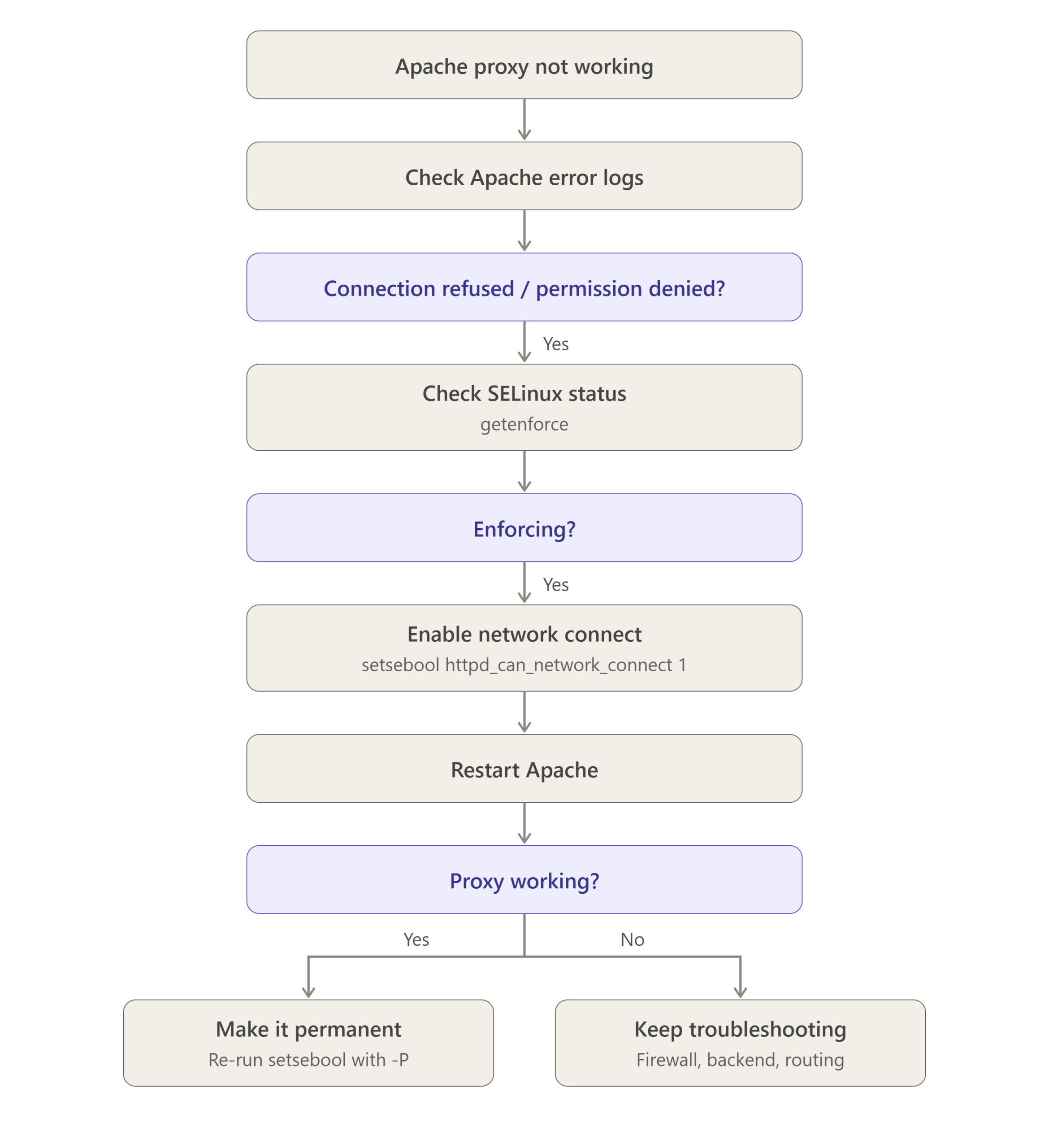
Useful SELinux Commands
Check SELinux Status
sestatus
View Current Boolean Value
getsebool httpd_can_network_connect
List All Apache SELinux Booleans
getsebool -a | grep httpd
Check SELinux Audit Logs
ausearch -m avc -ts recent
or
grep denied /var/log/audit/audit.log
Real-World Use Cases
Enabling httpd_can_network_connect is commonly required when Apache acts as:
| Scenario | Example |
|---|---|
| Reverse Proxy | Apache → Tomcat |
| Load Balancer | Apache → Multiple Backend Servers |
| API Gateway | Apache → External APIs |
| Docker Proxy | Apache → Docker Containers |
| Kubernetes Ingress | Apache → Cluster Services |
| Node.js Proxy | Apache → Express Application |
| Python Proxy | Apache → Gunicorn/Uvicorn |
Conclusion
If Apache reverse proxy, load balancer, or backend connectivity suddenly fails while SELinux is running in Enforcing mode, the httpd_can_network_connect boolean is often the root cause.
A quick test using:
setsebool httpd_can_network_connect 1
can help identify the issue. Once verified, make the change permanent using:
setsebool -P httpd_can_network_connect 1
This approach preserves the security benefits of SELinux while allowing Apache to communicate with backend applications and services. By following this method, administrators can resolve proxy connectivity issues efficiently without compromising overall server security.
Frequently Asked Questions (FAQ)
1. Why does Apache work when SELinux is disabled?
When SELinux is disabled or set to permissive mode, security restrictions are not enforced. Apache can freely connect to backend services, which is why proxy connections start working.
2. Is enabling httpd_can_network_connect safe?
Yes. This is the recommended SELinux method for allowing Apache to initiate outbound network connections. It is significantly safer than disabling SELinux entirely.
3. Do I need to reboot after running setsebool -P?
No. The change takes effect immediately and remains persistent across future reboots.
Related Articles
- Setup password authentication for Apache2 in Centos
- How to Install Apache on macOS via Homebrew
- Apache Rules for wildcard API end points
Talk to our experts
Have a technology challenge or looking for the right solution for your business? Our team can help you with cloud, DevOps, development, infrastructure, design, and more. Feel free to reach out to our experts here.
I had the same issue and this solved it.