
Post Date: December 26, 2018
Last Updated: October 02, 2026
Introduction
This guide explains how to install and uninstall Docker CE on CentOS 7.
One note upfront: CentOS 7 reached end-of-life in June 2024 and no longer receives security updates. The steps below still work on CentOS 7 if you’re maintaining an existing system, but for a new server, AlmaLinux or Rocky Linux (both RHEL-compatible, currently supported) are the better foundation — Docker’s installation process is identical on either.
Prerequisites
- A maintained/currently supported version of CentOS 7 (archived/EOL repo mirrors aren’t tested or supported by Docker)
- Root or sudo access
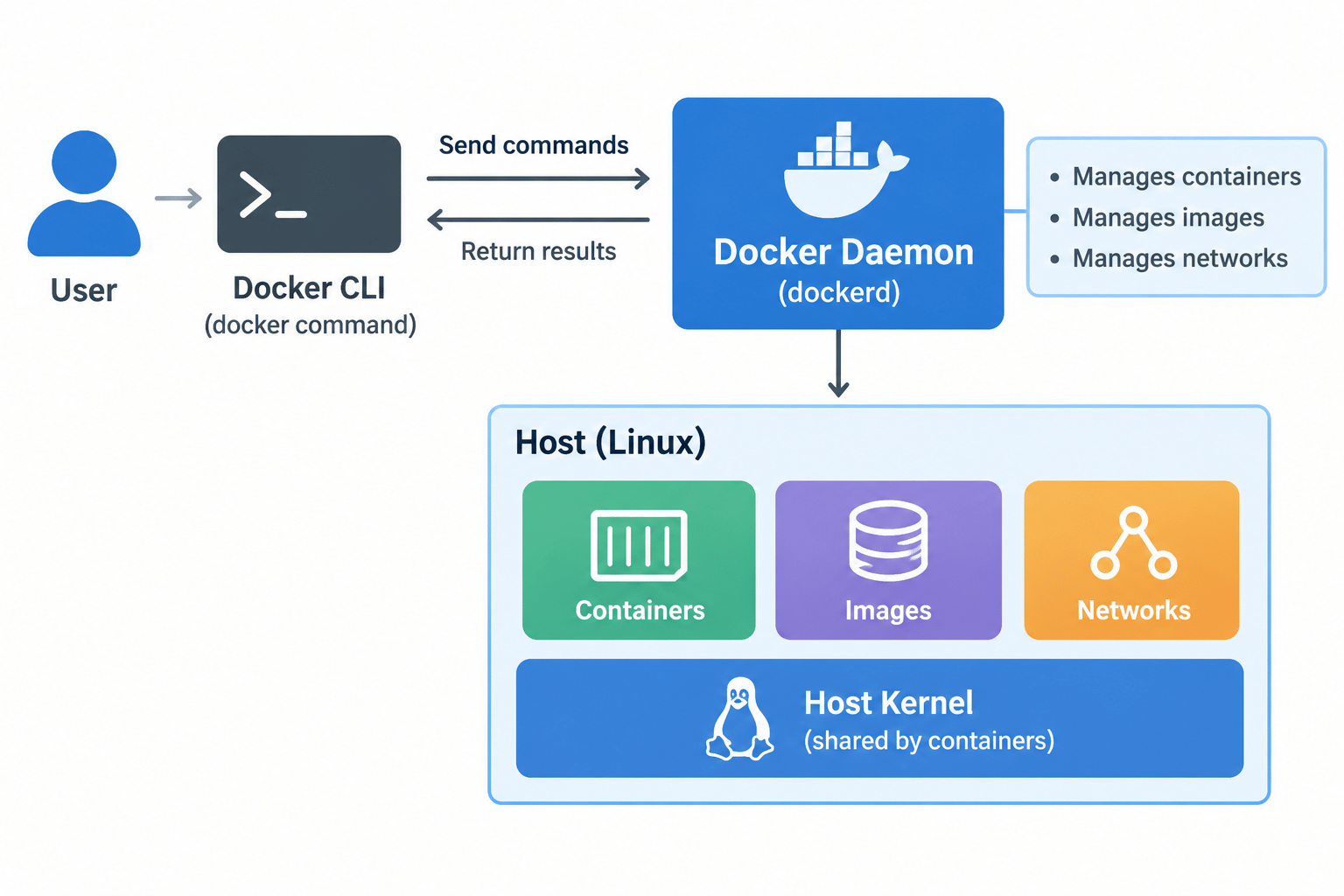
Architecture
- The Docker daemon (
dockerd) runs as a background service, managing containers, images, and networks - The Docker CLI (
dockercommand) talks to that daemon to start, stop, and manage containers - Containers share the host’s kernel, which is why they start much faster and use fewer resources than a full virtual machine
Steps
1. Uninstall Older Docker Versions (If Present)
yum remove docker \
    docker-client \
    docker-client-latest \
    docker-common \
    docker-latest \
    docker-latest-logrotate \
    docker-logrotate \
    docker-selinux \
    docker-engine-selinux \
    docker-engine
It’s fine if yum reports none of these are installed. Anything already in /var/lib/docker/ (images, containers, volumes) is preserved.
2. Set Up the Docker Repository
yum install -y yum-utils device-mapper-persistent-data lvm2
yum-config-manager --add-repo https://download.docker.com/linux/centos/docker-ce.repo
3. Install Docker CE
yum install docker-ce
If prompted to accept a GPG key, verify the fingerprint matches 060A 61C5 1B55 8A7F 742B 77AA C52F EB6B 621E 9F35 before accepting.
If you have multiple Docker-related repositories enabled, installing without specifying a version always pulls the latest available — which is usually fine, but worth knowing if you need a specific version for stability reasons (see the next step).
4. Install a Specific Version (Optional)
List available versions:
yum list docker-ce --showduplicates | sort -r
Then install a specific one:
yum install docker-ce-<VERSION>
5. Start Docker
systemctl start docker
6. Verify the Installation
docker run hello-world
7. Enable Docker to Start on Boot
systemctl enable docker
Note: The original guide had
systemctl Enable dockerwith a capital “E” — Linux commands are case-sensitive, sosystemctldoesn’t recognizeEnableas a valid subcommand. It must be lowercase.
Tip: You can combine Steps 5 and 7 into one command:
systemctl enable --now docker.
8. Run Docker Without sudo (Optional)
By default, Docker commands require root/sudo. To run them as your regular user:
usermod -aG docker $USER
Log out and back in for the group change to take effect.
Uninstalling Docker CE
Remove the package:
yum remove docker-ce
To also delete all images, containers, and volumes:
sudo rm -rf /var/lib/docker
Any manually edited configuration files aren’t removed automatically — delete those separately if needed.
Conclusion
Installing Docker CE on CentOS 7 is a straightforward repository-based install, with one real gotcha: systemctl enable must be lowercase, unlike the original guide’s Enable. Keep in mind CentOS 7 itself is past end-of-life, so treat this as maintenance for an existing system rather than a foundation for a new one.
Frequently Asked Questions
Why did “systemctl Enable docker” fail for me? Linux commands and their subcommands are case-sensitive — systemctl only recognizes the lowercase enable, not Enable.
Do I need to restart the server after installing Docker? No — starting and enabling the service (Steps 5 and 7) is enough; a full restart isn’t required.
Can I run Docker on CentOS Stream instead of CentOS 7? Yes — the same repository and install steps work on CentOS Stream, AlmaLinux, and Rocky Linux, since they’re all RHEL-compatible.
Related Articles
How to Convert a Docker Container to Image
How to Save Docker Images as a TAR File
Talk to Our Technology Experts
Containerizing your applications or setting up a Docker-based infrastructure? Our team can help with containerization, orchestration, and ongoing DevOps support.
Pingback: How to create docker container - PHEONIX SOLUTIONS