
Introduction
This guide explains how to fix “Unable to stop container: operation timed out” in OpenVZ, a common error where vzctl stop fails to shut down a container within its expected timeout window, and the server logs often don’t point to an obvious cause.
One clarifying note up front: this guide is specific to OpenVZ, the container-based virtualization technology commonly used by VPS hosting providers, and the vzctl command-line tool used to manage OpenVZ containers (also called VPS or VEs). This is a different technology from Docker or Kubernetes, despite sometimes being filed under a general “containers” category — if you’re troubleshooting a Docker container that won’t stop, the underlying cause and commands are different, though the general troubleshooting mindset (check what’s blocking a clean shutdown before forcing anything) still applies.
Implementation
I. Prerequisites
Before you fix this error, make sure you have:
- Root access to the OpenVZ host node (not the container itself)
- The
vzctlutility installed (standard on OpenVZ host nodes) - The VEID (VPS/container ID) of the affected container
II. Understanding the Error
When you run a stop command and see this:
$ vzctl stop VEID --fast
Stopping container ...
Unable to stop container: operation timed out
OpenVZ attempted to gracefully shut down the container’s processes, but that process didn’t complete within the expected timeout window. Unlike more common service failures, this often doesn’t leave an obvious explanation in the standard logs — which is exactly what makes it a frustrating error to troubleshoot without a clear workflow.
III. How the Stop Process Works
Understanding what’s actually happening under the hood makes the fix (and its risks) much clearer:
- When you run
vzctl stop, OpenVZ sends a shutdown signal to the container’s init process, asking it to terminate all running processes cleanly - OpenVZ creates a lock file at
/vz/lock/VEID.lckfor the duration of the stop operation, to prevent conflicting operations from running against the same container simultaneously - If the container’s processes don’t terminate within the configured timeout — commonly due to a hung process, an unresponsive application, or a kernel-level issue inside the container — the stop operation fails, and critically, the lock file can be left behind, which then blocks any future stop or checkpoint attempts from proceeding at all, even after the original hang resolves itself
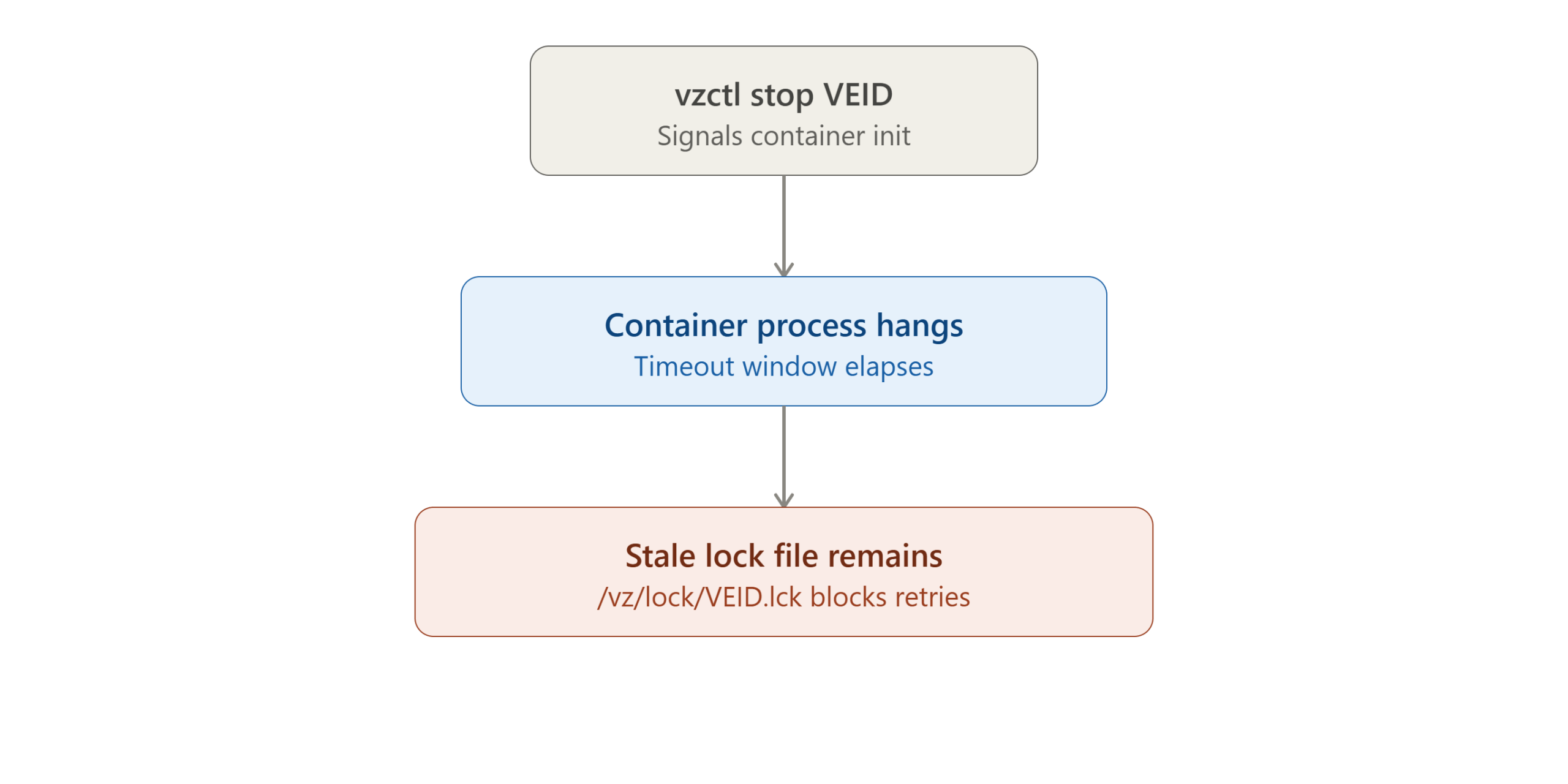
This is the key insight the workaround in this guide relies on: the stale lock file, not the original hang, is often what’s actually preventing subsequent stop attempts from working — which is why simply retrying vzctl stop again typically fails identically.
IV. Check for Obvious Causes First
Before jumping to the workaround, it’s worth briefly checking whether something more specific and fixable is happening:
Check for zombie or hung processes inside the container:
vzctl exec VEID ps aux
Look for processes in an uninterruptible sleep state (D in the STAT column) or clearly hung processes — these are common root causes of a container that won’t cleanly stop.
Check dmesg on the host node for kernel-level errors:
dmesg | tail -50
Occasionally, a stuck stop operation correlates with a kernel-level I/O issue or resource exhaustion on the host itself, which is worth ruling out, especially if this is a recurring problem rather than a one-off.
V. The Corrected Workaround Commands
A commonly circulated version of this fix uses en-dash characters (–) instead of standard double-hyphens (--) in the commands — an artifact of copying text out of a word processor or certain web pages that visually looks nearly identical to a real double-hyphen but isn’t recognized by the shell as the same flag syntax at all. If copied as-is, these commands will fail with an “invalid option” or similar shell error rather than actually running.
Incorrect (uses en-dash, will fail):
vzctl stop VEID –fast
vzctl chkpnt VEID –kill
Correct (uses standard double-hyphen):
vzctl stop VEID --fast
vzctl chkpnt VEID --kill
If you’re ever unsure whether a command you’ve copied from somewhere contains this issue, retype the double-hyphen manually rather than trusting a copy-paste from an unfamiliar source — it’s a very easy mistake to carry forward without noticing.
VI. Apply the Fix
With the correct syntax in hand, here’s the actual workaround:
Step 1: Remove the stale lock file
rm -f /vz/lock/VEID.lck
Replace VEID with your container’s actual ID number.
Step 2: Force a checkpoint-kill operation
vzctl chkpnt VEID --kill
This forcibly terminates the container’s processes, bypassing the graceful shutdown sequence that was hanging in Step II.
VII. Understand What –kill Actually Does
This step matters more than a lot of quick-reference guides acknowledge: --kill is a forceful termination, not a graceful one. Any application inside the container with unflushed writes, an open database transaction, or in-memory state that hasn’t been persisted to disk can lose data or, in some cases, end up in a corrupted state as a result of being killed rather than shut down cleanly.
Before running --kill, when time allows:
- Try
vzctl exec VEID syncfirst, to flush any pending disk writes from inside the container - If a database server is running inside the container, consider whether a targeted, graceful stop of just that specific service (from inside the container) is possible before forcing the whole container down
- Treat
--killas a last resort for a genuinely stuck container, not a routine first response to any slow shutdown
VIII. Verify the Container Restarts Successfully
Once the forced checkpoint completes, attempt to start the container normally:
vzctl start VEID
Confirm it’s running:
vzctl status VEID
You should see the container listed as running. If it fails to start, check the OpenVZ logs for specifics:
tail -50 /var/log/vzctl.log
IX. Check for Data Integrity Issues After a Forced Kill
Given the risk described in Step VII, it’s worth a quick check after the container is back up:
- If a database was running inside the container, check its own logs for any startup warnings about unclean shutdown or crash recovery
- Verify any application that was actively writing data at the time of the timeout is behaving correctly
- If anything looks off, restoring from your most recent backup is safer than trying to manually repair a corrupted data file
X. Preventing This Issue Going Forward
A few practices reduce how often you’ll need this workaround at all:
- Investigate recurring timeouts, don’t just work around them repeatedly. If the same container keeps hitting this issue, there’s likely a specific hung process or application misbehaving inside it that’s worth fixing at the source, per Step IV.
- Monitor host resource usage. Container stop timeouts can correlate with host-level resource exhaustion (I/O, memory pressure) rather than anything specific to the individual container — keep an eye on overall host health, not just the affected VEID.
- Keep OpenVZ and the kernel updated, since stop/checkpoint reliability issues are sometimes addressed in updates to the underlying virtualization stack.
- Document affected VEIDs and timestamps if this happens more than once, to help spot patterns — like it always happening after a specific cron job or backup window — that point to a root cause rather than random occurrences.
XI. Common Root Causes of the Original Hang
While the lock file is what blocks subsequent attempts, it’s worth understanding what typically causes the initial stop to hang in the first place, since fixing the actual cause prevents the whole cycle from recurring:
- A process stuck in uninterruptible I/O wait (state
Dinps aux) — usually caused by a slow or failing underlying storage device, and one that can’t be terminated by a normal signal until the I/O operation itself completes or times out at the kernel level - An application ignoring standard termination signals — some poorly behaved daemons don’t respond correctly to
SIGTERM, requiringSIGKILLto actually terminate, which is effectively whatchkpnt --killforces at the container level - Resource exhaustion on the host node — if the host itself is under heavy memory or I/O pressure, even a well-behaved container’s shutdown sequence can stall simply because the host doesn’t have spare capacity to process it promptly
- A previous unclean shutdown or crash — if the container was already in a partially inconsistent state from an earlier incident, subsequent stop attempts can behave unpredictably until that underlying inconsistency is resolved
Identifying which of these applies in your specific case — usually via the process and dmesg checks in Step IV — is what separates “workaround applied, problem fixed” from “workaround applied, same issue recurs next week.”
XII. Troubleshooting Related Issues
The lock file keeps reappearing after deletion: This can indicate another process is still actively attempting to interact with the container. Check for any scheduled backup jobs, monitoring scripts, or automation that might be issuing overlapping vzctl commands against the same VEID.
vzctl chkpnt VEID --kill also times out or fails: This points to a more serious host-level issue rather than a simple stuck container. Check dmesg and system resource usage carefully, and consider whether the host node itself needs attention (or, in a worst case, a controlled reboot) rather than continuing to target the individual container.
The container starts but immediately crashes again: Check /var/log/vzctl.log and the container’s own internal logs for the specific service that’s failing — this is more likely to be a downstream consequence of whatever caused the original hang than a new, unrelated issue.
XIII. Conclusion
“Unable to stop container: operation timed out” in OpenVZ is typically resolved by removing the stale lock file left behind after a failed graceful shutdown, then forcing termination with vzctl chkpnt VEID --kill — using correct double-hyphen syntax, not the visually similar en-dash that circulates in some copied versions of this fix. Because --kill is a forceful, non-graceful operation, it’s worth checking for data integrity issues afterward, and investigating the root cause if the same container hits this repeatedly, rather than treating the workaround as a routine fix.
For more on OpenVZ container management commands, see the official OpenVZ documentation.
Frequently Asked Questions
Why did copying the original command not work for me? The most likely cause is an en-dash character (–) in place of a standard double-hyphen (--) — a common artifact when commands are copied from a word processor or certain web pages. Retype the flags manually with standard hyphens to fix this.
Is it safe to delete the .lck file directly? Generally yes, as long as you’ve confirmed the stop operation has genuinely failed and isn’t still legitimately in progress. Deleting a lock file for an operation that’s actually still running (rather than hung) could cause a conflicting operation to start prematurely, so confirm the original vzctl stop command has actually exited before removing the lock.
Will I lose data by using vzctl chkpnt –kill? It’s possible, since this forcibly terminates processes rather than shutting them down gracefully. Any unflushed writes or in-progress transactions inside the container at that moment are at risk — checking application and database logs afterward, as covered in Step IX, is worth doing rather than assuming everything is fine.
Does this apply to Docker containers too? No — this guide is specific to OpenVZ and the vzctl tool. Docker uses an entirely different mechanism (docker stop, docker kill), and while the general troubleshooting principle of “check what’s actually hanging before forcing termination” carries over conceptually, the specific commands and lock-file mechanism described here don’t apply to Docker or Kubernetes environments.
How long should I wait before assuming vzctl stop has actually hung, rather than just being slow? OpenVZ’s default stop timeout is typically several minutes, and the “operation timed out” error itself is your confirmation that the timeout was already reached — so by the time you see this specific error message, you don’t need to guess or wait further; the workaround in this guide is the appropriate next step rather than waiting longer.
Talk to Our Technology Experts
Running into stubborn infrastructure issues like stuck containers or VPS management headaches? Our team can help with server administration, virtualization troubleshooting, infrastructure monitoring, and ongoing DevOps support.
Connect with our technology experts.
Related Articles:
How to restore OpenVZ / Virtuozzo 7 (Disaster Recovery – DR)