
Post Date: May 06, 2019
Last Updated: October 20, 2026
Introduction
WordPress Redis Caching is an effective way to improve website performance by storing frequently accessed data in memory. As website traffic increases, repeated database queries can affect loading times and server resources. Redis helps reduce this overhead by providing fast in-memory object storage. In this tutorial, we will explain how to set up WordPress Redis Caching on CentOS 7.6, install the required PHP extension, and configure the Redis Object Cache plugin to improve WordPress performance.
Prerequisites
Before setting up Redis caching for WordPress on CentOS 7.6, ensure you have the following:
- A server running CentOS 7.6 with root or sudo access.
- A working WordPress installation.
- PHP installed and compatible with your WordPress installation.
- Access to the server terminal through SSH.
- The required Redis server and PHP Redis extension packages.
- Access to the WordPress dashboard with administrator privileges.
- A backup of your website and database before making configuration changes.
Note: CentOS 7 has reached its end of life. For production environments, consider using a supported operating system and compatible software versions
Implementation: WordPress Redis Caching on CentOS 7.6
In this post, we will explain, how to setup WordPress with Redis Caching with simple steps.
1. Install Redis on CentOS 7.6
yum install redis
Start and enable Redis on system boot:
systemctl start redis.service
systemctl enable redis.service
2.Install the PHP Redis Extension
yum install php-pecl-redis
3.Install the Redis Object Cache Plugin
WordPress Dashboard >> Go to Plugins > Add new
Search for Redis and install the Redis Object Cache
Go to Plugins again and enable the Redis Object Cache
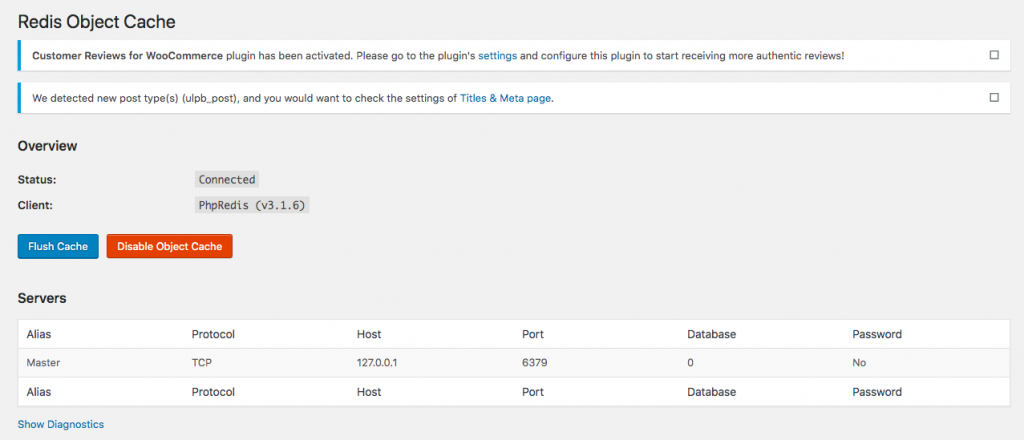
Go to Settings > Redis and click on Enable Object Cache
The default configuration should work out of the box since the default Redis listening address is 127.0.0.1 and the default listening port is 6379.
Conclusion
WordPress Redis Caching on CentOS 7.6 can improve website responsiveness by storing frequently accessed objects in memory and reducing repeated database queries. By installing Redis, enabling the PHP Redis extension, and configuring the Redis Object Cache plugin, you can implement persistent object caching for your WordPress website.
Always verify the cache connection, monitor performance, and secure Redis against unauthorized access. Since CentOS 7 is no longer supported, consider migrating production websites to a supported operating system.
To protect your website, read the official Documentation Link and ensure Redis is not exposed to untrusted public connections.
For assistance with WordPress hosting, server optimization, or caching configuration, contact pheonixsolutions.com
FAQs
1. What is Redis caching in WordPress?
Redis caching is a technique that stores frequently accessed WordPress objects in memory, reducing repeated database queries and helping improve website performance.
2. What are the benefits of using Redis caching with WordPress?
Redis caching can reduce database load, improve response times, and help WordPress handle frequent requests more efficiently.
3.Which port does Redis use by default?
Redis uses TCP port 6379 by default. When Redis and WordPress are installed on the same server, the default local address is typically 127.0.0.1.
Related Articles
How to Install reCAPTCHA in WordPress
How to reset the WordPress password in Mysql
Need Help with WordPress and Redis Caching?
Need help with WordPress configuration, Redis caching setup, or website performance optimization? Our experts can assist with WordPress development, server administration, caching solutions, DevOps, cloud hosting, and other technical requirements. Get in touch with our team here.