Introduction
Creating email accounts in cPanel allows you to set up professional email addresses using your domain (e.g., info@yourdomain.com). This is essential for businesses, teams, and personal branding, as it provides a more reliable and professional communication channel.
cPanel offers an easy interface to create, manage, and configure email accounts, including storage limits, password security, and mail client setup.
Prerequisites
Before creating an email account, ensure you have:
- Access to your cPanel account
- A valid domain configured in cPanel
- Sufficient hosting resources (disk space)
- Basic understanding of email naming conventions
Implementation
Step 1: Login to cPanel
- Open your cPanel URL (e.g.,
https://yourdomain.com/cpanel)
Step 2: Navigate to Email Accounts
- Go to the EMAIL section
- Click on Email Accounts
Enter your credentials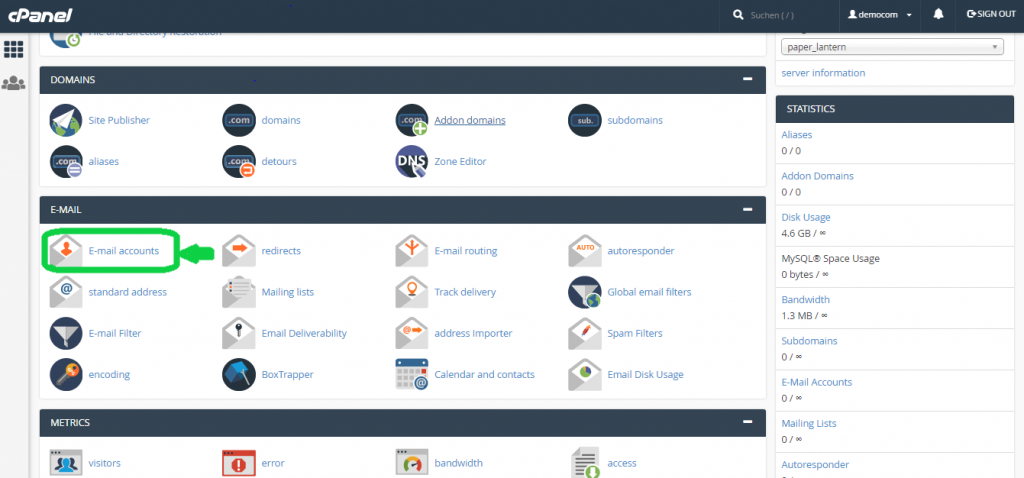
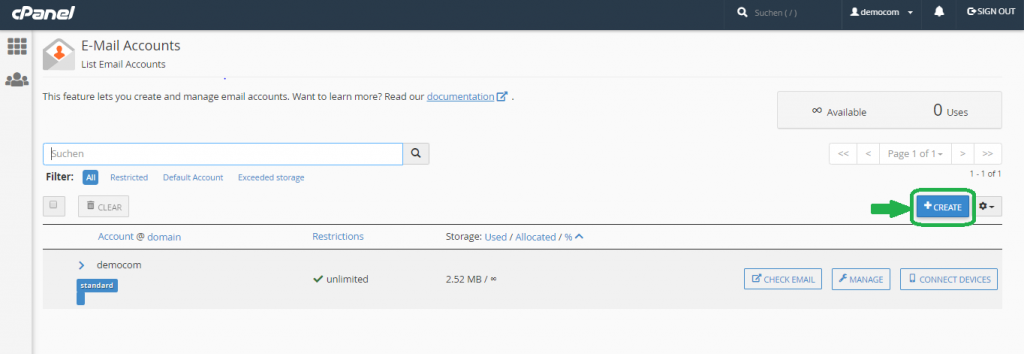
Step 3: Start Email Creation
- Click on the + Create button (top-right corner)
Step 4: Enter Email Details
Domain Selection
- If you have multiple domains, choose the required domain
- If only one domain exists, it will be selected by default
Username
- Enter the email name (e.g.,
support,info,admin) - Full email will be like:
support@yourdomain.com
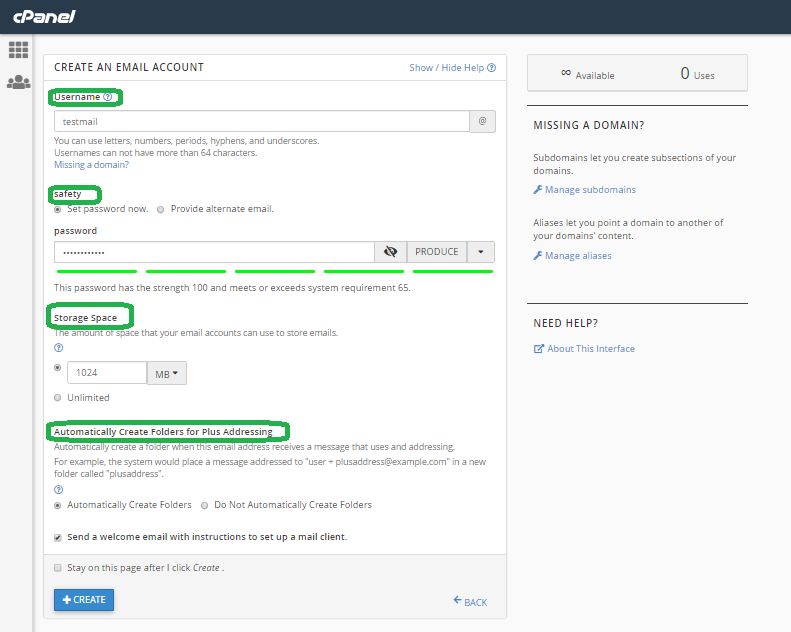
Step 5: Set Password (Security Settings)
Choose one of the following:
- Set password manually
→ Enter a strong password or use the Generate option - Send setup email
→ Provide an alternate email to receive setup instructions
Step 6: Configure Storage Space
- Limited Storage
→ Specify size (e.g., 1024 MB, 5 GB) - Unlimited Storage
→ No restriction (depends on hosting plan)
Step 7: Plus Addressing (Optional)
- Automatically Create Folders
→ Creates folders for emails likeuser+tag@domain.com - Do Not Create Folders
→ Keeps all emails in inbox
Step 8: Additional Options
- Send Welcome Email
→ Sends setup instructions for mail clients - Stay on Page After Creation
→ Useful if creating multiple email accounts
Step 9: Create Email Account
- Click + Create
✅ Your email account is now successfully created!
Conclusion
Creating email accounts in cPanel is a straightforward process that helps you establish professional communication using your domain. With features like password security, storage management, and flexible configurations, cPanel makes email management simple and efficient.
By following the above steps, you can:
- Create multiple email accounts
- Manage storage and security
- Configure email clients easily
This is especially useful for business communication, support teams, and organizational email management.